Sage 100

 View Only
  • 1.  Slowness with Error 43

    Posted 10-22-2025 10:05

    Morning 90 Minders:

    My client has been experiencing random bouts of extreme slowness on Sage 100 as well as random Error 43 issues.

    Here is their scenario:

    • ·       They are running Sage 100 Advanced V2022 on their IT companies hosted server (windows server 2022 Datacenter with 32 GB RAM.  They have 4 virtual machines that the users log into.
    • ·       They have on average 18-22 users in the system (25 User license)
    • ·       AR_InvoiceHistoryHeader has almost a million records (and that is holding 4 years worth of data).
    • ·       They have the following add-ons:
      Kissinger EDI – have been running for years no issues
      Kissinger Web-Stor – started using over a year ago – eats up resources but no issues
      Added CIMcloud over the last couple of months and seems that when the services are running – that is when things slow down.  When the services are turned off – things are a bit better.
    • ·       Randomly but often the users get error 43:
      Have followed all of Sage's instructions, including reinstalling the Workstation setups on the virtual workstations.

      Rename ..\Mas90\Mas_System\SY_ActivityLog.m4t
      Rename ..\Mas90\Mas_System\SY_LockFileInfo.m4t
      Rename ..\Mas90\Mas_System\SY_Workstation.m4t
      Rename ..\Mas90\Mas_System\SY_Console.m4t
      Rename .. \Sage100 folder located in users Documents folder** c:Documents

    Short of reinstalling Sage 100 on the server I am at my wits end with what to do.  Some of my thoughts: 

    1. Request to increase server resources – not sure if this has any bearing.
    2. Move them to Premium – not sure if SQL version will improve performance – pulling SO Invoice History takes minutes to load (and that is for the current quarter).

    Would love to get your thoughts and possible resolutions.


    ------------------------------
    Jacqueline Hoyte
    Director of Client Services
    Integrated Data Technology, Inc.
    ------------------------------


  • 2.  RE: Slowness with Error 43

    Posted 10-22-2025 10:31

    Do you have more information on (a) the exact error message - including program/line ( from INFO ), (b) location at which the user is seeing the error and/or slowdown - is it printing? Previews? Posting? Data Entry? 


    ------------------------------
    Wayne Schulz
    wayne@s-consult.com
    Schulz Consulting
    (860) 516-8990
    Connecticut
    ------------------------------


  • 3.  RE: Slowness with Error 43

    Posted 10-22-2025 10:50

    Hi Wayne,

    Thanks for the quick response, sorry should have included.

    All users get this especially when logging into a module - Data Entry.

    Thanks again. Jacquie


    ------------------------------
    Jacqueline Hoyte
    Director of Client Services
    Integrated Data Technology, Inc.
    ------------------------------


  • 4.  RE: Slowness with Error 43

    Posted 10-22-2025 10:55
      |   view attached

    Have you seen the Sage article attached to this email? 


    ------------------------------
    Doug Higgs
    Midwest Commerce Solutions, Inc
    (312) 315-0960
    Chauffeur, Chef, and Personal Assistant to Sprinkles
    ------------------------------


  • 5.  RE: Slowness with Error 43

    Posted 10-22-2025 10:43

    "Added CIMcloud over the last couple of months and seems that when the services are running – that is when things slow down.  When the services are turned off – things are a bit better."

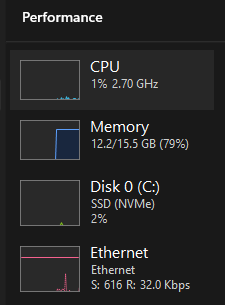
    I would look at the Task Manager Performance Tab.  Stop and Start the service(s) and see if there are difference in CPU, Memory, Disk I/O etc.  This may point you to the bottleneck.


    ------------------------------
    Doug Higgs
    Midwest Commerce Solutions, Inc
    (312) 315-0960
    Chauffeur, Chef, and Personal Assistant to Sprinkles
    ------------------------------


  • 6.  RE: Slowness with Error 43

    Posted 10-22-2025 11:05

    When renaming system files for Sage 100 advanced, in addition to the files you mentioned above, I also:

    • Rename ..\Mas90\Home\Lib\_appserv\Locate.pvk
    • Rename ..\Mas90\Home\Lib\_appserv\Sessions.pvk

    I'm not sure if that will help but I thought I would throw that in the ring. 


    ------------------------------
    David Overholt
    Programmer/Project Manager
    DWD Technology Group
    Fort Wayne IN
    (260) 399-8655
    ------------------------------


  • 7.  RE: Slowness with Error 43

    Posted 10-22-2025 11:10

    Make sure AV real-time scanning exceptions are in place (on the server, and any workstations that may scan network locations).  AV can easily slow down Sage 100.

    https://us-kb.sage.com/portal/app/portlets/results/viewsolution.jsp?solutionid=223924950045806


    ------------------------------
    Kevin Moyes
    Technical Systems Analyst
    Munjal White Consulting Co.
    Toronto ON
    ------------------------------


  • 8.  RE: Slowness with Error 43

    Posted 10-22-2025 11:36

    Thanks Gentlemen, really appreciate the responses.

    I will review and give them a try - have a call with the IT team this afternoon.

    Any thoughts on bumping the RAM to 64GB to support the slowness issues.


    ------------------------------
    Jacqueline Hoyte
    Director of Client Services
    Integrated Data Technology, Inc.
    ------------------------------


  • 9.  RE: Slowness with Error 43

    Posted 10-22-2025 11:53

    Adding resources will only help if that resource is the bottleneck.  If the problem is CPU, disk, or something else entirely, more RAM won't do much. 

    (This is why Doug suggested looking at the Task Manager's Performance tab... to see if there is a resource issue).


    ------------------------------
    Kevin Moyes
    Technical Systems Analyst
    Munjal White Consulting Co.
    Toronto ON
    ------------------------------