Have dealt with it to demo it but haven't implemented it for a client yet. Very similar to WHS 100 except ShopFloor (like MFG 100) uses its own mobility for barcode tasks under the Production Management module folder.
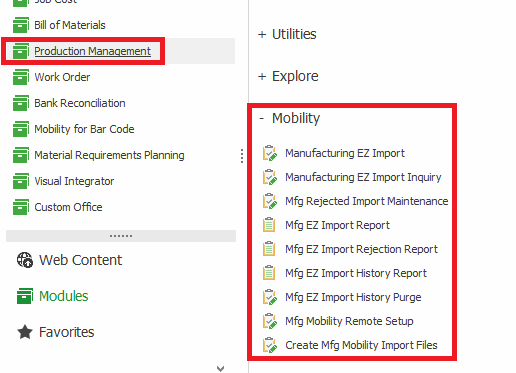
ShopFloor also doesn't have as many features as MFG 100. I think you'll have to reach out to Scanco to get a feature comparison list.
Both ShopFloor and MFG 100 requires Scanco's ConnectIt software to be installed. ConnectIt is used by ShopFloor, MFG 100, and WHS 100.
If you are implementing ShopFloor on a system that will only run ShopFloor, you may be able to run the "Mfg Mobility Remote Setup" task in the above screenshot to set up the ConnectIt software but I wouldn't be surprised if you will still have to get Scanco involved unless they have improved that process since the last time I tried using the standard Mobility Remote Setup under Mobility For Bar Code which was a year or two ago and I ran into issues.
In order to get the Mobility tasks for PM, you need to install the appropriate installer from
Sage Production Management Downloads - Sage Warehouse & Manufacturing Automation (scanco.com)If you have Scanco MB for PM installed, make sure you use the links under the "
///USE BELOW IF YOU HAVE SCANCO MULTI-BIN FOR PM///" section for the Mobility For Bar Code software downloads.
------------------------------
David Speck II
Tennessee Software Solutions
------------------------------