If you know the data entry screen that allows the extra CRLF, report to Sage for correction. They fixed this for Item Maintenance (when creating new items), so they should be able to fix the blank characters for Lot / Serial entry too. Seems like an easy "quick win" issue.
------------------------------
Kevin Moyes
Technical Systems Analyst
Munjal White Consulting Co.
Toronto ON
------------------------------
Original Message:
Sent: 08-28-2025 11:21
From: Barbara Goldstein
Subject: Serial numbers with non-visible characters at the end
Thanks for the feedback! Alnoor, appreciate the alternatives. I've been telling people to copy from a .TXT file, but good to know there are other options.
------------------------------
Barbara Goldstein
Sr. Consultant
DSD Business Systems
------------------------------
Original Message:
Sent: 08-26-2025 14:21
From: Alnoor Cassim
Subject: Serial numbers with non-visible characters at the end
Agree with Greg. Copying from the formula bar is safe if they can get into the habit of consistently doing so. Copying directly from the cell appends the extra CR and LF characters. But if it's a situation where they need to copy from Excel all day long and copying from edit bar becomes tedious, here are couple of ideas:
- Have them copy/paste the Excel contents into a Google Sheet (or import the XLSX into Google Sheets). Then copy the cells from there. Now it won't include the extra characters.
- If they are pasting into Sage into say the Lot Number / Serial Number field on a Lot/Serial Tier Distribution window, presumably a little script can run from there to strip out the CR and LF for you. I've done this before where they were pasting stuff into the CommentText field on PO Entry / Lines and SO Entry / Lines.
------------------------------
Alnoor Cassim
Accounting Systems, Inc. (ASI)
Original Message:
Sent: 08-26-2025 11:09
From: Greg Stiles
Subject: Serial numbers with non-visible characters at the end
Been there done that too!
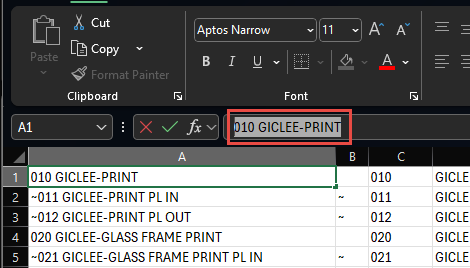
FWIW - I have found that if you select the cell and copy from the edit bar it will not bring over the extra characters.
------------------------------
Greg Stiles
DSD Business Systems
Original Message:
Sent: 08-25-2025 21:05
From: Barbara Goldstein
Subject: Serial numbers with non-visible characters at the end
Hey Bill! Yep, bet that's what they did. I'll get on my soapbox! Thanks for the confirmation.
------------------------------
Barbara Goldstein
Sr. Consultant
DSD Business Systems
Original Message:
Sent: 08-25-2025 20:13
From: Bill Pfahnl
Subject: Serial numbers with non-visible characters at the end
That should be it if the items are still in stock. Another reminder client's to not copy and paste from Excel into Sage 100. I have a client also that tends to do this, and I have to clean up like you. They should at least post into a notepad first if they don't want to type in the number.
------------------------------
Bill Pfahnl
Nims & Associates