Sage 100

 View Only
Expand all | Collapse all

Selection Field Doesn't Work in AP Cash Requirements Report

  • 1.  Selection Field Doesn't Work in AP Cash Requirements Report

    Posted 04-17-2024 14:41

    I created a UDF in AP_Vendor.  It;s a 10 character string.  The new UDF appears as a selection in the AP Cash Requirements Report yet when I enter a value the "No Data Selected" appears.  If the operand is "All" then the vendor appears on the report.  For example, I enter F1CUT as the value for vendor ABC.  If I print the AP Cash Requirements Report with all selection set to All then vendor ABC appears on the report.  If I then enter F1CUT as Equal To or as Range then "No Data Selected" appears.  I tried rebuilding the AP sort files. Any ideas?


    ------------------------------
    Doug Higgs
    Midwest Commerce Solutions, Inc
    (312) 315-0960
    Chauffeur, Chef, and Personal Assistant to Sprinkles
    ------------------------------


  • 2.  RE: Selection Field Doesn't Work in AP Cash Requirements Report

    Posted 04-17-2024 14:44

    If you DFDM the file there isn't an issue with lower vs upper case or if the UDF was imported, there isn't the dreaded unprintable character at the end of the field?


    ------------------------------
    Beth Bowers
    (269) 358-0989
    ------------------------------


  • 3.  RE: Selection Field Doesn't Work in AP Cash Requirements Report

    Posted 04-17-2024 14:46

    @Beth Bowers  The data is all upper case and looks perfect in DFDM.  I was able to re-create the issue on my office test system.


    ------------------------------
    Doug Higgs
    Midwest Commerce Solutions, Inc
    (312) 315-0960
    Chauffeur, Chef, and Personal Assistant to Sprinkles
    ------------------------------


  • 4.  RE: Selection Field Doesn't Work in AP Cash Requirements Report

    Posted 04-17-2024 14:48

    Ruh Roh...


    ------------------------------
    Beth Bowers
    (269) 358-0989
    ------------------------------


  • 5.  RE: Selection Field Doesn't Work in AP Cash Requirements Report

    Posted 04-17-2024 14:50

    Yes indeedy.  Now waiting for a Sr Advisor from Sage to call me back.


    ------------------------------
    Doug Higgs
    Midwest Commerce Solutions, Inc
    (312) 315-0960
    Chauffeur, Chef, and Personal Assistant to Sprinkles
    ------------------------------


  • 6.  RE: Selection Field Doesn't Work in AP Cash Requirements Report

    Posted 04-17-2024 15:36

    A quick test shows it's a bug.  UDF in AP_Vendor, but if you add that same UDF to AP_OpenInvoice, and add a value in the open invoice table, the filter works.
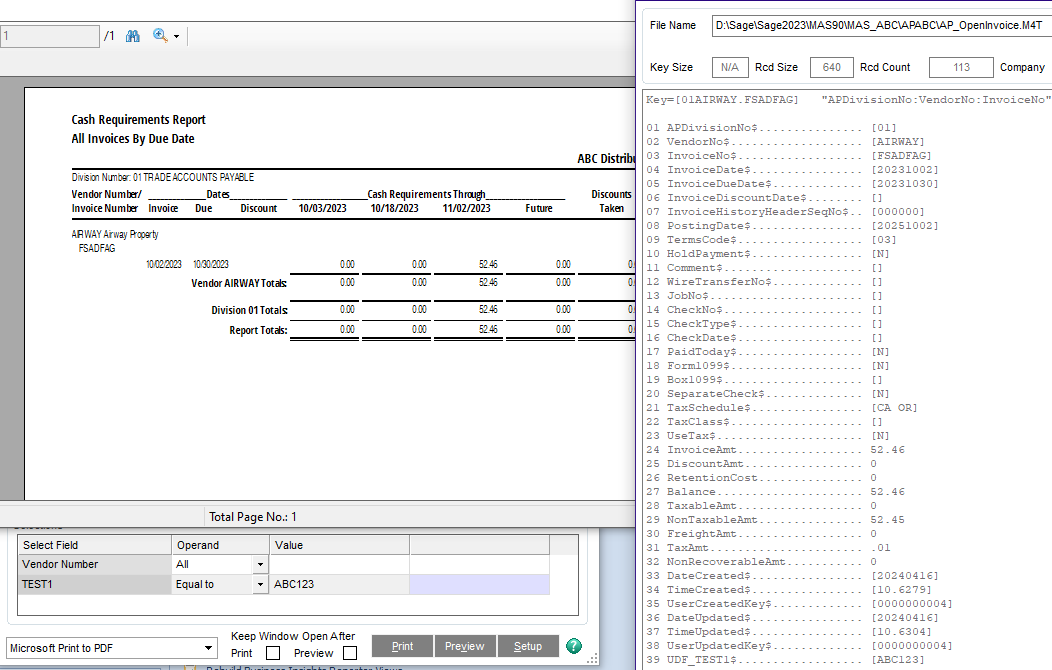
    So, if your values don't change, you could flow the UDF value into AP_OpenInvoice (from all the various sources), update all historic AP_OI rows, and be done with it... or wait for a Sage bug fix.


    ------------------------------
    Kevin Moyes
    Technical Systems Analyst
    Munjal White Consulting Co.
    Toronto ON
    ------------------------------


  • 7.  RE: Selection Field Doesn't Work in AP Cash Requirements Report

    Posted 04-17-2024 16:35

    Thanks @Kevin Moyes!  That's great information. 


    ------------------------------
    Doug Higgs
    Midwest Commerce Solutions, Inc
    (312) 315-0960
    Chauffeur, Chef, and Personal Assistant to Sprinkles
    ------------------------------


  • 8.  RE: Selection Field Doesn't Work in AP Cash Requirements Report

    Posted 04-17-2024 16:46

    Post back on what the SR Advisor advises


    ------------------------------
    Jeff Schwenk
    Bottomline Software, Inc.
    (540) 221-4444
    ------------------------------


  • 9.  RE: Selection Field Doesn't Work in AP Cash Requirements Report

    Posted 04-22-2024 20:26

    I spoke with Scott Brady today and Sage has acknowledged this is a bug. 

    Case#8010056829 - Data is not selected for report printing when running AP Cash Requirements Report and selecting AP_Vendor UDF value in selection screen

    Scott Brady wrote and published the following Knowledgebase entry:

    Solution ID: 240422232343990 - Data is not selected for report printing when running AP Cash Requirements Report and selecting AP_Vendor UDF value in selection screen.

    submitted Defect# 117024: Data is not selected for report printing when running AP Cash Requirements Report and selecting AP_Vendor UDF value in selection screen.


    ------------------------------
    Doug Higgs
    Midwest Commerce Solutions, Inc
    (312) 315-0960
    Chauffeur, Chef, and Personal Assistant to Sprinkles
    ------------------------------


  • 10.  RE: Selection Field Doesn't Work in AP Cash Requirements Report

    Posted 04-17-2024 16:55
    Edited by Kevin Moyes 04-17-2024 17:14

    I had a hunch... the Options on the report screen were filtering based on the transaction data, not the vendor records. 

    What I find truly odd is that an AP_Vendor UDF shows up in the selection grid, when selection grid fields should be based on the AP_OpenInvoice UDF (since that is the table the filter applies to).


    ------------------------------
    Kevin Moyes
    Technical Systems Analyst
    Munjal White Consulting Co.
    Toronto ON
    ------------------------------


  • 11.  RE: Selection Field Doesn't Work in AP Cash Requirements Report

    Posted 04-17-2024 19:02

    Yes.  My initial thought was that the UDF on the selection screen was from either the OpenInvoice or maybe the TransactionPaymentHisory table.  I looked and the AP_vendor UDF was never mapped so that blew that theory.  Although it doesn't makes sense to add a UDF to the selection at least there is a viable work around.  Easy enough to create and map new fields and maybe we can wait a few weeks o populate the records after most of them have been paid.


    ------------------------------
    Doug Higgs
    Midwest Commerce Solutions, Inc
    (312) 315-0960
    Chauffeur, Chef, and Personal Assistant to Sprinkles
    ------------------------------


  • 12.  RE: Selection Field Doesn't Work in AP Cash Requirements Report

    Posted 04-23-2024 14:33

    I think I encountered this some time ago.  I added a UDF to the customer master.  It appeared in the selection grid for open invoices.  Didn't work.  Didn't research it to the extent that @Doug Higgs did.  Big shout out to Doug for following it down the rabbit hole!

    Doug, did Scott mention when a patch would be forthcoming?  Plenty of time until PU1 release, but my guess is the PU patches are in place.  I hope I am wrong.


    ------------------------------
    Jeff Schwenk
    Bottomline Software, Inc.
    (540) 221-4444
    ------------------------------


  • 13.  RE: Selection Field Doesn't Work in AP Cash Requirements Report

    Posted 04-23-2024 14:40
    Edited by Doug Higgs 04-23-2024 14:40

    I sent an email to Scott Brady asking if or when a patch and or a product update will be forthcoming, and received an out of office until 4/30 reply.  I will report back when there is further info.


    ------------------------------
    Doug Higgs
    Midwest Commerce Solutions, Inc
    (312) 315-0960
    Chauffeur, Chef, and Personal Assistant to Sprinkles
    ------------------------------


  • 14.  RE: Selection Field Doesn't Work in AP Cash Requirements Report

    Posted 04-30-2024 18:52

    Per Scott Brady of Sage: The fix for this issue is currently scheduled to be included in our Sage 100 2023 PU4 release which is scheduled to be available July 18th 2024.<u5:p></u5:p>


    ------------------------------
    Doug Higgs
    Midwest Commerce Solutions, Inc
    (312) 315-0960
    Chauffeur, Chef, and Personal Assistant to Sprinkles
    ------------------------------