Originally, it did not work in Item Inquiry at all.
I added the button logic & it worked in Item Inquiry & when I cycled through a few items, it seemed to work fine.
Then I heard from one user that sometime through the day it would throw that error. Then I heard from a couple more users, same thing. It was never first thing, it was after quite a while.
She doesn't fly though them. She checks quantities all day long so she just has Item Inquiry open & moves item to item, as needed.
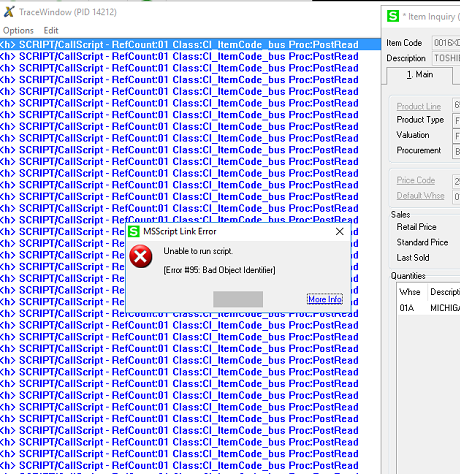
I was able to reproduce it by continually going item to item. Last week is was right around 100 items. When I tested it again just now, it was more like 180 items. I opened a debug window & I just have one line showing the script firing over & over. Eventually, error 95.
It seems like if the message box appears more often, I reach that error quicker.
Any of this help?
------------------------------
Dana Young
Lehman Wesley & Associates
Lansing MI
------------------------------
Original Message:
Sent: 08-19-2021 12:40
From: Alnoor Cassim
Subject: Script works in Maintenance but not Inquiry
No I didn't cycle thru 100+ items. I haven't tested anything previous to my last post in fact. So are saying on your original PostRead script (before there was any BT_LINK_x button added to show the msg), it does work in Item Inquiry but sooner or later you'll run into a 95? I thought from original post it wasn't working at all to begin with which is why I suggested the InvokeButton route.
I just tried to "fly" thru 20 of them based on PostRead stuff from my last post and seems to be ok. Almost seems like a timing issue for you. Strange question but does it work better if you slowly move through the items instead of flying thu them? About your PreWrite script, I agree that it wouldn't be firing off or interfering here. I don't know what to tell you without actually remoting in to see myself.
------------------------------
Alnoor Cassim
Email: alnoor@asifocus.com
Ph: 949-689-9887
Orange County, CA
------------------------------
Original Message:
Sent: 08-19-2021 09:38
From: Dana Young
Subject: Script works in Maintenance but not Inquiry
@Alnoor Cassim did you cycle through like 100+ items? So if I just keep clicking the over arrow to bring up the next item, it eventually errors out on me, even though only about 5% of those actually have the conditions to display the message. When I was testing a few, it looked like it was working, but now I can reproduce it by just clicking next, next, next until it gives the Error 95.
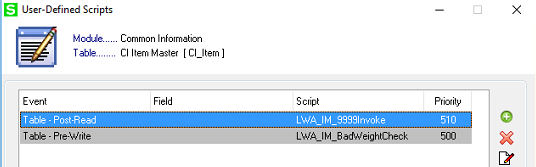
I have one other script on that screen, its a Pre-Write that checks that the weight field is actually a numeric value. That's been on there for years. This should not be firing tho when I am just flying through the records. I don't have any UI scripts either.
------------------------------
Dana Young
Lehman Wesley & Associates
Lansing MI
Original Message:
Sent: 08-18-2021 17:31
From: Alnoor Cassim
Subject: Script works in Maintenance but not Inquiry
Prolly you can script a new memo entry OTF but I don't think it would take effect at that point in PostRead to then auto-pop the memo. So you could place it as UI script for Panel PostLoad of PMain. Having said that, I went back to inspect the original premise that MessageBox didn't work in Item Inquiry on my local v2019. Apparently it works for me and here is what I used. It is possible you have another script or mod in play that is changing the behavior of Item Inquiry?
sProductLine = ""
rV = oBusObj.GetValue("ProductLine$", sProductLine)
r=oScript.DebugPrint("ProductLine = " & sProductLine)
If sProductLine = "9999" Then
sMsg = "This is a new discounted and clearance item." & vbCRLF & "Warranty credit only (no replacement) is honored for six months from invoice date." & vbCRLF & "All Sales are final and subject to inventory on hand."
rMsg=oSession.AsObject(oSession.UI).MessageBox("",sMsg)
End If
------------------------------
Alnoor Cassim
Email: alnoor@asifocus.com
Ph: 949-689-9887
Orange County, CA
Original Message:
Sent: 08-18-2021 14:47
From: Dana Young
Subject: Script works in Maintenance but not Inquiry
Dang it. I really don't want to manually add a memo each time there is a new item added to this product line. Is there a way to script a new memo entry based on a product line? I can VI the existing ones, but they constantly add items too.
------------------------------
Dana Young
Lehman Wesley & Associates
Lansing MI
Original Message:
Sent: 08-11-2021 13:34
From: Alnoor Cassim
Subject: Script works in Maintenance but not Inquiry
You can get rid of the 2nd MessageBox showing the low DSZ. If in fact the error occurs at DSZ of 24,155,714 then you are nowhere close to running out of workspace memory. It means you don't have a memory leak, that the cause of the 95 is something else. Prolly you have to come up with a different solution for Product Line 9999. Any chance you're on version 2021?
------------------------------
Alnoor Cassim
Email: alnoor@asifocus.com
Ph: 949-689-9887
Orange County, CA
Original Message:
Sent: 08-11-2021 13:16
From: Dana Young
Subject: Script works in Maintenance but not Inquiry
So, passing the variable didn't help it.
I setup this DSZ as the second button & I am invoking it first, but its not displaying the message, just giving the same Error 95 when I get to about 100 records. Now it displays 2 errors for each occurance, one for each button.
I first tried both buttons in the same post-read, then I split them & have button 2 happening before button 1, but its never showing the message box. The original script still shows the message box when those conditions are correct.
So, I set it to show in debugging & watched it as I moved to new records.
It starts with DSZ = 24808933
It errors when DSZ = 24155714
What does this mean?!
@Alnoor Cassim
------------------------------
Dana Young
Lehman Wesley & Associates
Lansing MI
Original Message:
Sent: 08-04-2021 18:19
From: Alnoor Cassim
Subject: Script works in Maintenance but not Inquiry
I like Kevin's idea. Try that! Just drop the trailing $ when using in the script. Also I was gonna say it sounds like a memory leak possibly since you're getting a 95 after it was working okay for a long time. There is a way to check.
Each task opened with the Launcher starts with 32 MB of workspace memory a.ka. session memory. It has nothing do with system RAM. Thru the process of "garbage collection" in the biz and UI objects, this memory is maintained and never runs out unless you have a memory leak. Here is another PostRead script you can add, or just add it to the existing one. First add a new button I/M Maint that does nothing. Set it to Hidden if it let's you. I'll assume it's called BT_LINK_2. This bit will set the value of DSZ into the button text. DSZ is a ProvideX system variable that shows available workspace memory.
r=oScript.DebugPrint("About to get and show DSZ value")
oScript.Execute("tmpDSZ = DSZ")
vbDSZ = oScript.Evaluate("tmpDSZ")
vbDSZFormatted = FormatNumber(vbDSZ,0,,,-1)
oUIObj.SetControlProperty "BT_LINK_2", "Visible", 1
oUIObj.SetControlProperty "BT_LINK_2", "Text$", "Mem=" & CStr(vbDSZFormatted)
If vbDSZ < 1000000 Then
sMsg = "Danger we are failing under 1 MB of available session memory. Close and re-open the screen soon."
rMsg = oSession.AsObject(oSession.UI).MessageBox("", sMsg) 'or add to existing MessageBox
End If
------------------------------
Alnoor Cassim
Email: alnoor@asifocus.com
Ph: 949-689-9887
Orange County, CA
Original Message:
Sent: 08-04-2021 17:24
From: Kevin Moyes
Subject: Script works in Maintenance but not Inquiry
Pass the value into the script without using oBusObj?
------------------------------
Kevin Moyes
Technical Systems Analyst
Munjal White Consulting Co.
Toronto ON
Original Message:
Sent: 08-04-2021 14:44
From: Dana Young
Subject: Script works in Maintenance but not Inquiry
@Alnoor Cassim I have a follow up on this...
One particular user gets an error after a while of using Item Inquiry. It works fine for a portion of the day, then she gets an error, then every item after that gets the error until she restarts Sage. Its like its logging something in her session & running out of room because it doesn't happen right away & she is the only user that is consistently using Item Inquiry to look up quantities all day long, so probably using it the most. Happens every day. I can't get it to happen for me using the same items.
I don't have anything getting logged in the script; its pretty basic.
Thoughts?!
------------------------------
Dana Young
Lehman Wesley & Associates
Lansing MI
Original Message:
Sent: 07-28-2021 14:25
From: Alnoor Cassim
Subject: Script works in Maintenance but not Inquiry
2 steps:
1. Create a button in DMain that has your MessageBox
If sLine="9999" Then
sMsg = "Clearance Item Dude!"
rMsg = oSession.AsObject(oSession.UI).MessageBox("", sMsg)
End If
- PostRead that does InvokeButton to it.
r=oScript.InvokeButton("BT_LINK_1")
------------------------------
Alnoor Cassim
Email: alnoor@asifocus.com
Ph: 949-689-9887
Orange County, CA