Sage 100

 View Only
  • 1.  Script Not Running for User - 2023

    Posted 02-14-2024 13:52

    OK, I know I saw this in the past week or so.  There was a  post about a user not being able to run a script.  It ran for reseller, but not the user.  And someone @Kevin Moyes? posted that it was security role that allowed this in v2023.  For the life of me, I cannot find that thread and more importantly, I do not see the security role setting,

    Thanks in advance


    ------------------------------
    Jeff Schwenk
    Bottomline Software, Inc.
    (540) 221-4444
    ------------------------------


  • 2.  RE: Script Not Running for User - 2023

    Posted 02-14-2024 14:09
    Edited by Kevin Moyes 02-14-2024 14:09

    Scripts can be set up with a Role check, to do things differently for users with / without the role.

    Company Maintenance, Allow External Access (checkbox) is needed to run scripts in a company.


    ------------------------------
    Kevin Moyes
    Technical Systems Analyst
    Munjal White Consulting Co.
    Toronto ON
    ------------------------------


  • 3.  RE: Script Not Running for User - 2023

    Posted 02-14-2024 15:01

    I think it is something else.  I did check the external selection in company maintenance.  It was selected.  Script runs for me (all access), script doesn't run for use with limited access.  The script reads the ship to country code.........  What, that it!  User does not have access to the country code maintenance table.  I just granted access (view only) and life is not good.  Thanks @Kevin Moyes for jobbing my brain.


    ------------------------------
    Jeff Schwenk
    Bottomline Software, Inc.
    (540) 221-4444
    ------------------------------


  • 4.  RE: Script Not Running for User - 2023

    Posted 02-14-2024 15:05

    Yes, if you open an object in a script, user permissions to that object can certainly block things.

    It's a wise practice to put in a permission check for all new objects created in scripts, with a warning when something doesn't work...


    ------------------------------
    Kevin Moyes
    Technical Systems Analyst
    Munjal White Consulting Co.
    Toronto ON
    ------------------------------


  • 5.  RE: Script Not Running for User - 2023

    Posted 02-15-2024 09:34

    Thanks @Kevin Moyes


    ------------------------------
    Jeff Schwenk
    Bottomline Software, Inc.
    (540) 221-4444
    ------------------------------


  • 6.  RE: Script Not Running for User - 2023

    Posted 05-17-2024 11:35

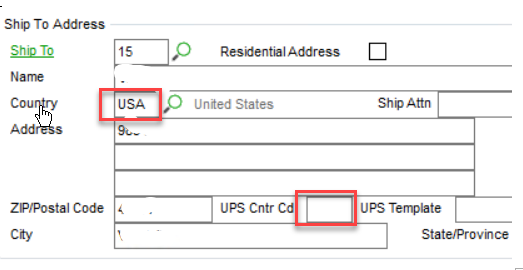
    Follow up.  @Kevin Moyes posted a thread detailing how to populate a UDF by linking to an existing table.  It worked, but now I am noticing that it does not populate unless you physically enter the primary field.  In the example below, I want the country code UDF to populate based on the value of the ship to country code.  It does if you key the USA, but if the address information pulls via a ship to code, the UDF does not populate.  Is there a trigger somewhere or am I needing a script to invoke a trigger?


    ------------------------------
    Jeff Schwenk
    Bottomline Software, Inc.
    (540) 221-4444
    ------------------------------


  • 7.  RE: Script Not Running for User - 2023

    Posted 05-17-2024 12:00

    I'm not sure what technique you are referring to but perhaps try to tie the same script to column-post validate on the ShipToCode.  (When Sage pulls in some kinds of linked data, like the address fields from a ShpToCode, they often bypass the associated column events... frustrating for sure.  The key question is whether the new country code is set by the time that event is triggered).

    For header type fields that don't affect $'s you can also run the script pre-write, and it will always work... (with no chance to override though).


    ------------------------------
    Kevin Moyes
    Technical Systems Analyst
    Munjal White Consulting Co.
    Toronto ON
    ------------------------------


  • 8.  RE: Script Not Running for User - 2023

    Posted 05-17-2024 12:06

    Thanks,  you had a post showing how a UDF can be linked to the country code to pull the alternative code.  Works great as long as you key the value.  Based on what you write above, I revert back to my original script for the heavy lifting.  Thanks for the clarification


    ------------------------------
    Jeff Schwenk
    Bottomline Software, Inc.
    (540) 221-4444
    ------------------------------


  • 9.  RE: Script Not Running for User - 2023

    Posted 05-17-2024 12:15

    Found it... if you post details of the problem, Sage might fix it in a product update.  UDF flow "should" work in that situation.


    ------------------------------
    Kevin Moyes
    Technical Systems Analyst
    Munjal White Consulting Co.
    Toronto ON
    ------------------------------


  • 10.  RE: Script Not Running for User - 2023

    Posted 05-17-2024 12:03
    Edited by Eric Lunceford 05-17-2024 12:05

    Validation scripts don't fire for default values. You need to add a script to the Set Default Values to deal with something like this. 

    ^^^ what Kevin said...


    ------------------------------
    Eric Lunceford
    First Mate Business Solutions
    Oklahoma City, OK
    877-880-8960
    ------------------------------
