Open a new instance of Job Maintenance but do not load a job yet, place the cursor in the job number field, then open the command window. That error sometimes occurs when focus is on something that it doesn't expect when you try to open the command window. The easiest way around this that I have found is to make sure the cursor is in an multi-line control that is not disabled or locked.
Once the command window is open, you can then load a job and go to the lines tab, then try clicking Halt on the command window and type the code in my previous message.
------------------------------
David Speck II
Blytheco LLC
------------------------------
Original Message:
Sent: 04-04-2024 09:58
From: Phil McIntosh
Subject: Script for Job Cost Change Order grid with Advanced Change order from DSD
Well this just gets better and better...Command Windwo gerneates a panel processing error
------------------------------
Phil McIntosh
Friendly Systems, Inc.
------------------------------
Original Message:
Sent: 04-03-2024 11:07
From: David Speck II
Subject: Script for Job Cost Change Order grid with Advanced Change order from DSD
What table and event do you have the script attached to?
From what I can tell, the Change Order tab is normally only loaded with records from JC_JobTransactionDetail where TransactionType$ is equal to "0" ("Contract Change Order" according to the File Layouts), and as you said, the CostType$ column for these records should be blank.
Since you mentioned a DSD enhancement, have you checked the table with either DFDM or SSMS to see if the data is in another column, like one that starts with the developer code?
I'm not familiar with the enhancement so I can't really comment on it but you might want to check for the existence of an auxiliary table that starts with the developer code. It could be that the non-stock columns are being written to another table.
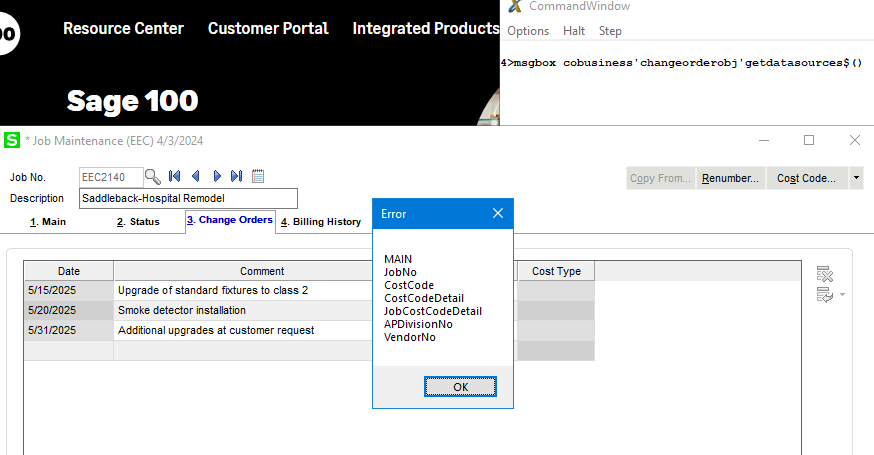
If you enable Debug mode in the Sota.ini, you can open the command window and type msgbox cobusiness'changeorderobj'getdatasources$() to see if there are any child data sources that might be retrieving the value to be displayed in the grid. This is what I got on my stock system.
------------------------------
David Speck II
Blytheco LLC