Original Message:
Sent: 01-15-2025 14:38
From: David Overholt
Subject: Screen issue
Just to avoid any confusion (which I'm susceptible too)
if you do file > Run > *ESC you are prompted "Do you want to enable Escape Trapping?" and answer YES. At that point, if you open any task in Sage 100 you will see the Standard Sage 100 even it a Customized screen exists. and there would not be an asterisk at the top of that screen
if you do file > Run > *ESC a second time you are prompted with "Do you want to Disable Escape Trapping?" and answer YES then you start seeing custom office screens again and then you would see the asterisk at the top of that screen.
Also, as @Alnoor Cassim said, you can close out of Sage 100 and reopen it at any time and that would effectively Disable escape trapping also.
*ESC turns off more than just the customizer screens, it also turns off all custom office scripts which is handy for troubleshooting weird issues like this
AND keep in mind that *ESC is only affecting the user/session that you are currently logged in as. it is not affecting any other users that might be logged in. .
------------------------------
David Overholt
DWD Technology Group
------------------------------
Original Message:
Sent: 01-15-2025 14:25
From: Beth Bowers
Subject: Screen issue
@Alnoor Cassim - I'm still waiting to hear back from the client but I've very hopeful, and I'm totally on board with backing away slowly, not looking the computer in the eyes, and letting it go if the Role is the issue.
------------------------------
Beth Bowers
(269) 358-0989
Original Message:
Sent: 01-15-2025 14:15
From: Alnoor Cassim
Subject: Screen issue
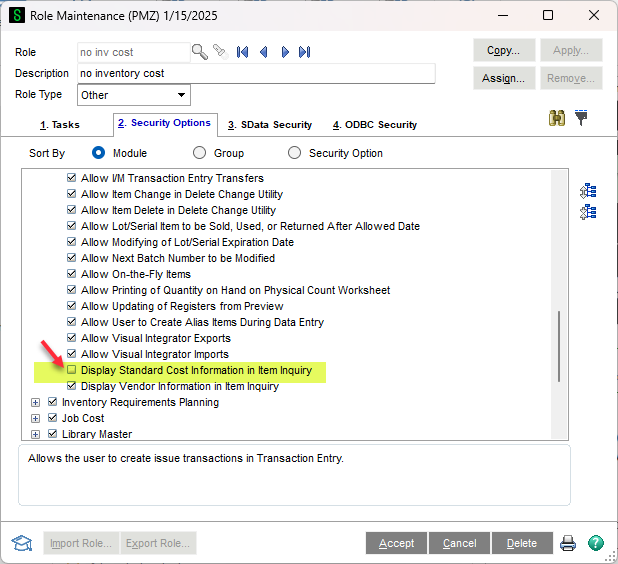
Beth - I think @David Overholt is right on the money. On why the * doesn't appears it might be that it's not loading the Customizer'd screen in \IM\Custom\###-### for some reason. I would be tempted to make a backup of CM_Log.m4t and then Rebuild Log File in Custom Office / Utilities (not Update Custom Panels). Having said that, if the box in Role Maint not being checked is the culprit then just fix that and not worry about the ###-### screen unless you have to.
------------------------------
Alnoor Cassim
Accounting Systems, Inc. (ASI)
Original Message:
Sent: 01-15-2025 11:01
From: Beth Bowers
Subject: Screen issue
Oh, @David Overholt - I SO did not scroll down further! I will go ask...
------------------------------
Beth Bowers
(269) 358-0989
Original Message:
Sent: 01-15-2025 10:58
From: David Overholt
Subject: Screen issue
Beth,
You mentioned one of her roles has the check box for Cost in inventory, I see two checkboxes one at the top and another at the bottom of the security options for Inventory. is the one in the screen shot below checked?
------------------------------
David Overholt
DWD Technology Group
Original Message:
Sent: 01-15-2025 10:41
From: Beth Bowers
Subject: Screen issue
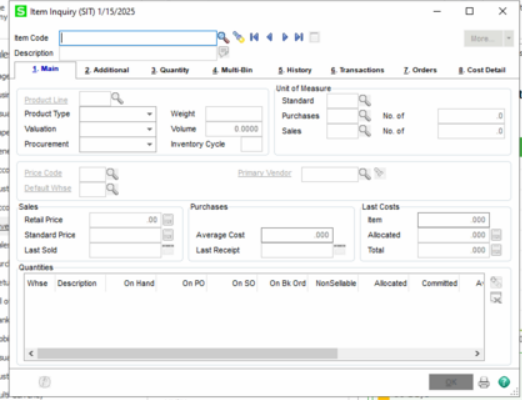
@Alnoor Cassim - This was with error trapping on, but I also am noticing that there is no asterisk by the screen name - theoretically she would at least be the ALL/ALL, so shouldn't there be an asterisk there?
------------------------------
Beth Bowers
(269) 358-0989
Original Message:
Sent: 01-12-2025 16:17
From: Alnoor Cassim
Subject: Screen issue
If you do File / Run / *ESC and click Yes to the escape trapping question, and then open the Item Inquiry screen does the Standard Cost field and label show up? This would rule out whether it's a Customizer issue. To get it back the way it is, repeat the command and say Yes again OR close the Launcher and restart Sage.
------------------------------
Alnoor Cassim
Accounting Systems, Inc. (ASI)
Original Message:
Sent: 01-11-2025 13:34
From: Beth Bowers
Subject: Screen issue
Man, I was really hoping on this one, @Cullen Lowe, but alas...
------------------------------
Beth Bowers
(269) 358-0989
Original Message:
Sent: 01-11-2025 09:01
From: Cullen Lowe
Subject: Screen issue
Even if you don't see it in Customizer Selection, is there a folder other than "###-###" under ..\IM\Custom?
------------------------------
Cullen Lowe | Senior Business Consultant
Kissinger Associates, Inc.
Office: 800-562-5456 x255 | Mobile: 717-460-3755
cullenl@kissingerassoc.com | kissingerassoc.com
Original Message:
Sent: 01-10-2025 17:18
From: Beth Bowers
Subject: Screen issue
Terminal server...?
------------------------------
Beth Bowers
(269) 358-0989
Original Message:
Sent: 01-10-2025 15:49
From: Jeff Schwenk
Subject: Screen issue
Uninstall workstation and reinstall?
------------------------------
Jeff Schwenk
Owner
Bottomline Software, Inc.
Waynesboro VA
(540) 221-4444
Improving bottom lines for over 25 years!