Sage 100

 View Only
  • 1.  Savubg firn as PDF results in Spelling Issues

    Posted 08-23-2021 23:19
    Edited by Jeff Schwenk 08-23-2021 23:21
    Let's try this again. 

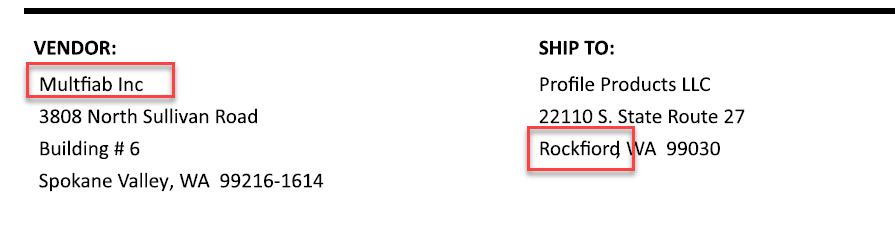
    SAVING FORM AS PDF RESULTS IN SPELLING ISSUES.

    V2018 and V2021 - Purchase Order Crystal report previews fine.  However, when saving as a PDF, funky spelling issues arise.  PDF is Adobe Reader.  Has anyone encountered this?


    ------------------------------
    Jeff Schwenk
    FORMER 90M Board Member -140,000,000 is a TERRIBLE thing to waste!!!
    Bottomline Software, Inc.
    Waynesboro VA
    540-221-4444
    ------------------------------


  • 2.  RE: Savubg firn as PDF results in Spelling Issues

    Posted 08-24-2021 08:26
    Is it happening on more than one workstation?  I think I have seen something like that previously and that it was a workstation-specific issue, but I can't recall for sure.  Maybe try re-running workstation setup and/or reinstall of Reader.

    ------------------------------
    Brett Zimmerman
    Net at Work
    Greater Boston Area
    ------------------------------


  • 3.  RE: Savubg firn as PDF results in Spelling Issues

    Posted 08-24-2021 11:05
    Have you seen this article?

    Cause

    <content>
    • Possible conflict with another Amyuni PDF print driver
    • Possilbe conflict with Adobe PDF reader
    </content>

    Resolution

    <content>
    • Reinstall the Sage PDF Converter
    • Re-register CDINTF300.DLL
    </content>


    ------------------------------
    Michelle Taylor
    ERP Consulting Manager, CS3 Technology
    918-388-9772
    ------------------------------