Fabulous suggestion Beth. It's a terrific feature and should have been added years ago! This is what makes 90 Minds so valuable.
------------------------------
Doug Higgs
Midwest Commerce Solutions, Inc
(312) 315-0960
Chauffeur, Chef, and Personal Assistant to Sprinkles
------------------------------
Original Message:
Sent: 08-25-2025 15:42
From: Beth Bowers
Subject: Sales Order Printed Flag for Backorders
WOO HOO! And that was an idea I had submitted!
------------------------------
Beth Bowers
Dog Mom, first and foremost. The rest is all just necessary to keep the dogs in biscuits.
(269) 358-0989
------------------------------
Original Message:
Sent: 08-25-2025 15:24
From: Doug Higgs
Subject: Sales Order Printed Flag for Backorders
Great news. This feature is also available in version 2024. Since this customer is currently on version 2024 there is no need to upgrade.
------------------------------
Doug Higgs
Midwest Commerce Solutions, Inc
(312) 315-0960
Chauffeur, Chef, and Personal Assistant to Sprinkles
Original Message:
Sent: 08-25-2025 14:55
From: Doug Higgs
Subject: Sales Order Printed Flag for Backorders
Thank you @Beth Bowers! This is exactly what we are looking for. We need to upgrade, but there's a solution that doesn't require a third party enhancement. I also thought of using VI to export records that have a backorder quantity in SO Invoice Entry immediately prior to updating the sales journal then use a VI import to change the print flag. Cumbersome and a two step process subject to user error.
This should work: "Select Order to automatically reset the Print Order check box in Sales Order Entry for back orders generated during the Sales Journal Update. This option is available only if the Print Sales Orders check box is selected."
------------------------------
Doug Higgs
Midwest Commerce Solutions, Inc
(312) 315-0960
Chauffeur, Chef, and Personal Assistant to Sprinkles
Original Message:
Sent: 08-25-2025 14:48
From: Beth Bowers
Subject: Sales Order Printed Flag for Backorders
That's a new option, @Doug Higgs in 2025, I think. Prior to that, they'd just have to print the Daily BackOrder report and print from there.
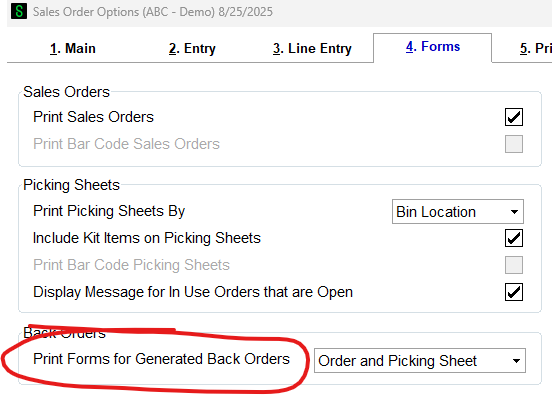
Print Forms for Generated Back Orders
Select an option to determine which forms are printed for back orders generated during the Sales Journal update.
- Select None if you do not want to print forms for generated back orders.
- Select Order to automatically reset the Print Order check box in Sales Order Entry for back orders generated during the Sales Journal Update. This option is available only if the Print Sales Orders check box is selected.
- Select Picking Sheet to automatically reset the Print Pick Sheets check box in Sales Order Entry for back orders generated during the Sales Journal Update. This option is available only if an option other than None is selected at the Print Picking Sheets By field.
- Select Order and Picking Sheet to automatically reset the Print Order check box and the Print Pick Sheets check box for back orders generated during the Sales Journal Update. This option is available only if the Print Sales Orders check box is selected and an option other than None is selected at the Print Picking Sheets By field.
------------------------------
Beth Bowers
Dog Mom, first and foremost. The rest is all just necessary to keep the dogs in biscuits.
(269) 358-0989