Bottomline Software, Inc.
Original Message:
Sent: 02-26-2025 11:26
From: Alnoor Cassim
Subject: Sage v2023 ADV, WIN 11 Workstation using Avalara
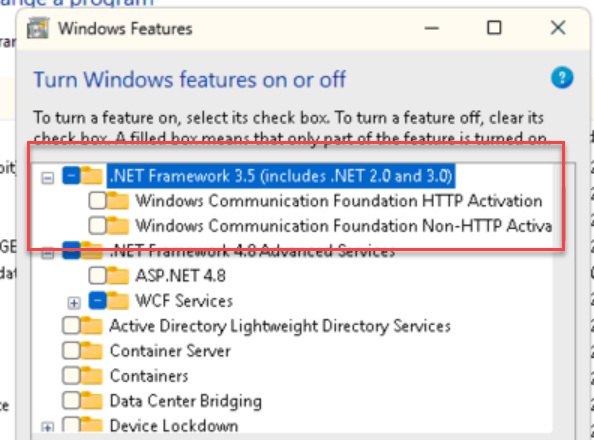
Jeff - No those 2 components are not necessary for Sage.
------------------------------
Alnoor Cassim
Accounting Systems, Inc. (ASI)
------------------------------
Original Message:
Sent: 02-26-2025 11:13
From: Jeff Schwenk
Subject: Sage v2023 ADV, WIN 11 Workstation using Avalara
@Alnoor Cassim - Quick question. Do I install the two subfolders of .Net 3.5? See below.
TIA
------------------------------
Jeff Schwenk
Owner
Bottomline Software, Inc.
Waynesboro VA
(540) 221-4444
Improving bottom lines for over 25 years!
Original Message:
Sent: 02-26-2025 09:13
From: Jerry Norman
Subject: Sage v2023 ADV, WIN 11 Workstation using Avalara
I double and triple Wayne's recommendation. Everybody should strongly recommend to customers that they either put their Sage 100 "utility" into the cloud (where ALL the competitive systems live) or use an internal TS with a modern interface.
Chuck and I have had experience in the past dozen years where ALL of these pesky install/connection problems disappear immediately once we get the system off of the customer's user computers, local servers, and dicey networks. We still occasionally have questions about printers, but it's always because a customer forgets how to select the right one. (Even these nearly disappear when we get customers to use only Paperless Office.)
When you put Sage 100 in the cloud, it is now OUT of the customer's network and its protocols. After you have shown the IT Dept that it poses no risk to their network's security, they are nearly always happy to be rid of it.
Go to the cloud. Show your customers the operational and financial benefits. (The $$ rewards require digging further into their true current server and desktop support costs.) Frankly, if you don't move them to at least TS, they will be gone as soon as they get a new CEO/CFO/Controller because they KNOW they can get bettr.
------------------------------
Jerry Norman
Smartbridge Partners
(512) 653-7498
Original Message:
Sent: 02-26-2025 08:51
From: Wayne Schulz
Subject: Sage v2023 ADV, WIN 11 Workstation using Avalara
Sage 100 workstation setup is stuck in the past, and instead we need to focus on recommending a Remote Desktop solution. Forgetting a component and getting a call back is all too frequent. With Remote Desktop we can create once and apply to all users without any of this running to individual workstations or taking incoming "my workstations was just replaced and xyz or pdq isn't working now".
I could go on an extended rant about how poorly the installation and configuration routine has become however I don't think this is ever ( and I do mean ever) improving so best to focus on something we have within our power to make our clients experience better without having to beg and plead with a publisher.
------------------------------
Wayne Schulz
wayne@s-consult.com
Schulz Consulting
(860) 516-8990
CT
Original Message:
Sent: 02-26-2025 00:29
From: Alnoor Cassim
Subject: Sage v2023 ADV, WIN 11 Workstation using Avalara
>> I wonder if installing .net 3.5 should be a best practice when installing Sage on WIN 11.
Yes absolutely. It should go our upgrade checklists.
------------------------------
Alnoor Cassim
Accounting Systems, Inc. (ASI)
Original Message:
Sent: 02-25-2025 11:56
From: Jeff Schwenk
Subject: Sage v2023 ADV, WIN 11 Workstation using Avalara
Great to know. Thanks
I wonder if installing .net 3.5 should be a best practice when installing Sage on WIN 11.
Thoughts?
------------------------------
Jeff Schwenk
Owner
Bottomline Software, Inc.
Waynesboro VA
(540) 221-4444
Improving bottom lines for over 25 years!
Original Message:
Sent: 02-25-2025 11:53
From: Alnoor Cassim
Subject: Sage v2023 ADV, WIN 11 Workstation using Avalara
Jeff - For the .NET error you're getting running Mas90 style, in case you still want to fix that, which has nothing to do with the Deferred printer issue you already fixed, it's because this new Windows 11 PC doesn't have .NET Framework 3.5 installed by default (Avalara removed that KB entry from their site for some reason). Go to Control Programs / Programs and Features and install it from there. When you run the normal way with Advanced / Premium, the AvaTax libraries (DLLs, OCXs, TLBs) are executed from the Sage server but for Standard / Mas90 mode it runs from the workstation and does require .NET 3.5 then running register_for_com.bat. This would also be the case on Advanced / Premium if you had a BOI application / script installed running from the wkstn as it runs Mas90 style too.
------------------------------
Alnoor Cassim
Accounting Systems, Inc. (ASI)