I had a similar problem with 2017 and upgrading to 2023. The deleting of the Crystal runtime would work, but they could not do any UAT. There is a .zip file attached and where to place it. It allows Crystal to make decisions on which version is trying to run. I would imagine this would work in most instances because it is being dropped in a Windows directory. Here are the directions:
If the issue occurs in Sage 100 2017 or older after Sage 100 2023 or FAS 2023 is installed
- Extract the contents of the
CrystalDecisions.AssemblyDlls.zip
to C:\Windows\assembly\GAC_MSIL directory
NOTE: you should see at least 28 folders with a name that begins with CrystalDecisions
- Copy pvxwin32.exe.config file from 2018 installation - or contact Sage Support - to the Sage 100 2017 (or prior version) ...\MAS90\HOME\ folder
NOTE: if client is on Sage 100 Advanced\Premium they will need to also copy the file to the client ...MAS90\HOME\ folder i.e. C:\Sage\Sage 100 Workstation\MAS90\Home\)
(Note: the pvxwin32.exe.config would not be the one from 2023 that is used here to "fix" 2017 but the older version of that file – the one you downloaded from the knowledgebase to resolve conflicts after installing 2018).
------------------------------
Brian Renner
Blytheco LLC
------------------------------
Original Message:
Sent: 01-16-2024 16:08
From: Jeff Schwenk
Subject: Sage v2021 & SFA v2015.1 crystal conflict
If still an issue, uninstall the Crystal runtime versions via control panel on the workstation, then reinstall the Sage client. Those message popped up for me migrating from v2022 to v2023. Deleting the Crystal run times did the trick for me
------------------------------
Jeff Schwenk
Bottomline Software, Inc.
(540) 221-4444
------------------------------
Original Message:
Sent: 01-16-2024 12:59
From: Wayne Schulz
Subject: Sage v2021 & SFA v2015.1 crystal conflict
@Brett Zimmerman I don't know if this is relevant, but found it on the Fixed Assets side of the Sage KB - Crystal Runtime Version Conflict
------------------------------
Wayne Schulz
wayne@s-consult.com
Schulz Consulting
(860) 516-8990
Moodus, CT
Original Message:
Sent: 01-16-2024 12:12
From: Brett Zimmerman
Subject: Sage v2021 & SFA v2015.1 crystal conflict
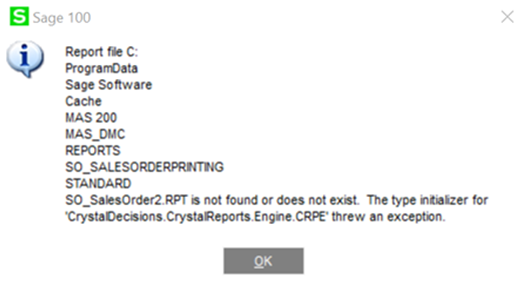
I'm running into this error (kb attached) on a SFA 2018 to 2024 Update and server migration: "Report file \[file path to share on server] MAS90 Reports\[Report File Name].RPT is not found or does not exist. The type initializer for 'CrystalDecisions.CrystalReports.Engine.CRPE' threw an exception".
I was able to get Sage 100 v2022 working again, but then upon launching SFA 2024, it auto-"re-configures", and successfully launches SFA - but now the Crystal error is back in Sage 100.
------------------------------
Brett Zimmerman
Net at Work
Greater Boston Area
Original Message:
Sent: 01-15-2024 11:17
From: Wayne Schulz
Subject: Sage v2021 & SFA v2015.1 crystal conflict
Sage has a KB here - What versions of Crystal Reports are supported with Sage 100? - and the LAST link on this page - Error:"Unable to cast COM object..." in Sage 100, after installing Sage Fixed Assets Client 2018.1 or higher (no longer functioning ) - used to lead to a chart with some information ( Note: I'm unsure if this chart dealt with FAS 2015.1).
Perhaps someone has a PDF of the KB article that used to exist and can post it. From memory I think the instructions were similar to what was also discussed in this Sage City ( now Community ) post.
------------------------------
Wayne Schulz
wayne@s-consult.com
Schulz Consulting
(860) 516-8990
Moodus, CT