Take a look at this article that we usually refer to for addressing Paperless Printing issues:
https://support.gotomyerp.com/portal/en/kb/articles/addressing-paperless-office-printer-problems
As it relates to removing one printer with the normal printer redirection, that is not possible, unless you are using a 3rd party, like TSPrint or similar.
Another item that I don't believe you mentioned you tried (also in the article). Make sure that the local workstations do not have any of the following printers locally installed:
- Sage 100 PDF Converter
- ABS PDF Driver
- Amyuni Document Converter 500
Getting those redirected through an RDP session, even for one user, will break it for
all users.
To check this easily, make sure that ALL the Sage users are logged and then go to Print Management ( in Administrative Tools ) (Make sure the user is part of the "Print Operators" group, or they will not be able to see all the user's printers)
Now find any users that may have any of the above printers listed there with the word (redirected #).
You can then map their session number to the user and find their workstation.
All the above is in the article I shared.
Good luck!
------------------------------
George Khairallah
CTO | gotomyerp, LLC
george.k@gotomyerp.com |
------------------------------
Original Message:
Sent: 07-08-2022 14:37
From: Jeff Schwenk
Subject: Sage remote user running v2021 as desktop app having continueal paperless Issue
There is indeed. But if you are running Sage as a remote app, there is an icon that launches Sage. I see no way to edit the app icon. Perhaps user does not have rights to edit. Like your great uncle Sgt Schultz, I no NOTHING about apps. Is there an edit function on the icon?

------------------------------
Jeff Schwenk
Bottomline Software, Inc.
------------------------------
Original Message:
Sent: 07-08-2022 13:43
From: Wayne Schulz
Subject: Sage remote user running v2021 as desktop app having continueal paperless Issue
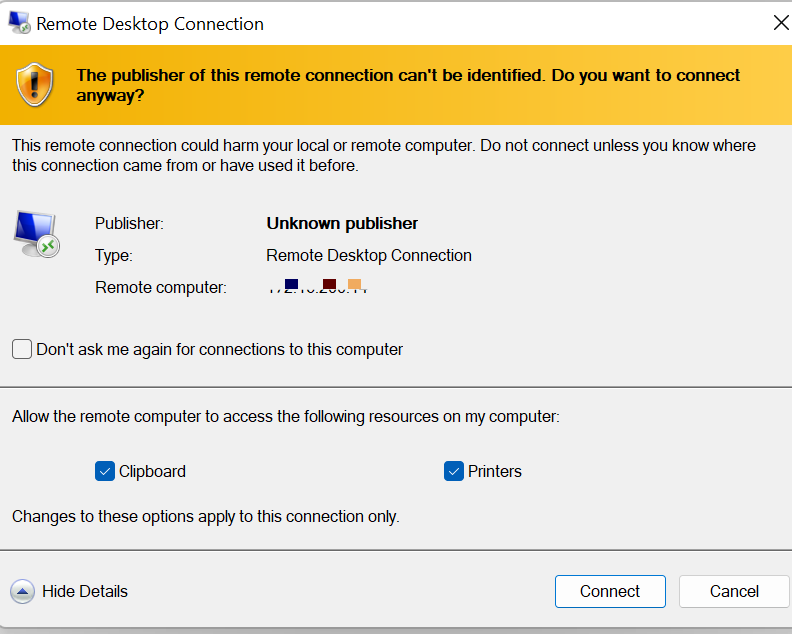
I think there's a spot on the RDP client to allow or disallow use of remote printers and that's how you get the redirected out
------------------------------
Wayne Schulz
wayne@s-consult.com
Schulz Consulting
(860) 516-8990
Moodus, CT
Original Message:
Sent: 07-08-2022 13:39
From: Jeff Schwenk
Subject: Sage remote user running v2021 as desktop app having continueal paperless Issue
Thanks Wayne for replying. Nothing new here. Think is is time to kick it up to Sage as they get the big buck. Maybe they will find something new.... Not sure how to delete the printers that are redirected as I don't see where to configure the desktop app connection to not allow redirected printers. Not sure if that is even an issue.
------------------------------
Jeff Schwenk
Bottomline Software, Inc.
Original Message:
Sent: 07-08-2022 12:43
From: Wayne Schulz
Subject: Sage remote user running v2021 as desktop app having continueal paperless Issue
I had/have almost this exact situation with a user printing statements. I believe they are on 2018 and I've wrestled with all the usual suspects. They print statements once a month so my window of time to get "the call" is every 30 days.
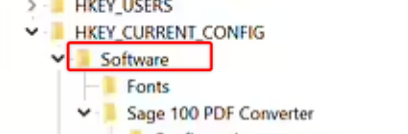
From memory I also looked at the registry and verified permissions on the below registry to be sure USERS had all access
This is in addition to reviewing the version of the Sage PDF driver and re-installing the Sage PDF driver
The symptoms seem to match yours - ie very sporadic - although this customer is likely on an older release ( 2018 ) than yours
------------------------------
Wayne Schulz
wayne@s-consult.com
Schulz Consulting
(860) 516-8990
Moodus, CT
Original Message:
Sent: 07-08-2022 11:55
From: Jeff Schwenk
Subject: Sage remote user running v2021 as desktop app having continueal paperless Issue
Printer error 30
------------------------------
Jeff Schwenk
Bottomline Software, Inc.
Original Message:
Sent: 07-08-2022 08:51
From: Wayne Schulz
Subject: Sage remote user running v2021 as desktop app having continueal paperless Issue
1. Please post the exact error
2. These paperless issues remind me of FRx. You could install it pretty easily but getting it to work (for some) took one of several various patches - and it never seemed to be the same patch for everyone.
3. Verify that you installed the amyuni update and re-ran workstation setup ( as administrator ) after the patch
------------------------------
Wayne Schulz
wayne@s-consult.com
Schulz Consulting
(860) 516-8990
Moodus, CT
Original Message:
Sent: 07-07-2022 21:54
From: Jeff Schwenk
Subject: Sage remote user running v2021 as desktop app having continueal paperless Issue
It's backkkkkkkk.....
FYI-I'm still getting the printer error code about once a day, all different modules so it's not fixed. I've gotten the error 4 times today. Twice when I was trying to print PR DD stubs. The third time was the charm.
The local workstation running Sage as the Remote Desktop APP has a couple offline printer
Reviewing the printers available to Sage for use, there are several redirected printers displayed.
Why are the issues random - Third time was the charm??? Would it not be logical that once it breaks, it stays broken?
Bout ready to punt this one to Sage.....
TIA
------------------------------
Jeff Schwenk
Bottomline Software, Inc.
Original Message:
Sent: 06-10-2022 12:05
From: Jeff Schwenk
Subject: Sage remote user running v2021 as desktop app having continueal paperless Issue
Thanks all. No call from client this AM. Will let things be for a bit.......
------------------------------
Jeff Schwenk
Bottomline Software, Inc.
Original Message:
Sent: 06-10-2022 10:45
From: Carmen Cruz
Subject: Sage remote user running v2021 as desktop app having continueal paperless Issue
Here you go. ;)
Computer\HKEY_CURRENT_USER\SOFTWARE\Microsoft\Terminal Server Client\Default\AddIns\RDPDR\Sage 100 PDF Converter
Computer\HKEY_CURRENT_USER\SOFTWARE\Sage 100 PDF Converter
Computer\HKEY_LOCAL_MACHINE\SYSTEM\CurrentControlSet\Hardware Profiles\Current\Software\Sage 100 PDF Converter
(THIS IS THE MAIN ONE)

------------------------------
Carmen Cruz
Sage Consultant
CompuData