Make sure there is available free space in the log file. If this is zero, then you probably didn't change to Simple yet.
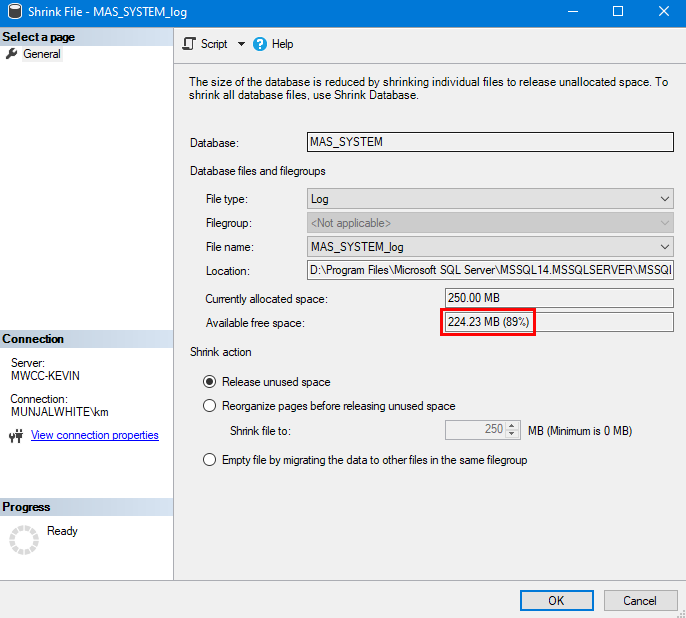
If you have extra room in the file to shrink, but it doesn't happen, try again later... or after hours (when you can stop Sage / SQL), restart the SQL service, which will break any active connections to the database and allow the shrink after you restart.
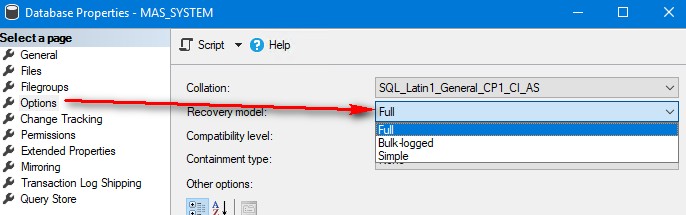
Full: log files contain transaction details for everything done in the database since the last full SQL backup of that database. Log file space keeps growing until a SQL backup command is run against the database.
Simple: log files are basically just working space, immediately recycled once pending transactions are written to the data file.
------------------------------
Kevin Moyes
Technical Systems Analyst
Munjal White Consulting Co.
Toronto ON
------------------------------
Original Message:
Sent: 08-17-2023 19:48
From: Shannon Stanley
Subject: Sage Premium SQL logs
@Kevin Moyes I ran the utility this evening on three different databases and the utility will not run. The screen would just disappear after I select okay and never started the shrinking process. I would go back in to check the log file size and it's still the same size. What does this mean? (Thank you for the screenshots they were very helpful).
------------------------------
Shannon Stanley
Sage 100 Consultant
Ardent Consulting LLC
------------------------------
Original Message:
Sent: 08-17-2023 17:38
From: Kevin Moyes
Subject: Sage Premium SQL logs
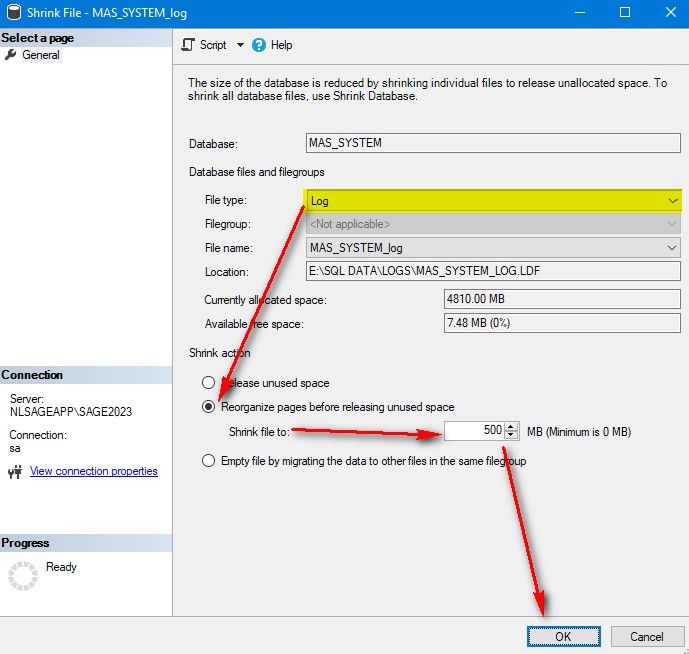
Change the recovery model, then shrink the log file (while setting the new size at the same time). Repeat for each database.
Rarely you'll have to repeat, if there is an active transaction in the wrong location within the log, blocking the shrink... Check the file size afterwards to make sure the shrink works.
Note: the new size is not a limit. SQL will automatically expand the log file size if needed, but it will only do that in times of heavy SQL activity (like running a big "recalculate" utility). The "Simple" recovery method just means the log space is automatically recycled (only holding actively-being-processed-transactions).
------------------------------
Kevin Moyes
Technical Systems Analyst
Munjal White Consulting Co.
Toronto ON
Original Message:
Sent: 08-17-2023 16:50
From: Shannon Stanley
Subject: Sage Premium SQL logs
Kevin,
I forgot to ask, which order do you recommend I go in? Shrinking the log file then apply the limit?
If a log file is large, do you have to run the shrink utility more than once?
Original Message:
Sent: 8/17/2023 4:23:00 PM
From: Kevin Moyes
Subject: RE: Sage Premium SQL logs
Yes, all MAS_* SQL databases can be set to Simple (when you don't have an advanced backup and recovery plan).
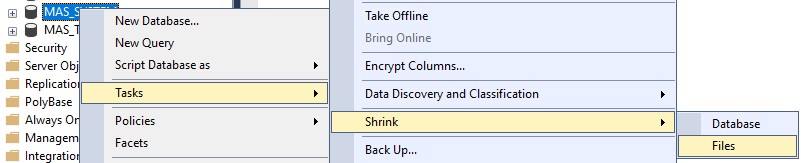
------------------------------
Kevin Moyes
Technical Systems Analyst
Munjal White Consulting Co.
Toronto ON
Original Message:
Sent: 08-17-2023 16:15
From: Shannon Stanley
Subject: Sage Premium SQL logs
Kevin,
Should I set this up "simple" under database recovery for both MAS_System and all the company code log files?
Also do you have steps or article on how to shrink the log files? Sorry I'm a rookie at SQL.
Original Message:
Sent: 8/17/2023 3:50:00 PM
From: Kevin Moyes
Subject: RE: Sage Premium SQL logs
No need to kick everyone out. Make the change, then you can shrink the log files down to a reasonable size. (I usually go with ~500MB). Do not shrink the database file size... just the log file size.
SQL log files are only useful if you have implemented an advanced backup and recovery strategy. Otherwise, Simple is fine for most Sage 100 systems.
------------------------------
Kevin Moyes
Technical Systems Analyst
Munjal White Consulting Co.
Toronto ON
Original Message:
Sent: 08-17-2023 15:47
From: Kevin Moyes
Subject: Sage Premium SQL logs
Quick fix, change the database recovery model to Simple. That recycles log file space without any extra steps.
------------------------------
Kevin Moyes
Technical Systems Analyst
Munjal White Consulting Co.
Toronto ON