At MOTM in February, Linda Cade made a
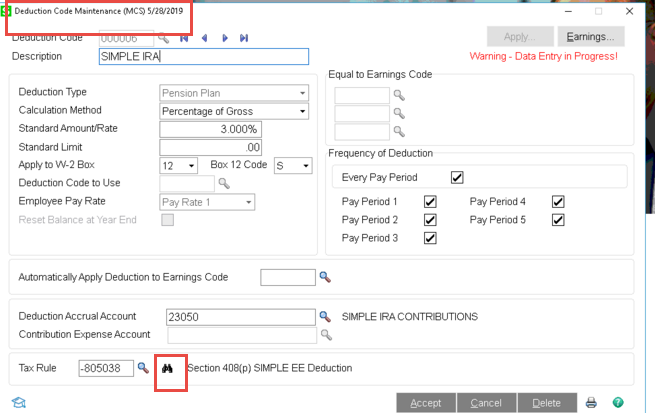
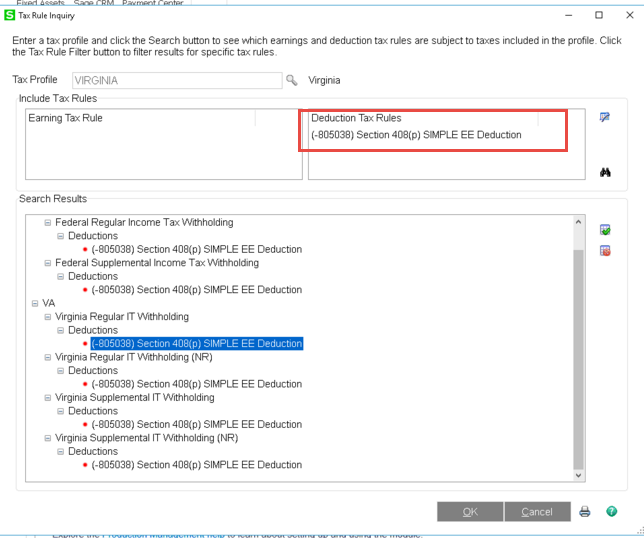
BIG deal about help being added for the tax rules. In PR 2019, a binocular icon was added (see below).
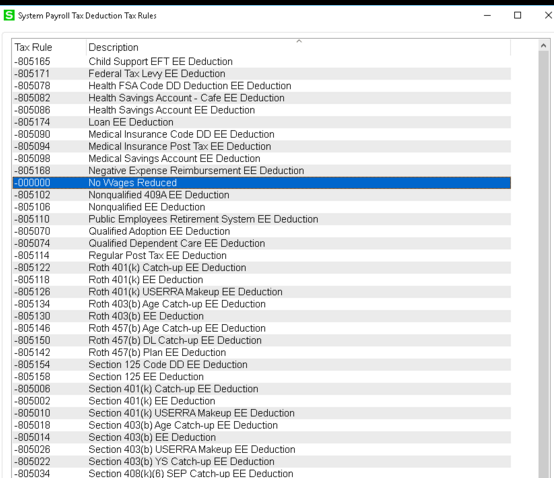
But what does it really mean???? To me, it is still a bunch of guess work. Pick a tax rule, run a sample PR and pray that you get the same result as you did in the past. Sage has a disclaimer that they are not responsible for which tax rule to use but what if you pick a tax rule that mimics the prior result but at YE, the w-2's are different. Who is the onus on? The reseller of course!
IMHO, the help files are just as bad as ever (if not worse due to the ambiguity of the many tax rules)!
Am I looking at it all wrong?
Where are the HELPFUL help files?
------------------------------
Jeff Schwenk
FORMER 90M Board Member
Bottomline Software, Inc.
Waynesboro VA
540-221-4444
------------------------------
Original Message:
Sent: 05-28-2019 11:55
From: Jeff Schwenk
Subject: Sage PR 2019 Installation
Well, a workaround is to jack up the W-4 allowances so that ZERO tax is calculated then ADD an amount to the withholding. This works for the state w/h allowances even though (Virginia) is grayed out. The field will still accept an allowance number and the tax engine uses it for the calculation.
------------------------------
Jeff Schwenk
FORMER 90M Board Member
Bottomline Software, Inc.
Waynesboro VA
540-221-4444
------------------------------
Original Message:
Sent: 05-28-2019 11:27
From: Beth Bowers
Subject: Sage PR 2019 Installation
I've been amazed at how many people were using that.
------------------------------
Beth Bowers
Mom to Samson, Peanut, ChiChi, Canton, and Cagney
Beth Bowers
269-445-1625
Original Message:
Sent: 05-28-2019 11:24
From: Jeff Schwenk
Subject: Sage PR 2019 Installation
Another little gotcha in v2.0 - You can no longer elect to withhold a specific amount for FIT or SIT withholding, ONLY add amounts to the calculated amounts. See attached KB and W4 from IRS website.
I can imagine a few shocked users....
------------------------------
Jeff Schwenk
FORMER 90M Board Member
Bottomline Software, Inc.
Waynesboro VA
540-221-4444
Original Message:
Sent: 05-24-2019 10:40
From: Jeff Schwenk
Subject: Sage PR 2019 Installation
I think I am nearly done with my first PR conversion. 28 employees with five years of perpetual history. The hardest part of it was trying to figure out what tax codes to assign to the earning and deduction codes. Is there a secret as Sage doesn't make it easy. I found the Sage tax code inquiry but either I was doing it wrong or it is as helpful as the help files are. Ran last week's PR for about five employees and they all matched to the actual check to the penny. So the next step is to recreate the full PR run, check a few more history file and the PTO benefit carry overs then do the first full PR. So far, so good. Knock on wood.
------------------------------
Jeff Schwenk
FORMER 90M Board Member
Bottomline Software, Inc.
Waynesboro VA
540-221-4444
Original Message:
Sent: 05-24-2019 08:41
From: Jeff Schwenk
Subject: Sage PR 2019 Installation
Not quite convinced. Was information for prior years retained in QTD and YTD buckets by year? I am unaware if it was. IMHO, information had to be recalculated. And if they did recalculate it, why not add the two quarters to the formula? Would be interested to hear from the coders in the group.
------------------------------
Jeff Schwenk
FORMER 90M Board Member
Bottomline Software, Inc.
Waynesboro VA
540-221-4444
Original Message:
Sent: 05-24-2019 08:07
From: alan niergarth
Subject: Sage PR 2019 Installation
If you think about it, classic Payroll doesn't have the quarterly breakdowns in the current year, just the current qtr and YTD. Hard to recreate that from history. Harder than ARAP Fix.
------------------------------
alan niergarth
Velosio LLC
Original Message:
Sent: 05-23-2019 16:49
From: Phil McIntosh
Subject: Sage PR 2019 Installation
Except that they assumed perpetual would be on for bringing in history and don't bring the current year from that file in the old version if perpetual is not turned on.
------------------------------
Phil McIntosh
President
Friendly Systems, Inc.
Asheville NC
678.273.4010 ext 5
Original Message:
Sent: 05-23-2019 16:11
From: Jeff Schwenk
Subject: Sage PR 2019 Installation
IMHO, a lazy assumption.
@Randy Marion - Are you out there??
------------------------------
Jeff Schwenk
FORMER 90M Board Member
Bottomline Software, Inc.
Waynesboro VA
540-221-4444
Original Message:
Sent: 05-23-2019 15:08
From: Myron Stevenson
Subject: Sage PR 2019 Installation
The conversion does not look at the perpetual history to calculate quarter history. QTD -> current quarter. Prior quarter assigned YTD - QTD. Sage made assumption that perpetual might not be enabled.
------------------------------
Myron Stevenson
Consultant
Clearis Consulting, Inc
Duluth, MN
218-525-6720
Original Message:
Sent: 05-23-2019 13:44
From: Jeff Schwenk
Subject: Sage PR 2019 Installation
I suppose.... But they dumped into two quarters. Starting to wonder if we need Randy to write a utility to do this properly.....
Will check on the Federal issue. Problem is that some some employees are good. But I do have several profiles...
Thanks
------------------------------
Jeff Schwenk
FORMER 90M Board Member
Bottomline Software, Inc.
Waynesboro VA
540-221-4444
Original Message:
Sent: 05-23-2019 13:28
From: alan niergarth
Subject: Sage PR 2019 Installation
Dumping prior year into on QTR for the whole years seems to be normal. As to the Federal taxes first check the tax settings in the default profile to make sure the appropriate boxes for applying taxes are checked.
------------------------------
alan niergarth
Velosio LLC