I was just about to type a sad face with a thank you, when a colleague called back - this had been circling in his mind all day - and we tried an idea he had, which worked! This is huge, as it opens up consolidated non-financial reporting in Sage Intelligence for any module or table(s).
1. Click on MAS90 4.0 ODBC Driver (or SQL equivalent).
2. Choose Add Connection.
3. Fill out the below screen, pointing directly to your Sage 100 install and your first company.
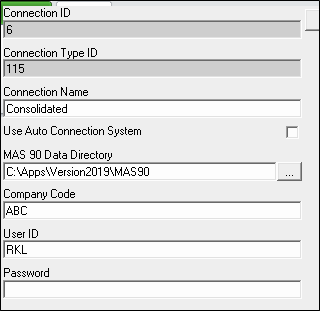
4. Create a container using the above connection. Add all needed tables, links and expressions.
5. Repeat the above steps for each company you wish to include in your consolidated report, creating a connection and a container for each individual company.
6. In Report Manager, create one standard report per container.
7. Create a union report and include all subreports created in step 6, pointing each to a different sheet.
8. Run it!
------------------------------
Susan Pawlowic
Sage 100 Solutions Architect
RKL eSolutions, LLC
spawlowic@rklesolutions.com(717) 735-9109 Ext. 4352
------------------------------
Original Message:
Sent: 06-30-2021 13:32
From: Beth Bowers
Subject: Sage Intelligence "Non-Financial" Consolidated Report
I'm not sure if consolidating will work if you don't start with the Consol Financial Report Designer Add-in - or at least that's the only way I've ever been able to do one.
------------------------------
Beth Bowers
Mom to Samson, Peanut, ChiChi, Canton, Cagney and Daisy (NO Oxford comma - shriek!)
Tennessee Software Solutions
269-445-1625
------------------------------