Sage 100

 View Only
  • 1.  Sage Intelligence

    Posted 01-24-2022 10:36
    Edited by Jeff Schwenk 01-24-2022 10:50
    EDITED - Nevermind.  Found the SPM!!!  See next thread.

    What are the rules for which Excel versions are compatible for Sage Intelligence?

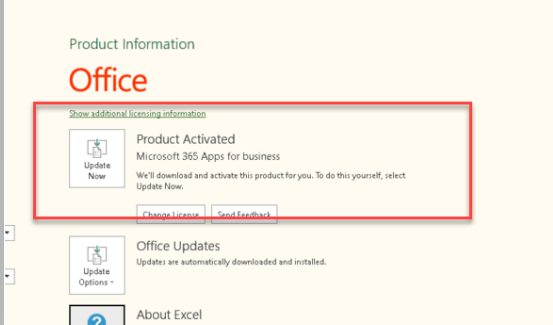
    Client was running fine with SI until IT installed new laptops and upgraded office.  They installed the cloud version, then reinstalled the 365 APP (below).  I read somewhere that it should be the desktop version.  Needless to say, SI not working yet.

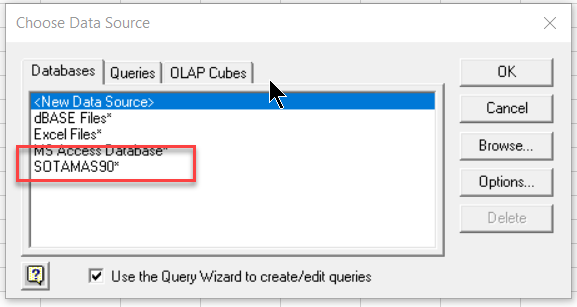
    Also, they are running v2020 Premium.  When I try to do an Excel query, the sotamas90 driver does not appear (2nd screen shot below).  Is it not appearing because of premium or because it is the wrong version of Excel or a bad client installation?

    TIA


    ------------------------------
    Jeff Schwenk
    FORMER 90M Board Member -140,000,000 is a TERRIBLE thing to waste!!!
    Bottomline Software, Inc.
    Waynesboro VA
    540-221-4444
    ------------------------------


  • 2.  RE: Sage Intelligence

    Posted 01-24-2022 10:52
      |   view attached
    Compatibility chart for Excel.

    ------------------------------
    Jeff Schwenk
    FORMER 90M Board Member -140,000,000 is a TERRIBLE thing to waste!!!
    Bottomline Software, Inc.
    Waynesboro VA
    540-221-4444
    ------------------------------


  • 3.  RE: Sage Intelligence

    Posted 01-24-2022 10:55
      |   view attached
    See the top of page 7 of the attached pdf file.
    Intelligence requires Microsoft Excel 2010, 2013, 2016 (32 and 64 bit), or Office 365 (Desktop Version Only)
    ▪ Installs automatically with Sage 100 Workstation setup, reminder to make sure Excel is installed and activated before installing workstation setup, please see the Sage 100 Installation and System Administrator's Guide for more details

    If you still have issues after verifying you have the correct version of Excel then consider re-instaling workstation setup after making sure UAC is turned off.  

    When using premium, I always create a new System DSN and use the MS SQL Client driver to access the data.

    ------------------------------
    Doug Higgs
    Midwest Commerce Solutions, Inc
    (312) 315-0960
    Chauffeur, Chef, and Personal Assistant to Sprinkles
    ------------------------------


  • 4.  RE: Sage Intelligence

    Posted 01-24-2022 11:02
    Thanks Doug.  It appears I found the same chart as you were posting.  Much appreciated.


    ------------------------------
    Jeff Schwenk
    FORMER 90M Board Member -140,000,000 is a TERRIBLE thing to waste!!!
    Bottomline Software, Inc.
    Waynesboro VA
    540-221-4444
    ------------------------------


  • 5.  RE: Sage Intelligence

    Posted 01-24-2022 11:03
    Jeff
    With the upgraded version of Office/Excel, they probably went to a 64 bit Excel.  If previous Excel was 32 bit, you'll need to remove the Excel Addin, close out of Excel, open it back up and Add In the 64 bit of the BIExcelFunctions1.1

    N

    ------------------------------
    Nancy Hanson
    Blytheco LLC
    Eagan MN
    ------------------------------