Todd just an update I finally figured it out......
Got that added in and things started flowing.....I read way to many articles from google search on this.....but got an answer.
Original Message:
Sent: 01-25-2024 18:33
From: Todd Martin
Subject: Sage eWebServices - HTTP status 413 Request Entity Too Large
You can try it. I think it would work as long as it isn't IIS Express which has limits. (I am guessing you are not on IIS Express).
<?xml version="1.0" encoding="utf-8"?><configuration> <system.webServer> <serverRuntime uploadReadAheadSize="10485760" /> </system.webServer></configuration>
------------------------------
Todd Martin
MBA Business Software
https://www.mbabsi.com
------------------------------
Original Message:
Sent: 01-25-2024 18:20
From: Chris Mengerink
Subject: Sage eWebServices - HTTP status 413 Request Entity Too Large
There is a web.config in the /eBusinessWebServices folder. It does not seem to have any uploadreadaheadsize in it but does have the other two
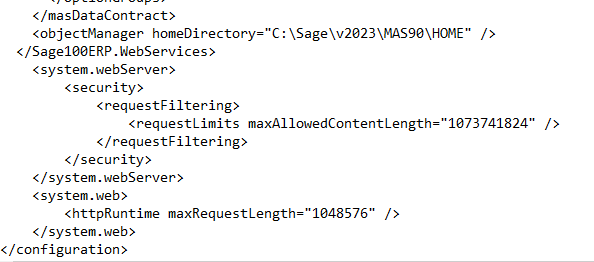
Yes installed under the default web site
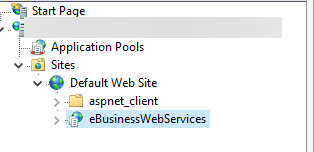
I keep coming back to the readaheadsize, just feels like maybe I need to add it to the web.config maybe, but it's currently in the applicationhost.config
------------------------------
Chris Mengerink
Partner
DWD Technology Group
Original Message:
Sent: 01-24-2024 12:49
From: Todd Martin
Subject: Sage eWebServices - HTTP status 413 Request Entity Too Large
Is there a web.config in the /eBusinessWebServices folder? It looks like they have disabled SSL for webservices in the old system. In the new system, is it installed the same way as a sub under the default? When you added the flag, was it under the path location for webservices on that server?
------------------------------
Todd Martin
MBA Business Software
https://www.mbabsi.com
Original Message:
Sent: 01-23-2024 19:59
From: Chris Mengerink
Subject: Sage eWebServices - HTTP status 413 Request Entity Too Large
Todd, again thanks for all your thoughts. To answer questions:
- Old server under wwwroot actually doesn't have a web.config, I believe one was created because I changed the maxallowed and maxrequest size variables.
- Old server under application.config had something different for sslFlags so I did match to that and reset IIS on the new server just to see what happens
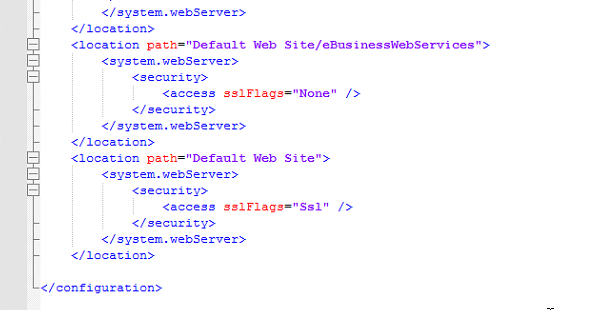
- The maximum URL length on both is set to 4096 with maximum query string set to 2048, both of these numbers in default website and eBusinessWebServices matches on both servers.
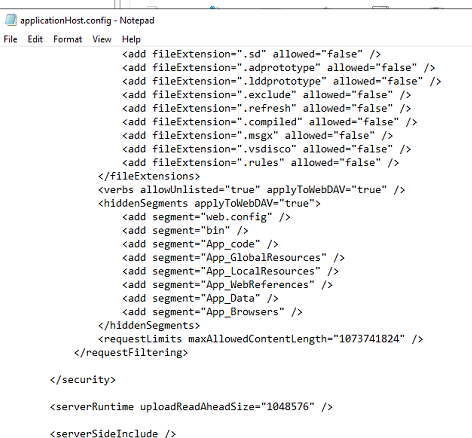
It's crazy as everything points to those maxrequest and maxallowed and the uploadreadaheadsize if using ssl because body of the request has to be preloaded in the ssl handshake process. They mention it should be in both web.config and applicationhost.config but I've only found it in the applicationhost.config and set it to 1048576, ref: https://learn.microsoft.com/en-us/answers/questions/946210/413-request-entity-too-large
Again thanks for your thoughts!!
------------------------------
Chris Mengerink
Partner
DWD Technology Group
Original Message:
Sent: 01-23-2024 19:29
From: Todd Martin
Subject: Sage eWebServices - HTTP status 413 Request Entity Too Large
What did these files look like on the old server that it was working on? If they are different then it might point to why it worked there but not on the new server.
Not sure where else it might be. I can't think of where HTTPS would be different but maybe using the cert increases the size.
What do you have for the Maximum URL length and Query String for the request filtering settings? Images below are for reference not for values to set and were some I found. Just pointing out areas to look.
Maybe look again here
------------------------------
Todd Martin
MBA Business Software
https://www.mbabsi.com
Original Message:
Sent: 01-23-2024 12:21
From: Chris Mengerink
Subject: Sage eWebServices - HTTP status 413 Request Entity Too Large
Todd, it looks like the web.config and the applicationhost.config match
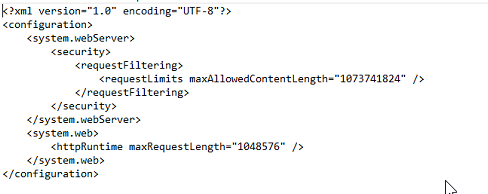
------------------------------
Chris Mengerink
Partner
DWD Technology Group
Original Message:
Sent: 01-23-2024 10:58
From: Todd Martin
Subject: Sage eWebServices - HTTP status 413 Request Entity Too Large
On the server that this was working with can you see what the web.config (c:\Inetput\wwwroot\<app> path to the site on the server) and applicationhost.config (%windir%\system32\inetsrv\config) settings were? Do they match what you have now? Did it have those fields set?
------------------------------
Todd Martin
MBA Business Software
https://www.mbabsi.com
Original Message:
Sent: 01-22-2024 14:45
From: Chris Mengerink
Subject: Sage eWebServices - HTTP status 413 Request Entity Too Large
This is a new cert, it does have its own binding defined on port 443 with the host name. I can't find read ahead settings for just the binding, maybe they don't exist or I don't know where to look....
------------------------------
Chris Mengerink
Partner
DWD Technology Group
Original Message:
Sent: 01-22-2024 14:38
From: Todd Martin
Subject: Sage eWebServices - HTTP status 413 Request Entity Too Large
Is the SSL cert current or expired? Is there a Binding specific with that Cert setup or is it pulling it as the default?
------------------------------
Todd Martin
MBA Business Software
https://www.mbabsi.com
Original Message:
Sent: 01-22-2024 13:33
From: Chris Mengerink
Subject: Sage eWebServices - HTTP status 413 Request Entity Too Large
I'll update this when I officially figure this out, at this point it does work when NOT using SSL so it's something about the HTTPS setup in IIS that seems to be causing the issue. I tell myself every day how much I love computers.....
------------------------------
Chris Mengerink
Partner
DWD Technology Group
Original Message:
Sent: 01-17-2024 23:08
From: Todd Martin
Subject: Sage eWebServices - HTTP status 413 Request Entity Too Large
Are your changes in both applicationHost.config and web.config? Have you tested to make sure you see your changes doing something if they are set really big or really small? I think you have all the ones I would look for. Being on a new server, there isn't an issue with resources for memory or disk space? Is there a firewall that has a proxy that may limit it? Is there a difference if you do the request local compared to from the web?
------------------------------
Todd Martin
MBA Business Software
https://www.mbabsi.com