Sage 100

 View Only
Expand all | Collapse all

Sage 2021 Premium Installation Error

  • 1.  Sage 2021 Premium Installation Error

    Posted 11-09-2022 11:12
    Trying to install Sage 2021 Premium on a new server. We get to the screen where we enter the SQL server name and credentials and this error comes back: Error 27502. Could not connect to Microsoft SQL Server (server name) [DBNETLIB][ConnectionOpen(SECCreateCredentials()).]SSL Security Error (18). We are using the SA credentials and can connect using SSMS. The client IT installed MSSQL security updates, the native client and ODBC/OLEDB drivers but we are still seeing the SSL error. Does anyone have a silver bullet for this monster?

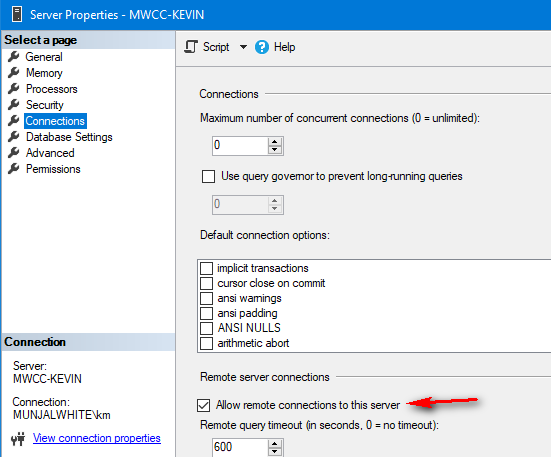
    ------------------------------
    Kate Krueger
    90 Minds, Inc.
    970-692-5113
    ------------------------------


  • 2.  RE: Sage 2021 Premium Installation Error

    Posted 11-09-2022 11:41
    Any dashes in the server name or instance name?  (If so, try wrapping the server/instance in square brackets).

    ------------------------------
    Kevin Moyes
    Technical Systems Analyst
    Munjal White Consulting Co.
    ------------------------------


  • 3.  RE: Sage 2021 Premium Installation Error

    Posted 11-09-2022 11:45
    Hi Kevin! Thanks for responding. There aren't any dashes but there are periods ".". still worth trying the brackets?

    ------------------------------
    Kate Krueger
    90 Minds, Inc.
    970-692-5113
    ------------------------------


  • 4.  RE: Sage 2021 Premium Installation Error

    Posted 11-09-2022 11:49
    Periods should be fine.
    Perhaps try the IP address instead of server name.
    If SQL is on a different machine, make sure the firewall is not blocking things, and that the SQL Server Browser service is running.

    ------------------------------
    Kevin Moyes
    Technical Systems Analyst
    Munjal White Consulting Co.
    ------------------------------


  • 5.  RE: Sage 2021 Premium Installation Error

    Posted 11-10-2022 11:00
    I think that's the TLS 1.early (like 1.0 or 1.1) is not installed error. Just google it. Maybe this is an older Windows server.

    ------------------------------
    Alnoor Cassim
    ------------------------------


  • 6.  RE: Sage 2021 Premium Installation Error

    Posted 11-10-2022 15:41
    Google and I have definitely been around this subject. We are trying to install 2021 and they are using SQL 2016 which both support TLS 1.2. The client is refusing to enable 1.0 because of the security vulnerabilities. They tried the telnet from the app server to the DB server on the SQL ports and it connected so they don't think it is a firewall issue. The SQL server and the App server are both Windows Server 2016, so not terribly old.

    ------------------------------
    Kate Krueger
    90 Minds, Inc.
    970-692-5113
    ------------------------------


  • 7.  RE: Sage 2021 Premium Installation Error

    Posted 11-10-2022 16:01


    ------------------------------
    Kevin Moyes
    Technical Systems Analyst
    Munjal White Consulting Co.
    ------------------------------


  • 8.  RE: Sage 2021 Premium Installation Error

    Posted 11-11-2022 11:00

    Thanks for the suggestions! I've passed them on to the client's IT and they responded that "yes TLS 1.0 and 1.1 have indeed been disabled on both servers, and the SQL server has "Allow remote connections to this server". We have verified that other applications (namely SQL Server Management Studio) are able to connect to the SQL engine on the TLS 1.2 secured standard port 1433 from this specific application server.  The problem is that we don't know how to instruct the Sage100 premium 2021 installer to use the newer (TLS 1.2 compliant) ODBC connector. How can we configure the Sage installer to recognize & utilize the newer ODBC connector?" 

    My thought is that if the TLS 1.2 is the only enabled option on both servers, then the installer should be using it. I'm not sure how to make the installer do anything :-)


    ------------------------------
    Kate Krueger
    90 Minds, Inc.
    970-692-5113
    ------------------------------


  • 9.  RE: Sage 2021 Premium Installation Error

    Posted 11-11-2022 11:14
    SQL and Sage are on different servers?  Maybe install SQL locally, temporarily... do the install, then move the databases afterwards.

    ------------------------------
    Kevin Moyes
    Technical Systems Analyst
    Munjal White Consulting Co.
    ------------------------------


  • 10.  RE: Sage 2021 Premium Installation Error

    Posted 11-11-2022 11:50
    The installer is probably using an old function for SQL connections and that connection method uses TLS 1.0/1.1. Bad news is nobody can control or configure the installer except Sage and I suppose you could create a Sage Support ticket just so you can say you reported it and that there is no date available for the fix (or maybe it got fixed on v2022).Good news is it's very likely the issue is restricted to the installer itself, as you already know. So maybe they could temporarily re-enable TLS 1.0 and 1.1 on the server??

    ------------------------------
    Alnoor Cassim
    ------------------------------


  • 11.  RE: Sage 2021 Premium Installation Error

    Posted 11-11-2022 11:53
    We had a Premium to Premium upgrade recently where Sage support gave @Robert White a new Migration folder to solve a different error.  Maybe they can do something similar for Kate's issues.


    ------------------------------
    Kevin Moyes
    Technical Systems Analyst
    Munjal White Consulting Co.
    ------------------------------