Sage 100

 View Only
Expand all | Collapse all

SAge 2020 PU 6 Message

  • 1.  SAge 2020 PU 6 Message

    Posted 12-28-2022 22:03
    I knew things were going to smoothly...

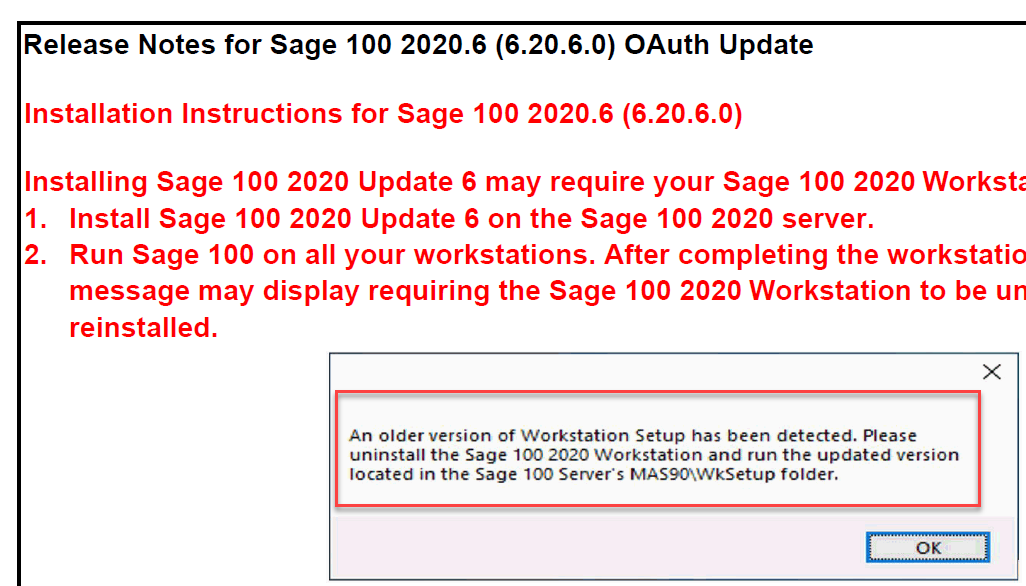
    Installed v2020 PU 6, 2022 IRD, all 4 DSD enhancements.  Fired up the server.  Everything works.  Attempted to access via workstation and we get this error message.  We follow instructions to uninstall/reinstall.  We get the error message.  Rinse/repeat.  Endless loop.  Reboot workstation, same end result.  Any clues why we aren't getting past it????


    ------------------------------
    Jeff Schwenk
    Bottomline Software, Inc.
    (540) 221-4444
    ------------------------------


  • 2.  RE: SAge 2020 PU 6 Message

    Posted 12-29-2022 09:01
    Is there any trash left in registry after uninstall?

    ------------------------------
    Gary Feldman
    Cloud Evangelist
    I-Business Network, LLC
    ------------------------------


  • 3.  RE: SAge 2020 PU 6 Message

    Posted 12-29-2022 09:11

    @Gary Feldman - Good question.  That is my thought but not sure where to look.  Client runs from two Citrix servers.  The issue arose when testing Sage from the master (VDA ?) copy.  I know enough about the registry to be VERY dangerous.  I was working with IT staff and no one was brave enough for the surgery.  NO hits on the KB search.​


    ------------------------------
    Jeff Schwenk
    Bottomline Software, Inc.
    (540) 221-4444
    ------------------------------


  • 4.  RE: SAge 2020 PU 6 Message

    Posted 12-29-2022 09:57
    I'm not sure what the network situation is here, but you may need IT involvement if you mean VDI ( Virtual Desktop Interface) AND you are trying to make changes from the VDI desktop. My (limited) understanding of VDI - from a customer who is using it 100% - is that any changes a user makes are automatically undone on the next reboot. I've always had to involve IT to make changes to the master image instead of trying to perform the workstation setup myself.

    ------------------------------
    Wayne Schulz
    wayne@s-consult.com
    Schulz Consulting
    (860) 516-8990
    Moodus, CT
    ------------------------------


  • 5.  RE: SAge 2020 PU 6 Message

    Posted 12-29-2022 10:42
    @Wayne Schulz - IT is VERY much involved with this.  We can move forward until we get the Sage client installed properly on the master image.  Once that hurdle is passed, IT will update the two images that the users access.​

    ------------------------------
    Jeff Schwenk
    Bottomline Software, Inc.
    (540) 221-4444
    ------------------------------


  • 6.  RE: SAge 2020 PU 6 Message

    Posted 12-29-2022 10:50
    Try uninstalling the workstation setup. Reinstall it and use a local workstation folder, "Sage 100 2020.6". Verify that folder exists. Reboot. Double-check that folder persists after the reboot.

    ------------------------------
    Wayne Schulz
    wayne@s-consult.com
    Schulz Consulting
    (860) 516-8990
    Moodus, CT
    ------------------------------


  • 7.  RE: SAge 2020 PU 6 Message

    Posted 12-29-2022 11:23
    I have one client using VDI to access SAGE 100 v2020 and it is confusing as #@LL. Need outside IT to install everything on the VDI desktop. Client cannot use Aatrix tax form processing because outside IT will NOT allow access to e-mails, cloud processing, etc. from the VDI. ​

    ------------------------------
    Michael McDonald - Consultant
    Michael T McDonald CPA
    (616) 813-8887 - mike@mcdcpa.com
    ------------------------------


  • 8.  RE: SAge 2020 PU 6 Message

    Posted 12-29-2022 14:08
    @Wayne Schulz - Are you suggesting that I uninstall the client (again) but reinstall to a different folder than before?​

    ------------------------------
    Jeff Schwenk
    Bottomline Software, Inc.
    (540) 221-4444
    ------------------------------


  • 9.  RE: SAge 2020 PU 6 Message

    Posted 12-30-2022 09:39
    OK, so I "escalate" the issue as a post to the Sage Community.  Link below.  There is a post from a few months back (below) where a user had the same issue.  But she posts that there is an article on the download page that apparently indicates the PU 6 does not work for ADV.  Has anyone read about that?  And why isn't PU 6 readily available on the download page?  You have to search for it.  Is something fishy going on?

    Sage 100 2020 Product Update 6 - Technical and Installation Discussions - Sage 100 - Sage City Community

    Thanks for pointing me in the right direction.  I just read through the document that's included on the download page.  This client is Advanced so I have to break it to them that based on what the article states, they will have to Upgrade instead of just loading the Product Update.  This just turned into a much bigger project!


    ------------------------------
    Jeff Schwenk
    Bottomline Software, Inc.
    (540) 221-4444
    ------------------------------


  • 10.  RE: SAge 2020 PU 6 Message

    Posted 12-30-2022 10:04
    If there is a restriction that 2020.6 won't work on Adv, then I haven't spotted it. And why does Sage do such a poor job cataloging their downloads? Would you like the long answer to the short one? I only have time for the short one today - because they're Sage.

    And, yes, if you reinstall the workstation setup into a new local folder with a new name, then it will make it easier upon reboot to know if your workstation installation took ( in the context of installing to a VDI environment ). Just reboot and see if, upon reboot the new Sage 100 local folder persisted or if you are left staring at the same old folder ( due to VDI )

    ------------------------------
    Wayne Schulz
    wayne@s-consult.com
    Schulz Consulting
    (860) 516-8990
    Moodus, CT
    ------------------------------


  • 11.  RE: SAge 2020 PU 6 Message

    Posted 12-30-2022 11:14
    Will try when we attempt again.  Would like to know sooner than later as it was over two hours before we were ready to try the client install.  And if it doesn't work, it is another waste of time.  I am really leaning toward a PU 5 install so there is no workstation reinstall.  In reading the notes, the Oauth was the main reason for the PU.  They did slip in a GL fix to a bank account field - KB 111939.   Big whoop.

    And for the record.  We were working on the master image.  if it would have worked, they would have copied the master image to the two production  instances.

    ------------------------------
    Jeff Schwenk
    Bottomline Software, Inc.
    (540) 221-4444
    ------------------------------