It has been a while since I encountered this with Zebra printers, but my recollection was that you couldn't start with the standard label design.
I ended up creating a custom report using a standard report format with crystal. Mocked it up to look like a label and then copied it over the top of a the label report that was created by default.
Target System Technology, Inc.
Original Message:
Sent: 06-15-2023 12:04
From: Jeff Schwenk
Subject: Sage 2016 migration to v2022
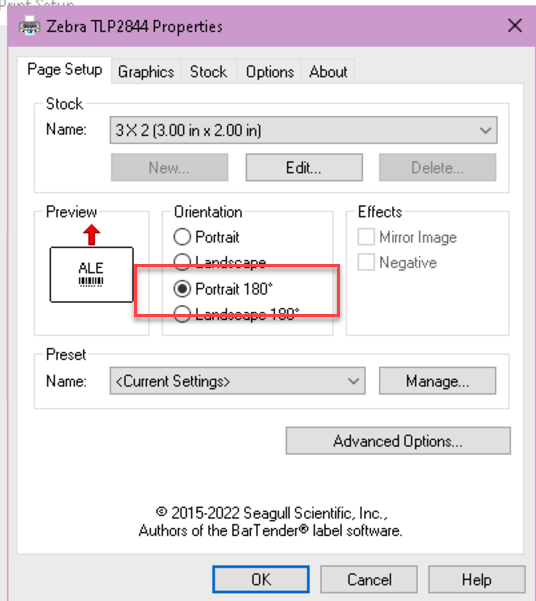
The plot thickens. In discussing the frustrating situation, the user casually mentioned that she changes the printer orientation setting (below) EVERYTIME she prints via Crystal Designer. I am able to replicate printing via Crystal Designer from the server. I will follow this down the rabbit hole.
------------------------------
Jeff Schwenk
Bottomline Software, Inc.
(540) 221-4444
------------------------------
Original Message:
Sent: 06-15-2023 08:26
From: Jeff Schwenk
Subject: Sage 2016 migration to v2022
Everywhere. No options for reverse printing. I did change the setting to output directly to the printer instead of spooling. Rope is running short. They may have to either suck it up with the reverse printing or replace the Zelbra printer that has been unsupported for 10 + Years
------------------------------
Jeff Schwenk
Bottomline Software, Inc.
(540) 221-4444
Original Message:
Sent: 06-15-2023 08:21
From: Steve Iwanowski
Subject: Sage 2016 migration to v2022
If it's happening everywhere, it's in the driver itself. Is there an option for 'Reverse Order' (or equivalent)?
------------------------------
Steve Iwanowski, NextStep Technology Advisors, aka DSD Lancaster PA ¯\_(ツ)_/¯
Original Message:
Sent: 06-14-2023 19:28
From: Jeff Schwenk
Subject: Sage 2016 migration to v2022
More progress. I have it running as a report under the custom reports menu. Using Seagull drivers. I still cannot get it to print in the correct order. It is printing in reverse order (Pages 10 - 1) instead of pages 1 - 10). It previews correctly, the actual output is bass ackwards.
Also, forgot to mention that it prints backward whether I print via a custom report, a form (picking sheets) or a stand-alone Crystal Designer. The printer is attached to the network.
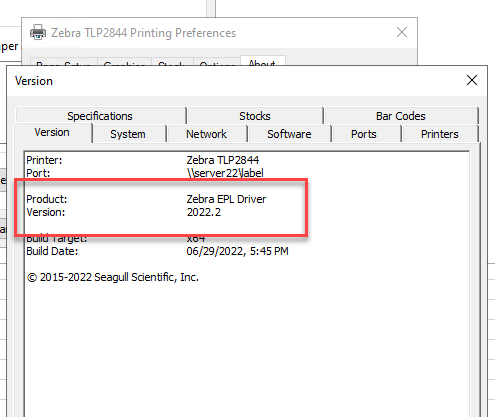
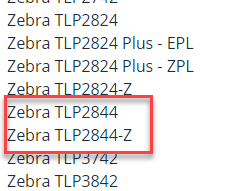
Unfortunately, the printer was discontinued nearly 10 years ago. A ZPL driver is being used (below),. Perhaps use the other driver?
------------------------------
Jeff Schwenk
Bottomline Software, Inc.
(540) 221-4444
Original Message:
Sent: 05-04-2023 10:47
From: Jeff Schwenk
Subject: Sage 2016 migration to v2022
Need to get back to this. Client is finally on v2022. I might try uninstalling v2016 now. Client wants it working on the Desktop menu so others can print.
------------------------------
Jeff Schwenk
Bottomline Software, Inc.
(540) 221-4444
Original Message:
Sent: 10-28-2022 14:17
From: Jeff Schwenk
Subject: Sage 2016 migration to v2022
Making progress. The Seagull driver was downloaded and installed. Crystal form was tweaked for the new driver (shout out to @Doug Higgs). I tested via Crystal Designer. Looks great although the print order is reversed from what they are used to (Sigh). Waiting for their IT to install the Seagull driver on the workstation. Will test from Sage menu to see how this goes. Worst case, I install Designer on the workstation for printing labels. Change is hard for everyone.
------------------------------
Jeff Schwenk
Bottomline Software, Inc.
(540) 221-4444
Original Message:
Sent: 10-28-2022 11:27
From: Beth Bowers
Subject: Sage 2016 migration to v2022
@Jeff Schwenk - verifying the paper layout was correct in Printer Server properties, switching between landscape and portrait - sometimes making them the same in Crystal and printer, sometimes doing the opposite...the weird thing is, if I remember right, is that it PREVIEWS correctly, just prints wrong.
------------------------------
Beth Bowers
(269) 358-0989
Original Message:
Sent: 10-28-2022 10:23
From: Jeff Schwenk
Subject: Sage 2016 migration to v2022
@Beth Bowers - That is very comforting..... Client is still using v2016. I just installed the v2022 client then replaced the v2016 pvxwin32.exe.config file so that Crystal would work in the old version. The wheels fell off the bus for this one issue. BTW, what are some things you tried?
@Doug Higgs - You mention directly from the Sage menu. What if you printed directly from Crystal Designer?
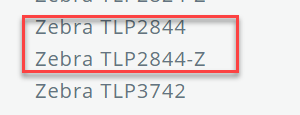
Anyone know what the difference between these two drivers are? They are from Seagull (Bartender) web site. Several years ago, a tech support person told me the Seagull drivers were much better than Zebra's. I installed them and my printing problems disappeared.
------------------------------
Jeff Schwenk
Bottomline Software, Inc.
(540) 221-4444
Original Message:
Sent: 10-28-2022 09:14
From: Doug Higgs
Subject: Sage 2016 migration to v2022
if the field is rotated 90 degrees ten you could right click on the field in Crystal Designer and rotate it 90 degrees. This would require rotating every field. I have seen this when printing forms from the Sage 100 menu.
------------------------------
Doug Higgs
Midwest Commerce Solutions, Inc
(312) 315-0960
Chauffeur, Chef, and Personal Assistant to Sprinkles
Original Message:
Sent: 10-28-2022 09:05
From: Beth Bowers
Subject: Sage 2016 migration to v2022
@Jeff Schwenk - I've had that rotated first label issue at several other clients, on older versions of Sage. Seems to have started maybe around 2018 for me. Sorry, no firm set of instructions to fix and one place I never did (but luckily their labels were 2x2 so it didn't really matter).
------------------------------
Beth Bowers
(269) 358-0989