Sent. Please let me know if you do not get it
Original Message:
Sent: 10-02-2025 13:31
From: Karen O'Lane
Subject: Sage 100 v2025 Sage Intelligence Conversion Issues
@Michael Davis - I would genuinely love to get your first draft. Thank you for sharing your convo with Alec. I've been holding off doing upgrades until this issue has a solution.
Karen
------------------------------
Karen O'Lane
Accounting Systems, Inc. (ASI)
kolane@asifocus.com
559-448-0900
559-577-4142
http://www.asifocus.com
------------------------------
Original Message:
Sent: 10-02-2025 11:47
From: Michael Davis
Subject: Sage 100 v2025 Sage Intelligence Conversion Issues
I just spoke with Alec at Sage and it seems that developers in South Africa have tracked down the issues on converting reports.
In V2025, you have to setup a new repository, which means that you have to re-register SIR, setup SIR security (if using), copy .tre (trees) to new repository. Most importantly, you have to import/ export out the SIR reports.
For the ones that use the G/L designer addin, they error out after importing when trying to run them (ie missing Add-in). This is due to the version that your imported SIR report was originally written in. If you are still using the original release of the connectors/ subreports, (ie Accounts 1.0), you need to replace it. Also, the roll up subreport is most likely missing too as it was added later.
This was a lot easier than copying and pasting sheets into a new report and updating the Excel paths.
Alec is working on updating the new and improve KB on troubleshooting SIR reports to include this. I do have the 1st draft of the steps if anyone wants them instead of waiting on his KB.
Thank you,
Michael
------------------------------
Michael Davis
Warren Averett Technology Group
Original Message:
Sent: 09-30-2025 12:19
From: Machelle Adler
Subject: Sage 100 v2025 Sage Intelligence Conversion Issues
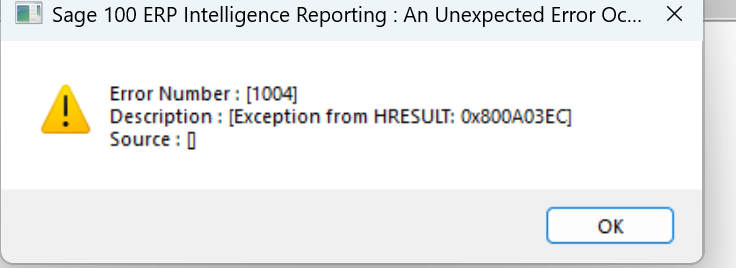
The error 1004 will occur if you have Excel open but is resolved if running Excel 2405 or higher. I have also received this error if there are issues in the VB scripting after the upgrade. If you go into the VB scripting and tell it to run through the script, it will halt at the line of code that it has an issue with so you can attempt to resolve the issue.
Error: "Error number 1004, application-defined or object-defined error" on saving SI reports
------------------------------
Machelle Adler
Consultant
Blytheco LLC
Original Message:
Sent: 09-29-2025 17:43
From: Thomas Rogers
Subject: Sage 100 v2025 Sage Intelligence Conversion Issues
I've managed to get report working by starting a fresh template and then copying the design from the old template. However Save Excel template then gives me an error message.
------------------------------
Thomas Rogers (TomTarget)
Target System Technology, Inc.
Original Message:
Sent: 09-10-2025 16:57
From: Beth Bowers
Subject: Sage 100 v2025 Sage Intelligence Conversion Issues
Work arounds for now, moving up the chain to press South Africa for solutions
------------------------------
Beth Bowers
Dog Mom, first and foremost. The rest is all just necessary to keep the dogs in biscuits.
(269) 358-0989
Original Message:
Sent: 09-10-2025 16:41
From: Jeff Schwenk
Subject: Sage 100 v2025 Sage Intelligence Conversion Issues
Work arounds or SOLUTIONS??
------------------------------
Jeff Schwenk
Owner
Bottomline Software, Inc.
Waynesboro VA
(540) 221-4444
Improving bottom lines for over 25 years!
Original Message:
Sent: 09-10-2025 14:50
From: Beth Bowers
Subject: Sage 100 v2025 Sage Intelligence Conversion Issues
They're working on a write up of possible work-arounds.
------------------------------
Beth Bowers
Dog Mom, first and foremost. The rest is all just necessary to keep the dogs in biscuits.
(269) 358-0989
Original Message:
Sent: 09-10-2025 14:47
From: Wayne Schulz
Subject: Sage 100 v2025 Sage Intelligence Conversion Issues
Sage has appeared to create a KB article on this. While the article does not presently ( as of 9/10/25 ) offer any resolutions to this issue it should at least serve as a starting point for anyone experiencing similar issues in the future.
Sage KB -Imported Sage Intelligence Reports don't convert properly to SI version 2025
------------------------------
Wayne Schulz
wayne@s-consult.com
Schulz Consulting
(860) 516-8990
CT