You could also use a BIE Explorer view saved as a Public setting, these export easily to Excel and would survive upgrades without any touches.
SWK Technologies Inc.
Original Message:
Sent: 10-21-2025 17:57
From: Michael McDonald
Subject: SAGE 100 v2022 - S/O Custom Lookup View - Is there a report?
@Brett Zimmerman I logged into a computer I have access, with the Customer Service Rep's SAGE 100 user code. I was able to create screen grabs of the UPS WorldShip view. Now I can set the same view for other SAGE 100 users.
------------------------------
Michael McDonald - Consultant
Michael T McDonald CPA
(616) 813-8887 - mike@mcdcpa.com
------------------------------
Original Message:
Sent: 10-21-2025 16:53
From: Michael McDonald
Subject: SAGE 100 v2022 - S/O Custom Lookup View - Is there a report?
@Brett Zimmerman Thank You for these suggestions. I believe you might be correct. I will try the Sales Order Rep's SAGE user code on a computer that I have access to and try this.
------------------------------
Michael McDonald - Consultant
Michael T McDonald CPA
(616) 813-8887 - mike@mcdcpa.com
Original Message:
Sent: 10-21-2025 15:52
From: Brett Zimmerman
Subject: SAGE 100 v2022 - S/O Custom Lookup View - Is there a report?
Or what about just viewing the Excel export to see what columns of data are present? - although I suppose that wouldn't include the filter info
------------------------------
Brett Zimmerman
Net at Work
Greater Boston Area
Original Message:
Sent: 10-21-2025 15:50
From: Brett Zimmerman
Subject: SAGE 100 v2022 - S/O Custom Lookup View - Is there a report?
Aren't ALE views user/company-specific, and therefore couldn't you just log in under her Sage 100 logon on any computer?
------------------------------
Brett Zimmerman
Net at Work
Greater Boston Area
Original Message:
Sent: 10-21-2025 15:16
From: Jeff Schwenk
Subject: SAGE 100 v2022 - S/O Custom Lookup View - Is there a report?
If the other users are going to export the information to Excel, then what about creating an Excel query to replicate the lookup information? Put the Excel spreadsheet in a shared folder. Users could pull it up as needed and refresh. Very simple to do.
------------------------------
Jeff Schwenk
Owner
Bottomline Software, Inc.
Waynesboro VA
(540) 221-4444
Improving bottom lines for over 25 years!
Original Message:
Sent: 10-21-2025 13:38
From: Michael McDonald
Subject: SAGE 100 v2022 - S/O Custom Lookup View - Is there a report?
@Kevin Moyes Thanks for your input. I was expecting this was the answer. Just will take a little more effort to give the client what they want.
THANKS
------------------------------
Michael McDonald - Consultant
Michael T McDonald CPA
(616) 813-8887 - mike@mcdcpa.com
Original Message:
Sent: 10-21-2025 12:50
From: Kevin Moyes
Subject: SAGE 100 v2022 - S/O Custom Lookup View - Is there a report?
ALE settings are stored in SOA files, with no way to query / design a report on that data, as far as I know.
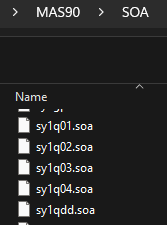
The easiest thing to do would be to screen share with the user, and take screen shots of the settings.
(I don't think you can add a named custom lookup in bulk, but you can edit Standard...).
------------------------------
Kevin Moyes
Technical Systems Analyst
Munjal White Consulting Co.
Toronto ON