This is a good question to bring up during the Development round-table... how to troubleshoot such things, when enhancements are involved?
Sage support has their "prove it is Sage" perspective... but does the Development team have any better suggestions?
Munjal White Consulting Co.
Original Message:
Sent: 11-08-2023 11:45
From: Wayne Schulz
Subject: Sage 100 v2022 Premium - Occasional Sales Order History TOTAL is zero
My currently line of thinking is to check with any of the ISVs who have a way to communicate to support and see if they have any feedback. I cringe when I think that a user of Sage 100 who is right in the "sweet spot" ( wholesale distribution ) of this product has to create manual processes to ensure that their accounting records are in balance.
------------------------------
Wayne Schulz
wayne@s-consult.com
Schulz Consulting
(860) 516-8990
Moodus, CT
------------------------------
Original Message:
Sent: 11-07-2023 13:11
From: Doug Higgs
Subject: Sage 100 v2022 Premium - Occasional Sales Order History TOTAL is zero
@Wayne Schulz If you can identify the Sage program that fixed the issue, you could ask ScanForce if the fix intersects with one of their programs and if so if the fix was incorporated into their enhancement.
------------------------------
Doug Higgs
Midwest Commerce Solutions, Inc
(312) 315-0960
Chauffeur, Chef, and Personal Assistant to Sprinkles
Original Message:
Sent: 11-07-2023 09:56
From: Wayne Schulz
Subject: Sage 100 v2022 Premium - Occasional Sales Order History TOTAL is zero
Kate-
So far as the customer has reported , they are seeing this with orders where the user who entered it is ScanForce. This leads me to wonder if somehow one of the published fixes Sage issued hasn't been carried forward.
As you know. the problem with virtually all 3rd party integrations is when you encounter an issue it's a game of "prove it's out fault". And the customer just wants you to "call Sage" and get it fixed. And, yes, this is after explaining in detail about the potential for these types of issues before they invest in 3+ different ISV solutions.
Sounds like we followed the same path as this customer went 2018 to 2022 as well except this customer fired Avalara and we did our best to remove the Avalara integrations during the 2022 upgrade ( the difficulting in doing so is another rant for another day ).
------------------------------
Wayne Schulz
wayne@s-consult.com
Schulz Consulting
(860) 516-8990
Moodus, CT
Original Message:
Sent: 11-06-2023 20:20
From: Kate Krueger
Subject: Sage 100 v2022 Premium - Occasional Sales Order History TOTAL is zero
I've recently had this exact situation. The client uses Avalara and in 2018 it was a know bug that Avalara "fixed in later releases" but not 2018. The client was stuck there until a few months ago when we upgraded them to Sage 100 2022 Premium pu2 (the current OM release at that time) and updated Avalara. They haven't seen the issue happen in 2022 so we did a big export and then import to the SO_SalesOrderHistoryHeader table to correct the non-taxable and taxable amounts as they wanted those values for their sales order explorers. I'm wincing that you are seeing the issue in 2022 because I was really hoping this problem was dead and buried for the client. Maybe the fact they actually use the updated Avalara is making a difference? If it starts happening again I think I would put in a table pre-write script that ran the sales tax recalculation and see if that forces the totals to be correct.
------------------------------
Kate Krueger
Consultant
MicroAccounting
214.800.5555x553
Original Message:
Sent: 11-06-2023 09:25
From: Wayne Schulz
Subject: Sage 100 v2022 Premium - Occasional Sales Order History TOTAL is zero
TAG - I'm it again.
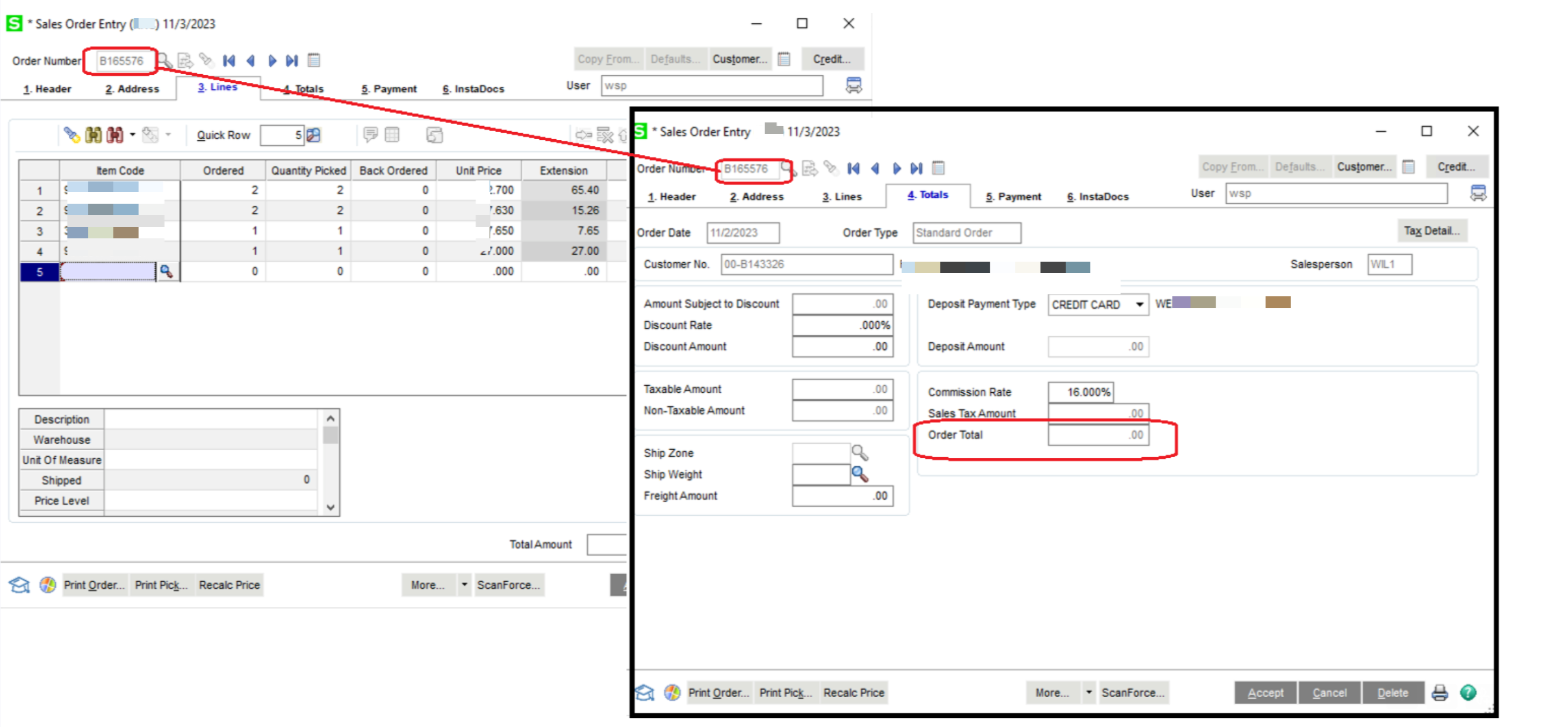
Customer is back 11/6/23 asking about this issue.
They have numerous third-party integrations making diagnosis tricky since, as you may have experienced, it becomes a game of "prove it's our enhancement" or "prove it's Sage 100".
The customer runs various reports during the day to try and catch these types of issues. One example they provided to me shows ScanForce as being the last user to modify the order.
They're asking if there's a global way using VI to correct this issue. I don't believe there is unless it's the AR or SO history files.
I've pointed them to the Sage KB which suggests removing/adding a sales tax code, location code or running the recalculate sales tax utility.
Has anyone experienced ongoing "zero dollar sales order" ( where the lines clearly have a value ) and/or have any further experience with this?
------------------------------
Wayne Schulz
wayne@s-consult.com
Schulz Consulting
(860) 516-8990
Moodus, CT