David, I don't think that is the right approach in this case. There are a whole bunch of tables that make use of the CompanyKey besides those three paperless log tables, SY_GridDefinition, the SY_Report* tables, to name a few off the top of my head. I think it would make more sense to either start the migration over from before the failed migration OR correct the CompanyKey in SY_Company. In a search of my 2018 install, the following tables contain the CompanyKey field.
| CU_ActivityLog |
| CU_AddressLink |
| CU_Company |
| CU_CustomerTemplate |
| CU_EmailLink |
| CU_MAS_Company |
| CU_OrderQuoteDetail |
| CU_OrderQuoteTracking |
| CU_Person |
| CU_PhoneLink |
| PL_EmailMessage |
| PL_Form |
| PL_JournalPDFLog |
| PL_JournalRegister |
| PL_PeriodEndPDFLog |
| PL_PeriodEndReport |
| PL_Report |
| PL_ReportPDFLog |
| SY_Activation |
| SY_Company |
| SY_Console |
| SY_CreditCardRestart |
| SY_LastFormUsed |
| SY_ModuleDate |
| SY_MultiPartForm |
| SY_PaymentCenterReference |
| SY_PeriodEndReport |
| SY_PopupMenuItem |
| SY_ReportManagerFormat |
| SY_ReportOption |
| SY_ReportSelection |
| SY_ReportSetting |
| SY_System |
| SY_TaskSchedulerHeader |
| SY_UserSecurity |
| SY_UserTableSecurity |
------------------------------
David Speck II
Tennessee Software Solutions
------------------------------
Original Message:
Sent: 05-03-2022 11:59
From: David Overholt
Subject: Sage 100 Upgrade to 2021.3 Advanced
Michelle, if you find out that it is an issue with the company key let me know. I have a utility modeled off of the one mentioned earlier in this post (the one that is used to change the directories in paperless).
The one I created asks for the original company Key and the new company key and then changes that company key for all records in the three paperless office tables found in MAS_SYSTEM folder.
PL_JournalPDFLog
PL_PeriodEndPDFLog
PL_ReportPDFLog
------------------------------
David Overholt
DWD Technology Group
------------------------------
Original Message:
Sent: 05-03-2022 10:08
From: Kevin Moyes
Subject: Sage 100 Upgrade to 2021.3 Advanced
Hind-sight is 20/20, but this kind of thing is why I reset (restore the "before" backups) if I have a failed migration and have to restart.
David's thought about CompanyKey is where my mind was going too.
------------------------------
Kevin Moyes
Technical Systems Analyst
Munjal White Consulting Co.
Original Message:
Sent: 05-02-2022 23:53
From: Michele Herzog
Subject: Sage 100 Upgrade to 2021.3 Advanced
I renamed the current PL_Journalpdflog.m4t file in the new version that has the correct paths, copied the pl_journalpdflog.m4t from version 2019 and nothing showed up in the link maintenance. I put the correct log file back in place and created a journal entry. It shows up in paperless fine. The below screenshot is before I did this. The initial migration did have an error where I had to go back into version 2019, go thru DFDM, go to SY_ReportSetting and delete the bank reconciliation audit records and then restart the migration. It is possible something in MAS_System has lost a setting. I had to enter the company codes in Library Master | Company Maintenance after the restart of the migration finished. Opening in MAS90 mode did not work. I will call Sage and see if have other information.

------------------------------
[Michele] [Herzog] [CPA,CITP, CGMA]
[Overland Park] [KS]
[816-520-1365]
Original Message:
Sent: 05-02-2022 21:13
From: Jeff Schwenk
Subject: Sage 100 Upgrade to 2021.3 Advanced
Launch in MAS90 mode to test??
------------------------------
Jeff Schwenk
Bottomline Software, Inc.
Original Message:
Sent: 05-02-2022 20:12
From: Doug Higgs
Subject: Sage 100 Upgrade to 2021.3 Advanced
If you copy the log from the old version into the new version, do you see the broken links in paperless office viewer?
------------------------------
Doug Higgs
Midwest Commerce Solutions, Inc
(312) 315-0960
Chauffeur, Chef, and Personal Assistant to Sprinkles
Original Message:
Sent: 05-02-2022 19:59
From: Michele Herzog
Subject: Sage 100 Upgrade to 2021.3 Advanced
The service is running with local admin account. My role has 100% access to everything. I used the utility created by by the 2 group members. I have filtered different modules & dates. The PDF's exist and have the correct path in the PDFJournal Log. I have copied and pasted the path from DFDM, put it in the search and it works.
------------------------------
[Michele] [Herzog] [CPA,CITP, CGMA]
[Overland Park] [KS]
[816-520-1365]
Original Message:
Sent: 05-02-2022 18:20
From: David Speck II
Subject: Sage 100 Upgrade to 2021.3 Advanced
Just checking, do you have these security options checked on your role?
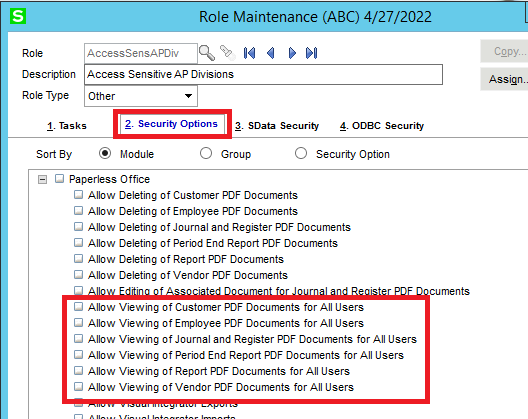
Have you tried tweaking the filters in the viewer to make sure you are selecting a valid range with known records?
------------------------------
David Speck II
Tennessee Software Solutions