Sage 100

 View Only
Expand all | Collapse all

Sage 100 Upgrade to 2021.3 Advanced

  • 1.  Sage 100 Upgrade to 2021.3 Advanced

    Posted 05-02-2022 17:16
    Hello,

    I have completed a Sage 100 Upgrade to 2021.3 Advanced today on a new server.  I ran the utility to change the server name path.  Thru DFDM the PL_JOURNALPDFLOG.M4T has the correct path for the new server.  I have copied the path and pasted in the search and it goes right to the paperless files.  The PDF's are not showing up in Viewer.  I have full admin rights in Sage 100 and on the server.  Has anyone run into this?  I found a KB on Sage, it just has to make sure the user role has access, which I do.

    ------------------------------
    [Michele] [Herzog] [CPA,CITP, CGMA]
    [Overland Park] [KS]
    [816-520-1365]
    ------------------------------


  • 2.  RE: Sage 100 Upgrade to 2021.3 Advanced

    Posted 05-02-2022 17:41

    Load Data on Initial Viewer Access.  Is it on or off?

    Account running the service-domain administrator?  Not sure if it would matter here, but it does matter in other spots.


    Roberta Chase, CompuData, Inc.

    roberta.chase@compudata.com

    215-969-1000,,277 or 800-223-3282,,277


    Roberta Chase
    Enterprise Software Consultant
    roberta.chase@compudata.com
    215-969-1000 ext. 277
    www.compudata.com
    Work Smarter... Together 

    CompuData, Inc. • 325 Chestnut St, Ste 700 • Philadelphia • PA • 19106


  • 3.  RE: Sage 100 Upgrade to 2021.3 Advanced

    Posted 05-02-2022 17:46
    Which utility?  Sage's or one of the two that group members have written that are far superior to what Sage offers.

    ------------------------------
    Jeff Schwenk
    Bottomline Software, Inc.
    ------------------------------


  • 4.  RE: Sage 100 Upgrade to 2021.3 Advanced

    Posted 05-02-2022 18:20
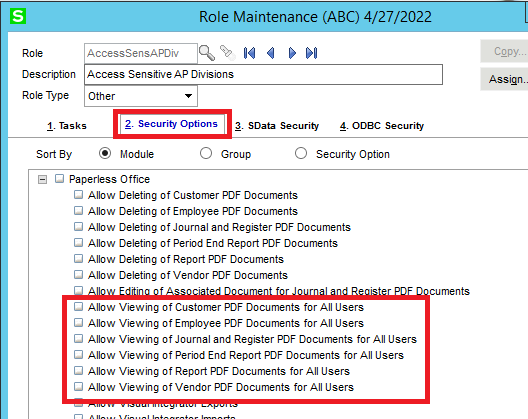
    Just checking, do you have these security options checked on your role?

    Have you tried tweaking the filters in the viewer to make sure you are selecting a valid range with known records?

    ------------------------------
    David Speck II
    Tennessee Software Solutions
    ------------------------------


  • 5.  RE: Sage 100 Upgrade to 2021.3 Advanced

    Posted 05-02-2022 19:59
    The service is running with local admin account.  My role has 100% access to everything.  I used the utility created by by the 2 group members.  I have filtered different modules & dates.  The PDF's exist and have the correct path in the PDFJournal Log.  I have copied and pasted the path from DFDM, put it in the search and it works.

    ------------------------------
    [Michele] [Herzog] [CPA,CITP, CGMA]
    [Overland Park] [KS]
    [816-520-1365]
    ------------------------------


  • 6.  RE: Sage 100 Upgrade to 2021.3 Advanced

    Posted 05-02-2022 20:13
    If you copy the log from the old version into the new version, do you see the broken links in paperless office viewer?

    ------------------------------
    Doug Higgs
    Midwest Commerce Solutions, Inc
    (312) 315-0960
    Chauffeur, Chef, and Personal Assistant to Sprinkles
    ------------------------------


  • 7.  RE: Sage 100 Upgrade to 2021.3 Advanced

    Posted 05-02-2022 21:13
    Launch in MAS90 mode to test??

    ------------------------------
    Jeff Schwenk
    Bottomline Software, Inc.
    ------------------------------


  • 8.  RE: Sage 100 Upgrade to 2021.3 Advanced

    Posted 05-02-2022 23:53
    I renamed the current PL_Journalpdflog.m4t file in the new version that has the correct paths, copied the pl_journalpdflog.m4t from version 2019 and nothing showed up in the link maintenance.  I put the correct log file back in place and created a journal entry.  It shows up in paperless fine.  The below screenshot is before I did this.  The initial migration did have an error where I had to go back into version 2019, go thru DFDM, go to SY_ReportSetting and delete the bank reconciliation audit records and then restart the migration.  It is possible something in MAS_System has lost a setting.  I had to enter the company codes in Library Master | Company Maintenance after the restart of the migration finished.  Opening in MAS90 mode did not work.  I will call Sage and see if have other information.



    ------------------------------
    [Michele] [Herzog] [CPA,CITP, CGMA]
    [Overland Park] [KS]
    [816-520-1365]
    ------------------------------


  • 9.  RE: Sage 100 Upgrade to 2021.3 Advanced

    Posted 05-02-2022 23:58
    You mention having to enter the company codes in Company Maintenance after the restart.  It sounds like you ended up creating "new" records in SY_Company with new CompanyKey values and they no longer match the CompanyKy in the PDF log files.

    ------------------------------
    David Speck II
    Tennessee Software Solutions
    ------------------------------


  • 10.  RE: Sage 100 Upgrade to 2021.3 Advanced

    Posted 05-03-2022 00:23
    That is very possible and probably the issue. I can't look until Tuesday.  It is my 1 client that will not give me 24 hour access to the Sage server or create a windows user for me.  Unfortunately, they do not understand the value of this.  Every time I do an upgrade I remind them of this and how my other clients do not have to be out of Sage for an entire day.  UGGH!

    ------------------------------
    [Michele] [Herzog] [CPA,CITP, CGMA]
    [Overland Park] [KS]
    [816-520-1365]
    ------------------------------


  • 11.  RE: Sage 100 Upgrade to 2021.3 Advanced

    Posted 05-03-2022 10:08
    Hind-sight is 20/20, but this kind of thing is why I reset (restore the "before" backups) if I have a failed migration and have to restart.
    David's thought about CompanyKey is where my mind was going too.

    ------------------------------
    Kevin Moyes
    Technical Systems Analyst
    Munjal White Consulting Co.
    ------------------------------


  • 12.  RE: Sage 100 Upgrade to 2021.3 Advanced

    Posted 05-03-2022 11:59
    Michelle, if you find out that it is an issue with the company key let me know. I have a utility modeled off of the one mentioned earlier in this post (the one that is used to change the directories in paperless).


    The one I created asks for the original company Key and the new company key and then changes that company key for all records in the three paperless office tables found in MAS_SYSTEM folder. 

    PL_JournalPDFLog
    PL_PeriodEndPDFLog
    PL_ReportPDFLog

    ------------------------------
    David Overholt
    DWD Technology Group
    ------------------------------


  • 13.  RE: Sage 100 Upgrade to 2021.3 Advanced

    Posted 05-03-2022 12:07
    That would be fantastic if you could send that to me. I’m going to connect with them in 2 hours. I was hoping to be able to change the company code and SY_company.

    Sincerely,
    Michele Herzog CPA,CITP,CGMA
    Work 913-402-1460
    Cell 816-520-1365


  • 14.  RE: Sage 100 Upgrade to 2021.3 Advanced

    Posted 05-03-2022 12:08
    David, I don't think that is the right approach in this case.  There are a whole bunch of tables that make use of the CompanyKey besides those three paperless log tables, SY_GridDefinition, the SY_Report* tables, to name a few off the top of my head.  I think it would make more sense to either start the migration over from before the failed migration OR correct the CompanyKey in SY_Company.  In a search of my 2018 install, the following tables contain the CompanyKey field.
    CU_ActivityLog
    CU_AddressLink
    CU_Company
    CU_CustomerTemplate
    CU_EmailLink
    CU_MAS_Company
    CU_OrderQuoteDetail
    CU_OrderQuoteTracking
    CU_Person
    CU_PhoneLink
    PL_EmailMessage
    PL_Form
    PL_JournalPDFLog
    PL_JournalRegister
    PL_PeriodEndPDFLog
    PL_PeriodEndReport
    PL_Report
    PL_ReportPDFLog
    SY_Activation
    SY_Company
    SY_Console
    SY_CreditCardRestart
    SY_LastFormUsed
    SY_ModuleDate
    SY_MultiPartForm
    SY_PaymentCenterReference
    SY_PeriodEndReport
    SY_PopupMenuItem
    SY_ReportManagerFormat
    SY_ReportOption
    SY_ReportSelection
    SY_ReportSetting
    SY_System
    SY_TaskSchedulerHeader
    SY_UserSecurity
    SY_UserTableSecurity


    ------------------------------
    David Speck II
    Tennessee Software Solutions
    ------------------------------


  • 15.  RE: Sage 100 Upgrade to 2021.3 Advanced

    Posted 05-03-2022 12:23
    @David Speck II - I didn't realize the extent of this, I thought she just needed the PDF logs corrected. I used this when a company started a new entity and wanted to pull the history PDF's over to their new company so they could see them in the viewer. 

    @Michele Herzog I can still send you this if you like, but as David points out, you may need to use one of his suggestions. 


    ​​​​​

    ------------------------------
    David Overholt
    DWD Technology Group
    ------------------------------


  • 16.  RE: Sage 100 Upgrade to 2021.3 Advanced

    Posted 05-03-2022 15:42
    Success! I had to migrate and convert again.  I could not change the company code as it was a file in use.  With the 2 versions being on different servers opening up SY_Company for the new version from the old version was not cooperating.  Thank you all!!

    ------------------------------
    [Michele] [Herzog] [CPA,CITP, CGMA]
    [Overland Park] [KS]
    [816-520-1365]
    ------------------------------


  • 17.  RE: Sage 100 Upgrade to 2021.3 Advanced

    Posted 05-03-2022 15:47
    For Standard / Advanced source systems I always copy MAS90 to the new server, and run the migration from that.  (Faster, and less risk of network issues affecting the migration).

    ------------------------------
    Kevin Moyes
    Technical Systems Analyst
    Munjal White Consulting Co.
    ------------------------------


  • 18.  RE: Sage 100 Upgrade to 2021.3 Advanced

    Posted 05-03-2022 15:54
    I did the same.  The new server would not open the old version in MAS90 mode on the new server.  I copied the MAS_System from the new version | new server to the old server and I could not get to it thru DFDM as it said the location could not be found.  Could be there security blocking this.

    ------------------------------
    [Michele] [Herzog] [CPA,CITP, CGMA]
    [Overland Park] [KS]
    [816-520-1365]
    ------------------------------


  • 19.  RE: Sage 100 Upgrade to 2021.3 Advanced

    Posted 05-03-2022 16:03
    I was talking about the data source for the migration... nothing related to running the old version on the new server, or DFDM edits.
    • Install new, then take a pre-migration copy of the new MAS90.
    • Copy source MAS90 from old server to new.
      • Rename SY_User on the old server (prevents accidental use of the old version).
    • Run the migration pointing at the local source copy...
    • If there is an error, restore the pre-migration copy of new MAS90 (saves time doing a reinstall).
    :-)

    ------------------------------
    Kevin Moyes
    Technical Systems Analyst
    Munjal White Consulting Co.
    ------------------------------


  • 20.  RE: Sage 100 Upgrade to 2021.3 Advanced

    Posted 05-03-2022 16:08
    Ok, thanks!!

    ------------------------------
    [Michele] [Herzog] [CPA,CITP, CGMA]
    [Overland Park] [KS]
    [816-520-1365]
    ------------------------------