UPDATE II: EVERYONE please sing along..."Happy Days are here again..." 90 Minds is the BEST support team - BAR NONE !
@David Speck II and others - It was the Windows Server Display Settings. Resolution was set at:1008 x 656. I changed it to 1024 x 768. That took care of it!
@Robert Wood - This can be moved out of Sage Urgent Support. Happy New Year !!!!!!
------------------------------
Michael McDonald - Consultant
Michael T McDonald CPA
(616) 813-8887 -
mike@mcdcpa.com------------------------------
Original Message:
Sent: 12-29-2023 16:40
From: Brett Zimmerman
Subject: SAGE 100 STD v2023 - Cannot convert DATA files
I'm not aware of a way to rebuild those files. However, I misread your initial post when I saw DSD and Company maintenance, but I suppose it's still worth a shot if you look in those files and delete any DSD records specifically with older version.
------------------------------
Brett Zimmerman
Net at Work
Greater Boston Area
------------------------------
Original Message:
Sent: 12-29-2023 16:28
From: David Speck II
Subject: SAGE 100 STD v2023 - Cannot convert DATA files
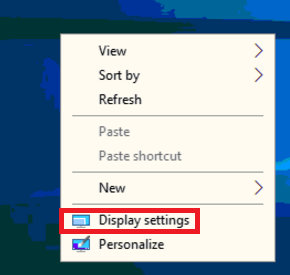
Within GoToAssist while connected to the remote server, right-click the desktop and click "Display Settings".
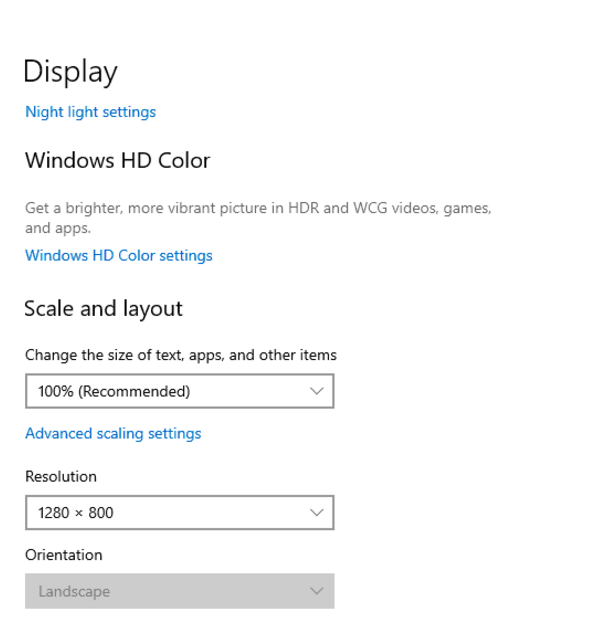
Then make sure the resolution and Windows scaling are set appropriately. I would start with making sure Windows Scaling is set to 100% and making sure the resolution is at least * x 800. If you change the Windows Resolution, you will need to stop GTA's screen sharing and start it again to reset it so you can see everything.
Thanks,
David Speck
Senior Sage 100 Developer | O: 949.583.9500 x1156
dspeck@blytheco.com | www.blytheco.com
ACUMATICA PARTNER OF THE YEAR | SAGE INTACCT | SAGE 100 PLATINUM ELITE | CREATIO GOLD PARTNER
This message contains information that may be confidential and privileged. Unless you are the addressee (or authorized to receive for the addressee) you may not use, copy, or disclose to anyone the message or any information contained in the message. If you have received the message in error, please advise the sender by reply email, and delete the message. Thank you.
Original Message:
Sent: 12/29/2023 4:22:00 PM
From: Michael McDonald
Subject: RE: SAGE 100 STD v2023 - Cannot convert DATA files
UPDATE: Application Scaling in v2023 set to "DEFAULT.". GoToAssist set to "full screen" with same behavior in Company Maintenance.
Brett: Is there a way to perform a "rebuild" on the sy_module, sy_enhancement, sy_classenhancement - and delete old version records. Will do a back-up first. Can some of the "SY" files in the MAS_System folder (or other folders) be deleted to have SAGE 100 auto regenerate new files?
I'm also thinking about removing the SAGE 100 STD v2023 installation on the Windows 2022 server and start again. How do I make sure I completely remove the problem installation including DLLs and other files placed in the C:\Program Files (x86) and sub folders?
------------------------------
Michael McDonald - Consultant
Michael T McDonald CPA
(616) 813-8887 - mike@mcdcpa.com
Original Message:
Sent: 12-29-2023 16:02
From: Michael McDonald
Subject: SAGE 100 STD v2023 - Cannot convert DATA files
Thanks everyone for these suggestions. I do have the proper DSD ExtSol updates for v2023 & PR 2.24. Interesting idea that it could be a screen scaling issue.
I am remotely connected to a new virtual Windows 2022 server. I am using GoToAssist to connect and I did notice that the bottom of my remote screen is cut off.
I will try to adjust the remote session to full screen or look into the application scaling settings. THANKS and Happy New Year!
------------------------------
Michael McDonald - Consultant
Michael T McDonald CPA
(616) 813-8887 - mike@mcdcpa.com
Original Message:
Sent: 12-29-2023 15:51
From: Mary Mays
Subject: SAGE 100 STD v2023 - Cannot convert DATA files
If the server's screen resolutions is too LOW you can have issues with Company Maintenance not displaying entire screen and give you an error if it is set to 800 x 600 – can try changing a higher resolution.
Please use the link below if you would like to book an appointment with me.
DSDInc@dsdinc.com/bookings/">Book with Mary
Mary Mays | Sr. Consultant


Wichita: 316.269.4264 | DSD Corporate: 800.627.9032
e: marymays@dsdinc.com
Original Message:
Sent: 12/29/2023 3:43:00 PM
From: Susan Pawlowic
Subject: RE: SAGE 100 STD v2023 - Cannot convert DATA files
Is Application Scaling set to Default? I've had issues opening specifically Company Maintenance in some environments when Application Scaling is set to a larger font size. I think it depends on the screen resolution.
------------------------------
Susan Pawlowic
Sage 100 Solutions Architect
RKL eSolutions, LLC
spawlowic@rklesolutions.com
(717) 735-9109 Ext. 4352