Sage 100

 View Only
  • 1.  Sage 100 Security - SQL Query

    Posted 10-24-2023 17:50

    Request for SQL Query (if someone already has created it)

    I have a client going through an audit on their security/roles in Sage 100.

    The client is on Sage 100 v2019 .Premium.

    Given the quick turnaround time on the request, has anyone created a SQL Query that provides data/analysis of Sage 100 User/Role Security?

    Essentially I need to create a SQL query that provides a breakdown of which roles have access to particular tasks.  

    Ex.  I need to see every role that has access to the Bank Code Maintenance task in A/P

    Thank you!


    ------------------------------
    Shannon Sadowsky
    RKL eSolutions, LLC
    ssadowsky@rklesolutions.com
    ------------------------------


  • 2.  RE: Sage 100 Security - SQL Query

    Posted 10-25-2023 07:17

    Have you tried just running the Role Report (Task Permissions Detail, A/P)?  Too bad you can't use Role/User Inquiry in the latest version(s), but maybe you could copy their security files into your local system.


    ------------------------------
    Brett Zimmerman
    Net at Work
    Greater Boston Area
    ------------------------------


  • 3.  RE: Sage 100 Security - SQL Query

    Posted 10-25-2023 11:56

    Unfortunately, they want to be able to query the information from SQL.  They do not want to pull from the front end reports.  


    ------------------------------
    Shannon Sadowsky
    RKL eSolutions, LLC
    ------------------------------


  • 4.  RE: Sage 100 Security - SQL Query

    Posted 10-25-2023 08:23
      |   view attached

    I don't have a 2019 install around, but something like the attached?

    SQL query to breakdown security by module by task by role


    ------------------------------
    Steve Iwanowski, NextStep Technology Advisors, aka DSD Lancaster PA ¯\_(ツ)_/¯
    ------------------------------

    Attachment(s)

    sql
    SecurityByTask.sql   555 B 1 version


  • 5.  RE: Sage 100 Security - SQL Query

    Posted 10-25-2023 12:00

    Yes, we tried this.  The trouble I am having is that information is not accurate, compared to what we see on the front end.  

    Ex.  User role = A/P Manager; This role in Role Maintenance does not have any access to Bank Code Maintenance, in the A/P module.  I have a similar script, and currently that table reflects similar to what you have.  It shows Create, Modify, etc. as "1", which is not correct.  This role has no access and those flags would reflect as "0". When I pull the front end report, the report is correct and shows "No Access".  I also tried to only mark "remove", to see what would happen.  Create, Modify, Remove, etc., still all reflect as "1".  The auditors are looking at this information, as the role has access. 

    I have also created a case with Sage but so far I am not able to get the answers that the auditor is wanting. 


    ------------------------------
    Shannon Sadowsky
    RKL eSolutions, LLC
    ------------------------------


  • 6.  RE: Sage 100 Security - SQL Query

    Posted 10-25-2023 12:24
      |   view attached

    Here is a custom report I did many years ago, translating the Sage raw data (which is not intuitive at all) into what the default report shows.
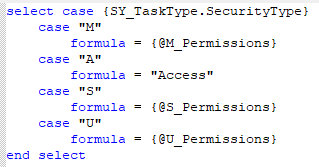
    (The client wanted to filter out the "no access" lines, before Sage added that as a feature).


    ------------------------------
    Kevin Moyes
    Technical Systems Analyst
    Munjal White Consulting Co.
    Toronto ON
    ------------------------------

    Attachment(s)

    rpt
    RoleReport_Custom.rpt   108 KB 1 version


  • 7.  RE: Sage 100 Security - SQL Query

    Posted 10-25-2023 18:24

    This is very helpful @Kevin Moyes.  Thank you so much!


    ------------------------------
    Shannon Sadowsky
    RKL eSolutions, LLC
    ------------------------------