Sage 100

 View Only
Expand all | Collapse all

Sage 100 Premium Issue

  • 1.  Sage 100 Premium Issue

    Posted 01-18-2023 21:18
    Edited by Wayne Schulz 01-26-2023 13:11
    Edit to add - there are a number of Premium "How To" guides authored by Carmen Cruz that are stored here and provide some step-by-step assistance with installation, migration and upgrades.

    Edit 1/26/2023 to add: This appears to be happening to more people. The errors vary.  I haven't seen any resolution other than keep good backups and try to migrate again if the migration fails. - See Sage City Post - Error Number 0x80040e14 Description ALTER DATABASE failed because a lock could not be placed on database

    I'm trying to remigrate Sage 100 2022.2 Premium from a 2018 Premium after something in my first migration attempt seemed to hose the data in 2022.2.

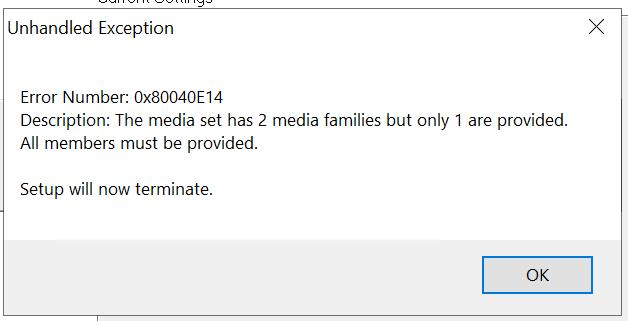
    Upon trying to re-migrate, I get this error which seems to be related to not being able to overwrite an existing file. 


    Ultimately I think my issue is that Sage is trying to overwrite this file (below), but it can't, so the migration bombs and somehow corrupts the SQL MAS_SYSTEM and I have to restore it from a backup in order to be able to get back into Sage and try again.
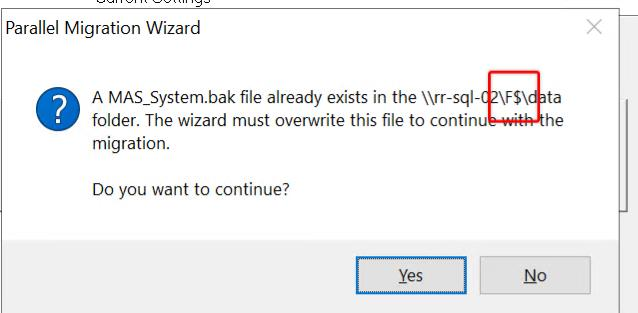


    If I answer Yes to try to overwrite then I get this


    And last this point I can only get back into 2022.2 Sage by restoring MAS_SYSTEM to SQL

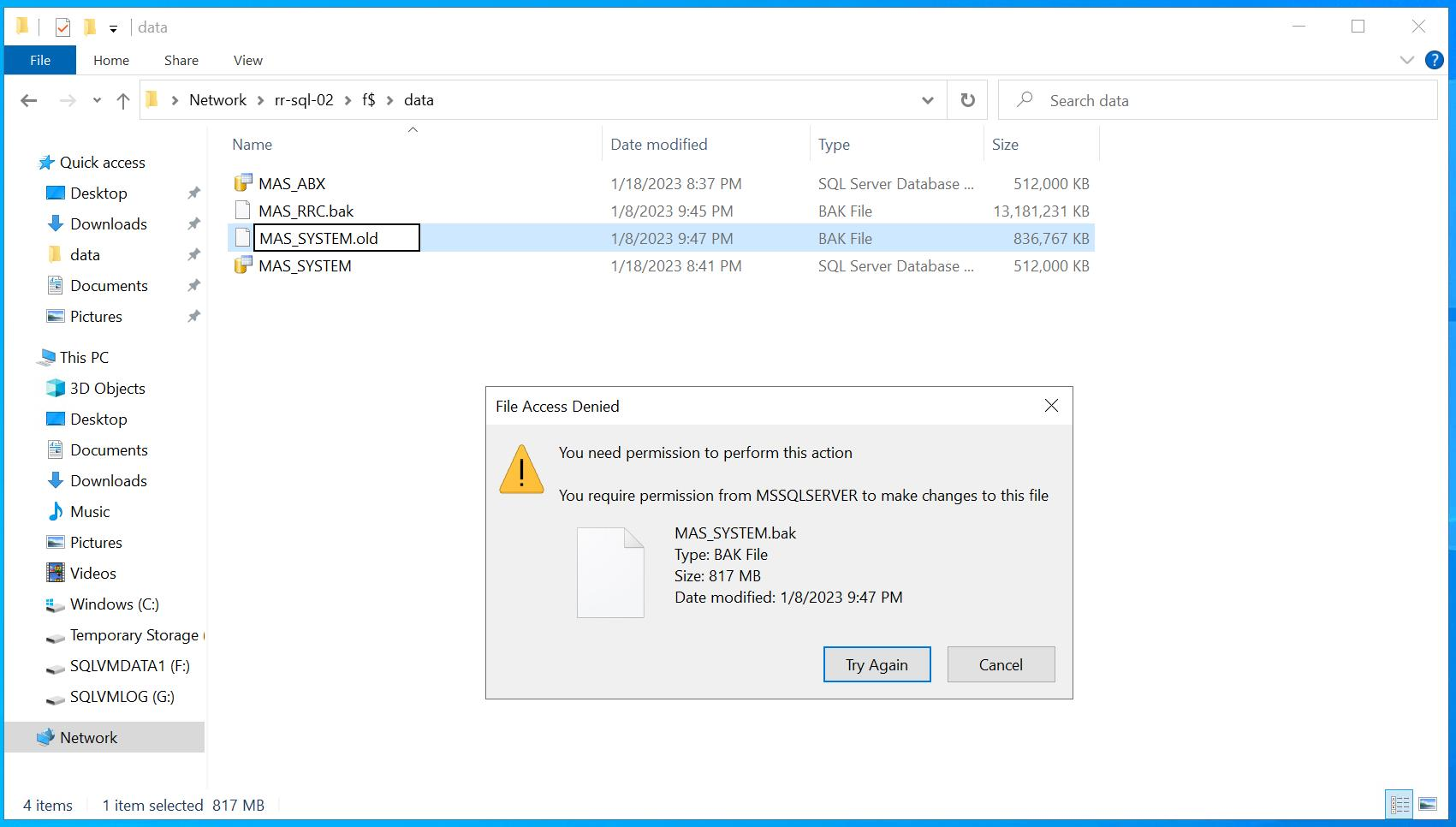
    I can't delete the BAK files manually. It seems like it's a permissions issue, but I'm unsure of how to resolve it. I'm told that I have an admin equivalent, but that may not be the case. Just curious if anyone has run into this and if there is any known issue (or additional user rights I need the IT department to verify that they have assigned to me). 

    TIA


    ------------------------------
    Wayne Schulz
    wayne@s-consult.com
    Schulz Consulting
    (860) 516-8990
    Moodus, CT
    ------------------------------


  • 2.  RE: Sage 100 Premium Issue

    Posted 01-18-2023 22:43
    Maybe a permissions issue on the hidden share F$ or folder.  I would go to computer management and check that everyone has full control of the shares you have in the path. 


    ------------------------------
    Doug Higgs
    Midwest Commerce Solutions, Inc
    (312) 315-0960
    Chauffeur, Chef, and Personal Assistant to Sprinkles
    ------------------------------


  • 3.  RE: Sage 100 Premium Issue

    Posted 01-18-2023 22:50
    You might also consider manually backing up MAS_SYSTEM in SQL and then overwrite the one that won't let you rename it.

    ------------------------------
    Doug Higgs
    Midwest Commerce Solutions, Inc
    (312) 315-0960
    Chauffeur, Chef, and Personal Assistant to Sprinkles
    ------------------------------


  • 4.  RE: Sage 100 Premium Issue

    Posted 01-18-2023 22:51
    First copy MAS_SYSTEM.bak to a backup folder before overwriting it with the new one you create the backup for.

    ------------------------------
    Doug Higgs
    Midwest Commerce Solutions, Inc
    (312) 315-0960
    Chauffeur, Chef, and Personal Assistant to Sprinkles
    ------------------------------


  • 5.  RE: Sage 100 Premium Issue

    Posted 01-19-2023 08:35
    I believe the issue is that something is stopping the overwrite of MAS_SYSTEM.BAK
    Using my credentials, I can't delete MAS_SYSTEM.BAK or cut/paste it to another folder. I can, however, create a text file and delete that file in the same folder. So it doesn't seem to be a pure user rights issue.

    When I try to re-migrate the Premium data, it corrupts the 2022 SQL MAS_SYSTEM. My working theory is that the issue is that during migration, the process can't overwrite MAS_SYSTEM.BAK ( it does ask ), and therefore it bombs and leaves the migration 1/2 done. If I didn't have a clean copy of MAS_SYSTEM to restore to SQL, I'd have to completely re-install.


    I'm pretty sure that @Carmen Cruz went over something similar with hidden shares during her premium upgrade session. I can't locate the materials.


    ------------------------------
    Wayne Schulz
    wayne@s-consult.com
    Schulz Consulting
    (860) 516-8990
    Moodus, CT
    ------------------------------


  • 6.  RE: Sage 100 Premium Issue

    Posted 01-19-2023 10:47
    Make sure all SQL connections are inactive on the target system.  The migration tool only checks for Sage related connections, but other software can interfere with taking a database offline.

    Is the SQL Service running with a domain account that is local admin to that machine, and local admin to the source server?  Was that account change done through the SQL Config tool (and not through Windows Services).

    Here's a note from our internal upgrade checklist... the error is different, but worth a try:


    ------------------------------
    Kevin Moyes
    Technical Systems Analyst
    Munjal White Consulting Co.
    ------------------------------


  • 7.  RE: Sage 100 Premium Issue

    Posted 01-19-2023 11:29
    Edited by Wayne Schulz 01-19-2023 11:30
    The problem I'm chasing now is that I can't delete/rename the MAS_SYSTEM.BAK that Sage seems to copy into \\server\f$\data\

    I keep getting the following after trying to rename MAS_SYSTEM.BAK to MAS_SYSTEM.OLD

    (Update: Tried rebooting the server that SQL is on and I continue to get the same message)


    ------------------------------
    Wayne Schulz
    wayne@s-consult.com
    Schulz Consulting
    (860) 516-8990
    Moodus, CT
    ------------------------------


  • 8.  RE: Sage 100 Premium Issue

    Posted 01-19-2023 11:32
    Wild thought.  Reboots sometimes clear server cobwebs.

    ------------------------------
    Jeff Schwenk
    Bottomline Software, Inc.
    (540) 221-4444
    ------------------------------


  • 9.  RE: Sage 100 Premium Issue

    Posted 01-19-2023 11:56
    It just said they can rename the file without a problem, so I think it's a rights issue. I'm still looking at this closely since I'm nervous that on a re-migrate, the issue might re-appear.

    This error only appeared on my second migration and probably because of the MAS_SYSTEM.BAK was leftover from the first. Sage prompts me to overwrite, and since I'm running the migration under my account, my permissions fail when trying to overwrite.

    I'm not 100% what's happening but that's the latest guess from me.

    ------------------------------
    Wayne Schulz
    wayne@s-consult.com
    Schulz Consulting
    (860) 516-8990
    Moodus, CT
    ------------------------------


  • 10.  RE: Sage 100 Premium Issue

    Posted 01-19-2023 12:03
    The way the SQL backups get created is not intuitive.  It's not done within the security context of the active user... the backup is pushed from the source system's SQL service account.

    If you remember, I complained to Sage about how temperamental Premium to Premium data migrations can be:
    Link

    ------------------------------
    Kevin Moyes
    Technical Systems Analyst
    Munjal White Consulting Co.
    ------------------------------


  • 11.  RE: Sage 100 Premium Issue

    Posted 01-19-2023 12:16
    Edited by Wayne Schulz 01-19-2023 12:17
    I'm getting a little further.

    I RDP to \\server\F$\data\, which is a hidden/administrative share that Sage seems to use to access SQL files.

    I can't do anything inside the F$\data ( which is weird because if I lookup effective access for my account on the file in question - MAS_SYSTEM.BAK - it does not show any restrictions )

    If I forget about the hidden share, which I don't need because I'm RDP to the server ( and not accessing it from another desktop through file explorer), and just use the drive letter then I have no problem renaming and presumably deleting that MAS_SYSTEM.BAK.

    I'm still thinking that it might have something to do with permissions related to being able to access the F$ ( as opposed to F: )

    ------------------------------
    Wayne Schulz
    wayne@s-consult.com
    Schulz Consulting
    (860) 516-8990
    Moodus, CT
    ------------------------------


  • 12.  RE: Sage 100 Premium Issue

    Posted 01-19-2023 12:21
    The Windows admin shares (like C$, F$...) are used by the backup / copy process, hard coded by Sage.  The SQL service account needs permission to that path, and the only way I know to do that is for the SQL Service account in question to have local administrator permission to the target machine. 
    If that isn't possible (i.e. the customer IT won't let you change the SQL service accounts, or there is no domain trust relationship between machines...), trying to set up the access using Windows Credentials Manager helped me a couple times.

    ------------------------------
    Kevin Moyes
    Technical Systems Analyst
    Munjal White Consulting Co.
    ------------------------------


  • 13.  RE: Sage 100 Premium Issue

    Posted 01-19-2023 12:24
    I think the issue is where Sage writes some of these files during migration when I try to re-migrate if there is already a MAS_SYSTEM.BAK in F$ it doesn't seem like Sage can overwrite it when using the F$ ( at least I can't do it through file explorer ).

    What I was trying to do was manually rename that BAK so that Sage wouldn't need permission to overwrite the existing BAK

    I presume during Premium to Premium Sage just drops the MAS_SYSTEM.BAK and probably any of the company MAS_XXX.BAK into the data folder and restores them to SQL


    ------------------------------
    Wayne Schulz
    wayne@s-consult.com
    Schulz Consulting
    (860) 516-8990
    Moodus, CT
    ------------------------------


  • 14.  RE: Sage 100 Premium Issue

    Posted 01-19-2023 12:27
    Windows can deny that overwrite, for a variety of reasons.  Renaming the BAK file before beginning the migration should work though.  (BAK files are not active / Live data).

    ------------------------------
    Kevin Moyes
    Technical Systems Analyst
    Munjal White Consulting Co.
    ------------------------------


  • 15.  RE: Sage 100 Premium Issue

    Posted 01-19-2023 11:32
    The Windows account the SQL service is running under is what needs that permission, which is why I mentioned using a domain account with local admin permissions.

    ------------------------------
    Kevin Moyes
    Technical Systems Analyst
    Munjal White Consulting Co.
    ------------------------------


  • 16.  RE: Sage 100 Premium Issue

    Posted 01-19-2023 11:33
    Also make sure AV software is not locking the file during a scan.

    ------------------------------
    Kevin Moyes
    Technical Systems Analyst
    Munjal White Consulting Co.
    ------------------------------