Sage 100

 View Only
  • 1.  Sage 100 Premium - Error 15 - [SQL Server]Could not allocate a new page for database 'MAS_PFC'.....

    Posted 05-23-2025 09:47
    Has anyone seen this error message. The user is just beginning to use Landed Cost and claims this only happens on a PO ROG when they add a landed cost. They are fresh brand spanking new at PO so have no history to say whether landed cost ever worked or didn't work without producing an error. 

    I've reviewed the typical issues that could produce this type of error including: 
    First thing I did was check disk space. Second thing I did was check disk space. Third thing I did was check the log file ( which is set to simple ) Fourth thing I did was backup the database to see if it would purge log space ( didn't seem to fix the issue)


    Observed this additional error in the SQL Server error log: 

    SQL Server Error 1101, Severity 17, State 1 typically means SQL Server can't allocate additional space within a filegroup or database file, even though your physical disk may seem to have sufficient space. It happens when SQL Server hits the configured growth limit or encounters file growth restrictions.

    Common Causes:

    1. Auto-growth Limits:
      The database files (MDF, NDF, or LDF) have auto-growth enabled, but the files have reached their configured maximum size.

    2. Insufficient Growth Increment:
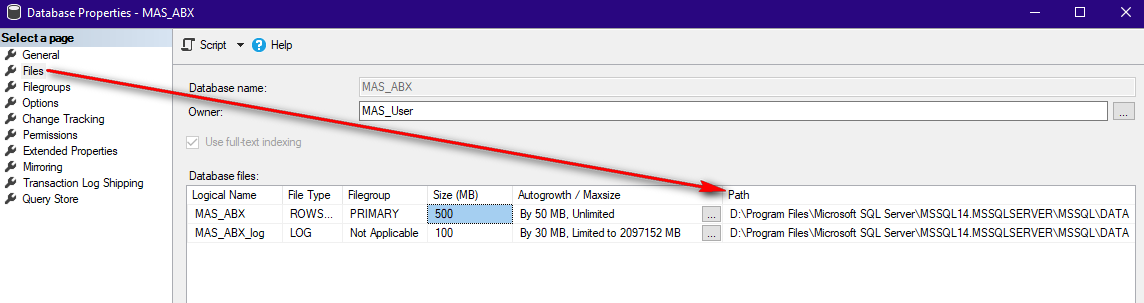
      Auto-growth is set to a small increment, causing frequent and insufficient allocations, eventually hitting a configured ceiling. (Wayne increased this from 50 to 256 )

    3. Drive Space vs. File Limit:
      The disk might have space, but the database file itself has reached its explicitly configured maximum file size or database limit.

    4. Disk Quotas or Restrictions:
      Even though the disk has space, certain policies (e.g., disk quotas, permissions, or storage-level restrictions) might block SQL Server's file expansion. 


    I'm curious if anyone has encountered this before and if you have any suggestions on resolving the error?


    ------------------------------
    Wayne Schulz
    wayne@s-consult.com
    Schulz Consulting
    (860) 516-8990
    CT
    ------------------------------


  • 2.  RE: Sage 100 Premium - Error 15 - [SQL Server]Could not allocate a new page for database 'MAS_PFC'.....

    Posted 05-23-2025 10:45

    Did you double-check the file paths?  There are a couple things that could cause the database files to be in a path other than you are expecting...


    ------------------------------
    Kevin Moyes
    Technical Systems Analyst
    Munjal White Consulting Co.
    Toronto ON
    ------------------------------


  • 3.  RE: Sage 100 Premium - Error 15 - [SQL Server]Could not allocate a new page for database 'MAS_PFC'.....

    Posted 05-23-2025 11:10

    Yes I checked the path last night.

    I think I may have fixed it and I'm not sure exactly what happened although the steps I just took are: 

    Used the instructions to reinitialize the PO Receipt of Goods data entry files ( here

    To reinitialize the Purchase Order Receipt of Goods/Receipt of Invoice Data Entry files, perform the following:

    1. Open Library Master, Utilities, Reinitialize Data Files
    2. In the Company field, select the affected company code
    3. In the Module field, select Purchase Order
    4. Select the following files:
      • PO_ReceiptDetail
      • PO_ReceiptHeader
      • PO_ReceiptRestart
      • PO_ReceiptReturnMatRqByPO (also used by PO Return of Goods data entry)
      • PO_ReceiptTaxAllocation
      • PO_ReceiptTaxDetail
      • PO_ReceiptTaxSummary
      • PO_ReceiptTierDistribution
      • PO_ReceiptVarianceCalculation.m4t
    5. Click Proceed and Yes to warning

    Since I was having an issue with landed cost I also re-initialized PO_LandedCostReceipt

    After I did the reinitialize to the above listed files I went back and tried to create a landed cost against a test PO and it worked without generating an error message.

    The end user is still verifying that this resolved the issue.

    Possible contributing factor is that I had changed the MAS_USER and MAS_Reports password at some time in the last 30 days(ish) and this end user has been working on and off at trying to get going with PO so it's possible though not entirely certain that some type of issue arose because of a password change ( which I did through standard Sage Premium utility ). I only would suspect this because the nature of the error number 15 tends to indicate an OS type error.

    If I get any additional feedback I will update this post. i may also throw this summary in our library with the full error message for future searches.


    ------------------------------
    Wayne Schulz
    wayne@s-consult.com
    Schulz Consulting
    (860) 516-8990
    CT
    ------------------------------


  • 4.  RE: Sage 100 Premium - Error 15 - [SQL Server]Could not allocate a new page for database 'MAS_PFC'.....

    Posted 05-23-2025 11:15
    Edited by Wayne Schulz 05-23-2025 11:15

    Additional screenshots: 
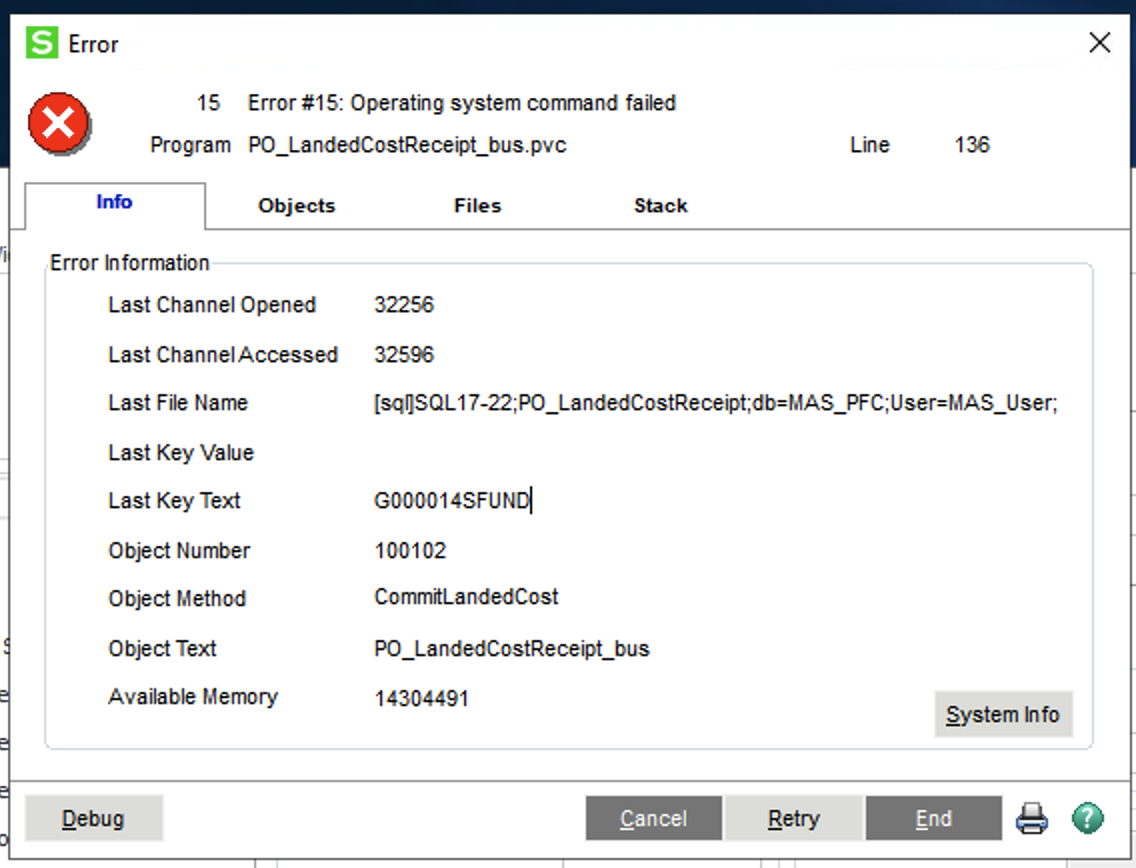
    Full text of the initial error (as shown in the screenshot in my initial post )

    Error Encountered

    Error 15: Operating system command failed

    O/S  Error: 42000: [Microsoft][SQL Server Native Client 11.0][SQL Server]Could not allocate a new page for database 'MAS_PFC' because of insufficient disk space in filegroup 'PRIMARY'. Create the necessary space by dropping objects in the filegroup, adding additional files to the filegroup, or setting autogrowth on for existing files in the filegroup.

    Program: PO_LANDEDCOSTRECRIPT_BUS.PVC

    Statement: 188

    Class: PO_LandedCostReceipt_bus

    Method: CommitLandedCost

    [Retry] [Info] [End]


    ------------------------------
    Wayne Schulz
    wayne@s-consult.com
    Schulz Consulting
    (860) 516-8990
    CT
    ------------------------------


  • 5.  RE: Sage 100 Premium - Error 15 - [SQL Server]Could not allocate a new page for database 'MAS_PFC'.....

    Posted 05-23-2025 15:59

    The user called back and said the issue re-appeared. What I did to (hopefully) resolve the problem was to manually increase the DB size reserved for the SQL table. I also significantly increased the autogrowth amount.

    What convinced me it was a space problem was when I looked at the SPACE AVAILABLE

    I raised both size and autogrowth and that seemed to cause the issue to resolve. I don't know why SQL didn't automatically fix the issue except maybe the old autogrowth number ( 50 MB ) was too small. I replaced 50 with 2048.

    Will keep watching and advise if any further action needed


    ------------------------------
    Wayne Schulz
    wayne@s-consult.com
    Schulz Consulting
    (860) 516-8990
    CT
    ------------------------------


  • 6.  RE: Sage 100 Premium - Error 15 - [SQL Server]Could not allocate a new page for database 'MAS_PFC'.....

    Posted 05-23-2025 16:08

    They should get a DBA / SQL specialist to take a look.  That kind of issue is purely SQL, not Sage.


    ------------------------------
    Kevin Moyes
    Technical Systems Analyst
    Munjal White Consulting Co.
    Toronto ON
    ------------------------------