Sage 100

 View Only
Expand all | Collapse all

Sage 100 and server reboot

  • 1.  Sage 100 and server reboot

    Posted 10-27-2025 11:58

    We have had three instances of our client's servers rebooting when we log into a server and launch Sage 100. In all three cases it happened right after logging into the server and launching Sage 100. There was no warning or prompts!. We just start typing our Sage 100 username and PW and suddenly we are waiting for the server to come back online.  

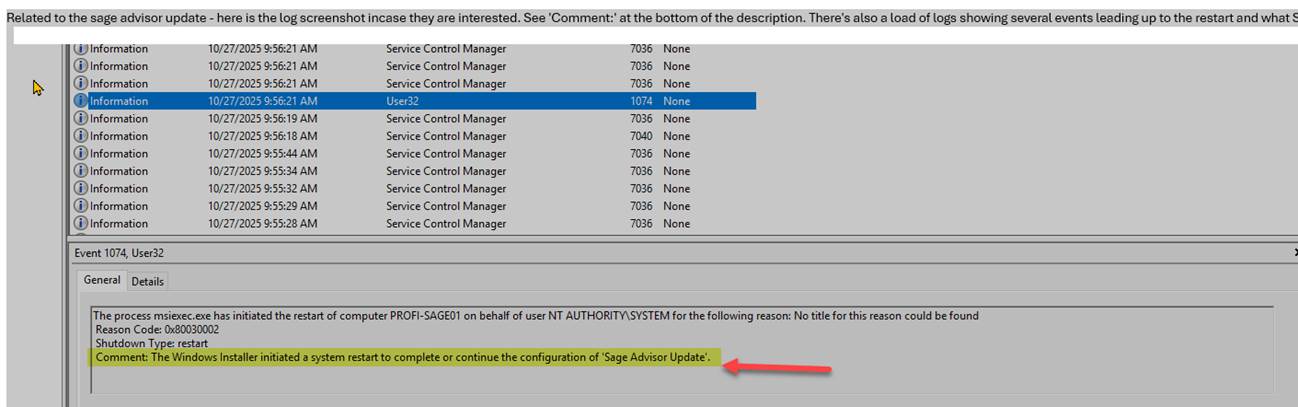
    In the most recent case, we had their IT look into it, and they found the following message in the windows log "The windows installer initiated a system restart to complete or continue the configuration of 'Sage Advisor Update'."

    WTH?? 

    I saw a recent post here on 90 minds where one of you said they always uninstall the Sage Advisor Update. I thought that was a good idea in case it tried to install a Product Update or something. But a server reboot is not something I even considered as a possibility. I am adding that to our required steps going forward. 

    Has anyone else had this happen? But I also wanted to alert anyone else that might not be aware of that.


    ------------------------------
    David Overholt
    Programmer/Project Manager
    DWD Technology Group
    Fort Wayne IN
    (260) 399-8655
    ------------------------------


  • 2.  RE: Sage 100 and server reboot

    Posted 10-27-2025 12:00

    I haven't seen this yet, and I also seem to remember somebody mentioned that Sage Advisor is going to stick around and might become mandatory? 


    ------------------------------
    Wayne Schulz
    wayne@s-consult.com
    Schulz Consulting
    (860) 516-8990
    Connecticut
    ------------------------------


  • 3.  RE: Sage 100 and server reboot

    Posted 10-27-2025 12:10

    The only automatic-reboot-without-warning that I have been seeing recently is related to .NET installers (pre-req's).

    Yes, it is safe to uninstall Sage Advisor Update.  It is only necessary when installing a Sage server / product update on the server / payroll update on the server.  After that is done, uninstall, every-single-time.

    The main reason I uninstall SAU is to prevent a well-meaning IT person from trying to apply a patch, thinking it is like Windows Update, not knowing to check for things like enhancements.

    (One exception: I leave it installed for a client who likes to install their own PR updates...).


    ------------------------------
    Kevin Moyes
    Technical Systems Analyst
    Munjal White Consulting Co.
    Toronto ON
    ------------------------------


  • 4.  RE: Sage 100 and server reboot

    Posted 10-27-2025 12:19
    Edited by Madeline Stefanou 10-27-2025 12:19

    @David Overholt this did happen to me last week at a client on v2023 Advanced.  I logged into the server with the same credentials used to Install Sage 100; and even before I had a chance to log into Sage 100, the server was rebooting.  30+ users were logged in at the time this happened.  Luckily it was not during any user "updates".  I thought it was a fluke.  I did see in the System Activity Log a "Sage Product Enhancement Program with a Force Close message.  We do not have PEP turned on for this client (for any client actually.)  I also see in Control Panel that the Sage Advisor Update was listed as "installed' on that date.  

    I have not opened a case on this, but will.  This could create devastating problems if a client were updating a large batch and just logging into the server instituted that reboot.


    ------------------------------
    Madeline Stefanou
    RKL eSolutions, LLC
    ------------------------------


  • 5.  RE: Sage 100 and server reboot

    Posted 10-27-2025 12:24

    Perhaps related to the Scheduled Task?


    ------------------------------
    Kevin Moyes
    Technical Systems Analyst
    Munjal White Consulting Co.
    Toronto ON
    ------------------------------


  • 6.  RE: Sage 100 and server reboot

    Posted 10-27-2025 12:31
    Have you seen any consistency with version of Sage or Windows OS type? Just wondering if there is a thread there.

    I would also check to see if Windows product updates installed/finished installing right after you logged in. I am wondering if an update is stuck and you logging on gives it what it needs to finish. 

    --
    Tara Morgan Schinkel, CPA
    Stewart Technologies, Inc.
    CFO/ Team Lead for Apps 


    Get the Boomerang Email App on mobile


    ----------


  • 7.  RE: Sage 100 and server reboot

    Posted 10-27-2025 12:37

    @Tara Schinkel, I am checking to see if the IT of our most recent instance can tell us if any windows updates installed before or after that reboot. 

    @Kevin Moyes, You may be on to something with the Sage Workstation Update. I have never known what that does and mostly ignored it. Does anyone know if that updates or launches Sage Advisor? 


    ------------------------------
    David Overholt
    Programmer/Project Manager
    DWD Technology Group
    Fort Wayne IN
    (260) 399-8655
    ------------------------------


  • 8.  RE: Sage 100 and server reboot

    Posted 10-27-2025 12:40

    I had this happen last week 10.20.25 and I thought it was fluke.  The install is v2022 but there is a prior version v2020 still there also.  This client doesn't have any automated Task Scheduler tasks, thew SAU setting is for Notify Only.   I am noticing the Paya Connect Desktop seems to be the latest version and I did not update it but not sure if this is the cause.


    BRUCE KERN
    TEAM LEAD ‑ SAGE 100
      2300 SE Beta Street | Suite A | Portland | OR 97222
      p 
    503-496-5378 x1015
      f
    503-496-5378
      bruce.kern@swktech.com
      www.swktech.com
     
    Web
    Facebook
    LinkedIn
    Twitter
    YouTube
    This message contains confidential information and is intended only for the intended recipients. If you are not an intended recipient you should not disseminate, distribute or copy this e-mail. Please notify the sender immediately by e-mail if you have received this e-mail by mistake and delete this e-mail from your system. E-mail transmission cannot be guaranteed to be secure or error-free as information could be intercepted, corrupted, lost, destroyed, arrive late or incomplete, or contain viruses. The sender therefore does not accept liability for any errors or omissions in the contents of this message, which arise as a result of e-mail transmission. If verification is required please request a hard-copy version.

    From: Tara Schinkel via 90 Minds, Inc. <Mail@ConnectedCommunity.org>
    Sent: Monday, October 27, 2025 9:31 AM
    To: Bruce Kern <bruce.kern@swktech.com>
    Subject: RE: Sage Urgent Support : Sage 100 and server reboot


    Have you seen any consistency with version of Sage or Windows OS type? Just wondering if there is a thread there. I would also check to see if... -posted to the "! Sage 100 Urgent Support" community


  • 9.  RE: Sage 100 and server reboot

    Posted 10-27-2025 12:42

    An older Paya update can cause a .NET install, with no-warning-reboot.


    ------------------------------
    Kevin Moyes
    Technical Systems Analyst
    Munjal White Consulting Co.
    Toronto ON
    ------------------------------


  • 10.  RE: Sage 100 and server reboot

    Posted 10-27-2025 12:39

    Now that I think about this, I did have an IT person contact me about two weeks ago wanting to have me stand by while they answered yes to a bunch of pop-ups that were on their server. They were all UAC-type prompts and when we cleared one of them (answered Yes), I thought it was odd because it did reboot the server. I could swear in the background I saw something about .net component or some type of Microsoft component was updating. This was while working directly on a Sage 100 2024 Advanced server doing nothing except answering yes to what appeared to be routine UAC prompts.


    ------------------------------
    Wayne Schulz
    wayne@s-consult.com
    Schulz Consulting
    (860) 516-8990
    Connecticut
    ------------------------------


  • 11.  RE: Sage 100 and server reboot

    Posted 10-27-2025 12:44
    Edited by Barbara Goldstein 10-27-2025 12:45

    I had this happen one day last week.  Windows 2019 server.  Nothing in the Activity Log.  I believe I was the only one logged in, as no one reached out to me, and no one logged in within the 5-10 minutes I was on (thankfully).  No CC processing.  A GL/AR/AP 2-user system.  Sage Advisor uninstalled when I upgraded them a couple weeks ago to 2025.1.  No Windows updates that week.


    ------------------------------
    Barbara Goldstein
    Sr. Consultant
    DSD Business Systems
    ------------------------------


  • 12.  RE: Sage 100 and server reboot

    Posted 10-27-2025 13:32

    I know that 

    @Madeline Stefanou said she was going to open a case with Sage. 

     I just got off the phone after opening a case with Sage support.

    Sage's first answer was "Sage 100 is not able to reboot the server" I was talking to entry-level tech and she was messaging a higher-level tech. I told her to take down the exact message that IT found tied to the reboot. "The windows installer initiated a system restart to complete or continue the configuration of 'Sage Advisor Update'." 

    She did that and sent it to the him/her, but after that, she told me that they were escalating it and someone would call me back.


    ------------------------------
    David Overholt
    Programmer/Project Manager
    DWD Technology Group
    Fort Wayne IN
    (260) 399-8655
    ------------------------------


  • 13.  RE: Sage 100 and server reboot

    Posted 10-27-2025 14:00

    Seems like it might be .NET-related, primarily because of the times the computer/server sometimes auto-reboots after Sage 100 prerequisites are installed, in particular .NET (although haven't really seen that happen in a while).  So maybe there was some sort of .NET update, and upon launching Sage 100 that triggered a similar thing?  


    ------------------------------
    Brett Zimmerman
    Net at Work
    Greater Boston Area
    ------------------------------


  • 14.  RE: Sage 100 and server reboot

    Posted 10-27-2025 14:31

    I just received this from the client and I think it is .NET install for sure. 

    I forwarded this on to Sage support too. 

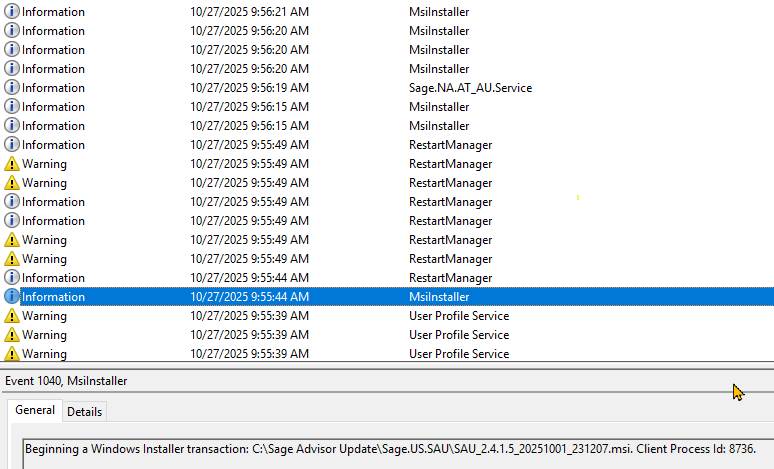
    Related to the sage advisor update - here is the log screenshot. See 'Comment:' at the bottom of the description. There's also a load of logs showing several events leading up to the restart and what Sage Advisor was trying to do.
    ..

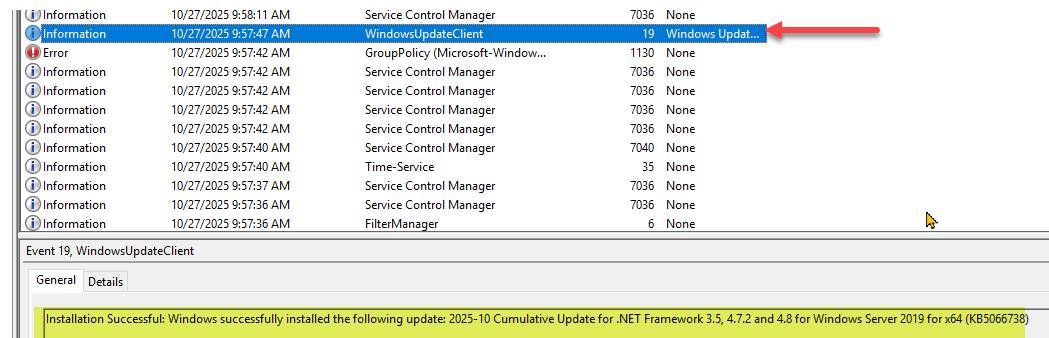
    As far as windows updates go, here is what I found. It looks like some windows updates did go through, but the timestamps lead me to believe that they were just installed due to the sage advisor kicking off the reboot. They happened during / after reboot. 


    ------------------------------
    David Overholt
    Programmer/Project Manager
    DWD Technology Group
    Fort Wayne IN
    (260) 399-8655
    ------------------------------


  • 15.  RE: Sage 100 and server reboot

    Posted 10-27-2025 14:51

    If you open Sage Advisor Update on the server and click the History button is there recent history listed?


    ------------------------------
    Doug Higgs
    Midwest Commerce Solutions, Inc
    (312) 315-0960
    Chauffeur, Chef, and Personal Assistant to Sprinkles
    ------------------------------


  • 16.  RE: Sage 100 and server reboot

    Posted 10-27-2025 15:29

    I checked and there is nothing showing in history since 2019 for this client. 


    ------------------------------
    David Overholt
    Programmer/Project Manager
    DWD Technology Group
    Fort Wayne IN
    (260) 399-8655
    ------------------------------


  • 17.  RE: Sage 100 and server reboot

    Posted 10-29-2025 09:59

    Update (as much as I know currently).

    I opened a case with Sage, and they have not been able to duplicate it of course. I sent them screen shots of installed programs and..NET versions for the three clients of ours where this happened. I'm working with Dan Riddle and he noted that he saw @Wayne Schulz's post on Sage Community (thanks Wayne).

    I think it does at least have Sage's attention now. 


    ------------------------------
    David Overholt
    Programmer/Project Manager
    DWD Technology Group
    Fort Wayne IN
    (260) 399-8655
    ------------------------------


  • 18.  RE: Sage 100 and server reboot

    Posted 10-30-2025 14:35

    Let me give an update to my client issue I saw on 10/20/25.  My Case (8010640294) was picked up by Nathan Shaw.  We spoke and he really felt it could have been anything, and did not believe it was Sage 100 that caused the reboot.  I mentioned that on 90Minds, it was not just my client experiencing this.  Today he reached out to request from me the Windows Event System Log.  He was able to segregate exactly what happened.  Earlier that morning, (a few hours before I logged in as the User that Installed Sage 100 on the Application Server); an event that triggered the reboot as soon as I logged in.  

    He has passed this additional information on to his Development Team.  
      The process msiexec.exe has initiated the restart of computer XXXXX on behalf of user NT AUTHORITY\SYSTEM for the following reason:  No title for this reason could be found.
      Reason Code:  0x800300002
      Shutdown Type:  restart
      Comment:  The Windows Installer initiated a system restart to complete or continue the configuration of "Sage Advisor Update".  


    ------------------------------
    Madeline Stefanou
    RKL eSolutions, LLC
    ------------------------------


  • 19.  RE: Sage 100 and server reboot

    Posted 10-30-2025 17:37

    Thanks for the update @Madeline Stefanou. I also sent information on my open case to Dan Riddle. I hope Sage is consolidating these cases and not working on them separately. 


    ------------------------------
    David Overholt
    Programmer/Project Manager
    DWD Technology Group
    Fort Wayne IN
    (260) 399-8655
    ------------------------------


  • 20.  RE: Sage 100 and server reboot

    Posted 11-03-2025 13:57

    Received closing notes from Nate in Support.  it was posted on Community Hub also.  

    CGBANNERINDICATOR

    Hi Madeline,

    The Global Development team responsible for the Sage Advisor Update application confirmed that a reboot may be triggered if Windows Installer detects that the SAU service or one of its associated files is still in use during the update process. In such cases, Windows Installer schedules a reboot to finalize the update. This behavior has been part of the default upgrade process in earlier versions as well.

    Our Sage 100 DEV team recommends disabling the Sage Advisor Update Service and manually download updates from the Download Portal.

    Please let us know if any of your other Sage customers encounter this issue.

    Community Hub: Unexpected Reboot on Server


    ------------------------------
    Madeline Stefanou
    RKL eSolutions, LLC
    ------------------------------


  • 21.  RE: Sage 100 and server reboot

    Posted 11-06-2025 16:01

    One of our consultants had this happen again today. She said she got the message Restarting not rebooting she said Several services were stopped and restarted including Sage 100 Service so users were booted from Sage 100 but she does not think the server actually did a shut down and restart.  Now I'm not sure if our other encounters may have acted the same.


    Year-end is around the corner. Be sure to attend our Sage 100 Year-End Tips and Tricks Webcast: View the details


    **************

    David Overholt

    DWD Technology Group, Inc.

    9921 Dupont Circle Drive West, Suite 300 | Fort Wayne, IN 46825

    260.423.2414 main

    260.399.8655 Direct

    800.232.8913 toll free

    sagesupport@dwdtechgroup.com

    www.dwdtechgroup.com


    A black background with white text  Description automatically generated