Sage 100

 View Only
  • 1.  Sage 100 ADV Service Account

    Posted 08-29-2024 14:47

    I am baffled and need a higher power to explain what is happening.

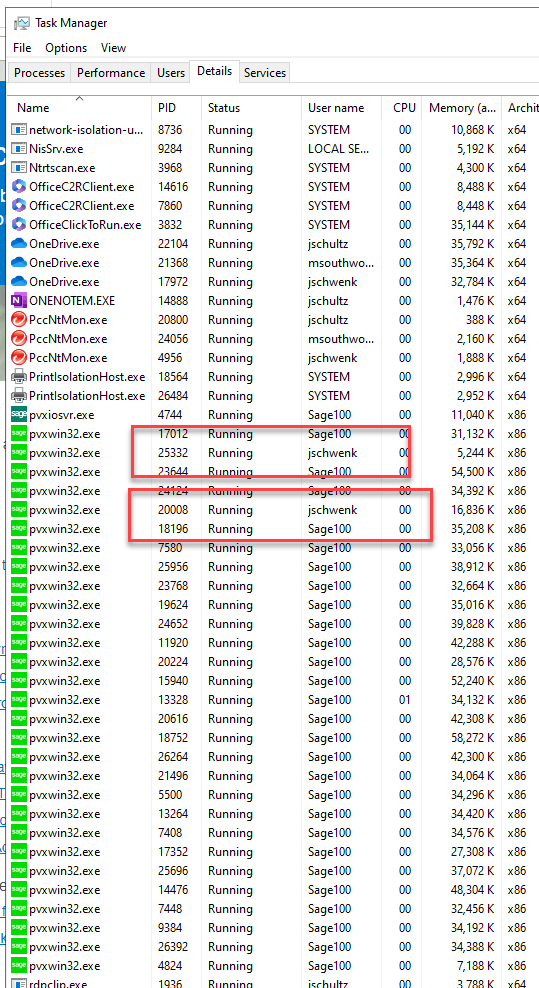
    Sage 100 ADV 2022 is running as a service.  As expected, when a user logs on, a session is started on the server using the service account (Sage100).  As expected.

    However, when I log onto the server via an RDP session, and then into Sage, a session is started using MY RDP session logon name.

    Not a big deal until I forget to log out of Sage before signing off the RDP session.  When I log back on the server, another Sage license is used.

    If I do this enough time, the client runs out of Sage licenses.  If I reboot the server or simply clear jschwenk sessions, all is well in the world.

    But why is my logon being used when I connect via RDP?

    Bottomline, I need to be more diligent when exiting.

    Thoughts?


    ------------------------------
    Jeff Schwenk
    Owner
    Bottomline Software, Inc.
    Waynesboro VA
    (540) 221-4444
    ------------------------------


  • 2.  RE: Sage 100 ADV Service Account

    Posted 09-06-2024 15:24

    HI Jeff, I often see the same thing.  I don't exactly understand it either.   Seems like the same sort of thing where on the server if you are running it as an application for advanced, sometimes it has task windows for the user processes.   I asked Sage and the tech said that the programmers told him that it "depends" on how Windows/Sage handles the session.   That is such a clear cut answer.. 


    ------------------------------
    Bob Osborn
    Consultant
    ACI Consulting
    ------------------------------


  • 3.  RE: Sage 100 ADV Service Account

    Posted 09-06-2024 16:11

    Click to add the Command Line to your Task Manager.  This should show you clearly what processes are running through the service, and what are your active session's workstation programs.


    ------------------------------
    Kevin Moyes
    Technical Systems Analyst
    Munjal White Consulting Co.
    Toronto ON
    ------------------------------