Sage 100

 View Only
Expand all | Collapse all

Sage 100 2018 email smtp error

Wayne Schulz

Wayne Schulz11-03-2021 11:01

  • 1.  Sage 100 2018 email smtp error

    Posted 10-25-2021 19:02
      |   view attached
    I've had 4 clients today over the last couple of days call for help on an issue emailing from Sage 100.  When I see "Failed to connect to SMTP Server", I normally send them back to their IT department to confirm the email account, password and config settings.  Everything appears to be correct for Outlook365.

    The error and solution ID write up is Solution ID: 106485. Error: "Failed to read beginning of SSL/TLS record" and "Failed to establish TLS connection" when attempting Test e-mail. Most of these clients are on Sage 100 2018 and all are using Outlook 365.

    My Question is has anyone stumbled across a work around fix to let them keep processing as we plan and implement an upgrade?  Is there a way to work around or load TLS 1.2? from a new version?  

    Any help is greatly appreciated. 


    ------------------------------
    Jim Steele
    Orion Business & Accounting Solutions
    ------------------------------


  • 2.  RE: Sage 100 2018 email smtp error

    Posted 10-25-2021 19:06
    We've been putting our customers on SMTP2GO.

    I'm not technical to answer any questions, but for our customers that are on it, it's working great.

    ------------------------------
    Roberta Chase
    Enterprise Software Consultant--Sage 100, Crystal Reports, Sage Intelligence, FAS, Starship
    CompuData, Inc.
    Philadelphia, PA 19154
    215-969-1000, ext. 277
    ------------------------------


  • 3.  RE: Sage 100 2018 email smtp error

    Posted 10-25-2021 19:08
    I got this message last week for a customer in v2017…The only way to workaround was to create a gmail account and configure that email until the upgrade is scheduled..

    ------------------------------
    Lourdes Sobrino
    LU² DSD Puerto Rico
    Guaynabo Puerto Rico
    787.485.9638
    ------------------------------


  • 4.  RE: Sage 100 2018 email smtp error

    Posted 10-25-2021 19:12
    I also have a client that is using smtp2go for other purposes and we are going to switch Sage to it.

    I haven't tried the resolution below with any clients, but it seems like a possible solution.

    You may be able to allow MS 365 to accept TLS 1.0 & 1.1 by doing this: (complete article 
    here - same link as in my previous post)
    • Use PowerShell to run the Set-TransportConfig cmdlet in the Exchange Online management module:
    • Set-TransportConfig -AllowLegacyTLSClients $True
    • Configure clients to use a new endpoint: smtp-legacy.office365.com.


    ------------------------------
    Greg Stiles
    S & W Microsystems
    Torrance CA
    310.787.1010
    ------------------------------


  • 5.  RE: Sage 100 2018 email smtp error

    Posted 10-26-2021 09:31
    here is our 2 cents

    If it's the TLS issue (Office 365) they need to setup an SMTP relay.


    https://adamtheautomator.com/office-365-smtp-relay/


    follow the instructions in the non-tls smtp relay.


    Go to http://go.microsoft.com/fwlink/?linkid=526655 and add the public IP of the server the sage is hosted on and the email addresses you'd like to send from and verify the email address. (wait possibly 30mins per their email)


    Now the one part this instructions doesn't provide is the MX (the SMTP address for this server) this typically looks like <Domain-com>.mail.protection.outlook.com I wasn't able to find a good guide how to find that but its located on the o365 admin interface somewhere (the IT guy took control at that point).


    Once that's setup just go into sage and put in the address, remove the username password and such, change the port to 25, and set none to the authentication type and you should be back up and running.


    ------------------------------
    alan niergarth
    Velosio LLC
    ------------------------------


  • 6.  RE: Sage 100 2018 email smtp error

    Posted 10-25-2021 19:33
    I have tried several times to convince customers to use smtp2go but I always get pushback that they don't want to use a third-party email for sending private accounting info.

    ------------------------------
    Wayne Schulz
    Schulz Consulting
    860-516-8990
    ------------------------------


  • 7.  RE: Sage 100 2018 email smtp error

    Posted 10-26-2021 09:03
    Another issue I'm running into - as the remaining customers of Sage 100 grow they increasingly have more sophisticated IT. One of my customers underwent an IT audit which recommended all sorts of security changes. They changes the Windows level security for all the Sage users and pulled out TLS 1.0 and 1.1.

    And all of this now happens without a call to see if there would be any impact on Sage.

    Increasingly I do not get any calls until the doo doo is hitting the fan. This includes with 3rd party ISV solutions where for some reason customers mistake me for the vendors unpaid complaint department.


    ------------------------------
    Wayne Schulz
    Schulz Consulting
    860-516-8990
    ------------------------------


  • 8.  RE: Sage 100 2018 email smtp error

    Posted 10-26-2021 09:13
      |   view attached
    There's 4 potential solutions I have come across in my research.

    1. Upgrade Sage 100 to v2019 or Newer
    2. Set up an SMTP Relay in IIS on the Sage Server.  I don't know the specifics on this, but IIS will need to be installed and set up in some way to make this work.  In Company Maintenance, you will enter the IP Address of the server where IIS is installed instead of outlook.office365.com. Use the port and security settings per the way IIS is set up.  Authentication is not necessary unless the SMTP Relay in IIS is set up to use it. I'm starting to get the feeling I will need to learn how to do this.
    3. Find an SMTP Provider that will allow TLS 1.0 or 1.1. 
    4. FOR V2018 ONLY:  Call Sage Support and request to receive the program files necessary to swap it from using TLS 1.0 to TLS 1.2.  It requires the customer to sign a Pre-Release Agreement (or PRA) and after Sage received the signed document, they'll send you the files.  It requires the customer's system to be on 2018 PUs 8, 9 or 10.  The Sage Support person I worked with was Don Wiser. 

    I recently put together a short document on this issue so I could send it off to some of our customers who are on older systems. Feel free to review.

    ------------------------------
    Chris Love
    Accounting Systems, Inc. (ASI)
    ------------------------------


  • 9.  RE: Sage 100 2018 email smtp error

    Posted 10-26-2021 09:22
    It's a bit more work on the IT management side, but creating an O365 Exchange connector secured by IP thus eliminating authentication is another option (no TLS required). 

    It also provides a performance boost when processing.  See Option 3 in the MS link below.  Step 9 regarding the DNS SPF record is important to prevent emails sent from landing in SPAM / JUNK folders of recipients. The MX record is all that needs to be put in Sage 100 as "Address" using port 25.  Very simple from Sage side.

    https://docs.microsoft.com/en-us/exchange/mail-flow-best-practices/how-to-set-up-a-multifunction-device-or-application-to-send-email-using-microsoft-365-or-office-365

    Hope this helps.


    ------------------------------
    Andy Adkisson
    Tennessee Software Solutions
    ------------------------------


  • 10.  RE: Sage 100 2018 email smtp error

    Posted 10-27-2021 10:40
    For anyone who has contacted Sage and gotten the 2017 TLC 1.2 patch - has it resolved the issue?

    I’d say that all my 2018 users who send paperless with Microsoft seem to have been impacted in some way.

    I’m trying to see what the best overall recommendation is to get past this issue without forcing an emergency upgrade.

    Is the patch working?

    ---------------------------------
    Wayne Schulz
    Schulz Consulting
    860-516-8990
    ---------------------------------


  • 11.  RE: Sage 100 2018 email smtp error

    Posted 10-27-2021 11:12
    I should be getting my hands on the patch for my Sage 100 Standard 2018.10 end user today and will post the results.

    ------------------------------
    Jim Steele
    Orion Business & Accounting Solutions
    ------------------------------


  • 12.  RE: Sage 100 2018 email smtp error

    Posted 10-27-2021 13:46
    Thanks, @Jim Steele, we eagerly await.​

    ------------------------------
    Brett Zimmerman
    Net at Work
    Greater Boston Area
    ------------------------------


  • 13.  RE: Sage 100 2018 email smtp error

    Posted 10-27-2021 14:16
    Edited by David Speck II 10-27-2021 14:16
    Came across this link in a Sage City post.  It details a legacy end point that can be opted in on a case by case basis.  Might be useful for clients unable to get a static IP address for the relay option.  Personally haven't tried it yet.
    New opt-in endpoint available for SMTP AUTH clients still needing legacy TLS - Microsoft Tech Community

    ------------------------------
    David Speck II
    Tennessee Software Solutions
    ------------------------------


  • 14.  RE: Sage 100 2018 email smtp error

    Posted 10-27-2021 13:56
    We have been successfully using the email relay approach, as discussed in these posts, for our clients 2018 and below.  Advising this should work until they can upgrade, which we emphasize they need to do if they plan to use Sage 100 into the foreseeable future.

    ------------------------------
    alan niergarth
    Velosio LLC
    ------------------------------


  • 15.  RE: Sage 100 2018 email smtp error

    Posted 10-28-2021 11:44
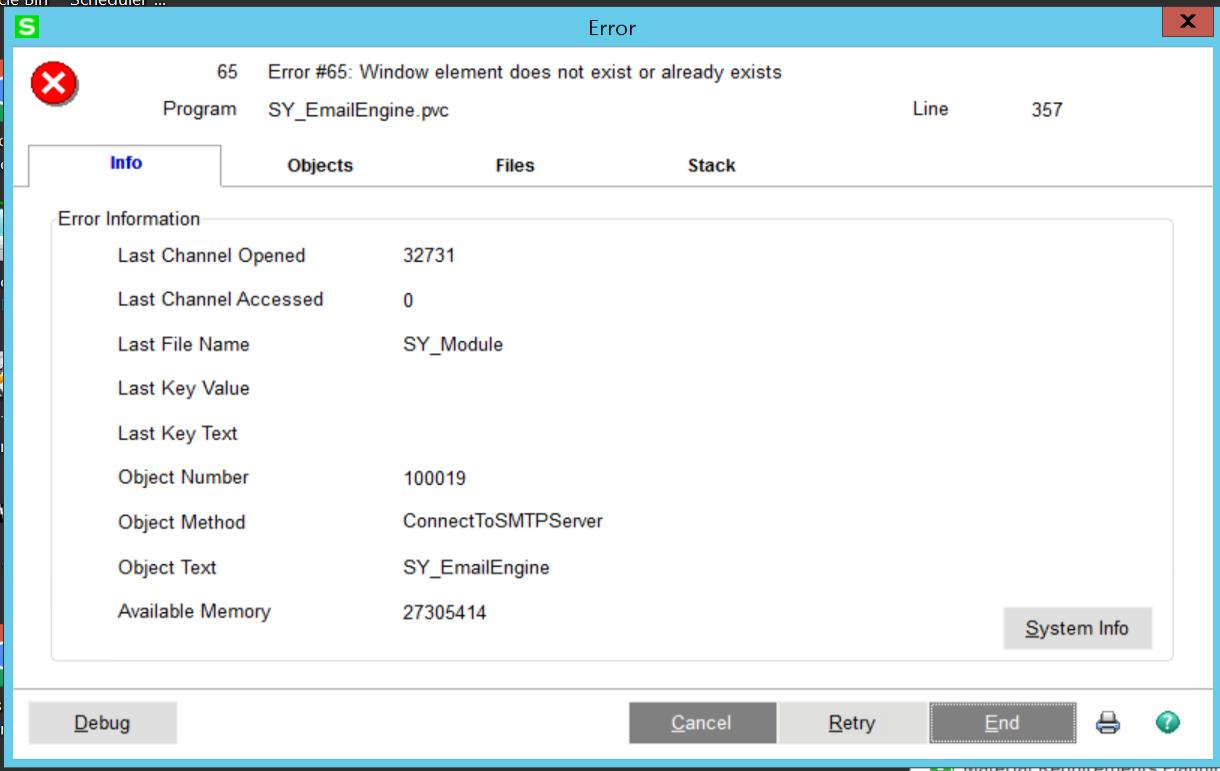
    I applied the supplied patch to a 2018.10 system and receive this ( image below )  when I test the email  ( just an FYI in case someone else tries this as well )

    So far two customers setup SMTP relays and did not install the patch.

    The relay seems to be working for them. 

    Sage provides two files as part of their 2018 secret patch/hot fix: 

    Copy the ChilkatDotNet47.dll to the Sage 100 Server's ..\mas90\home folder. This is a new component.
    Copy the SY_EmailEngine.pvc to the Sage 100 Server's ..\mas90\SY folder, after renaming the original file.

    I'm unsure if the ChilkatDotNet47.DLL has to be registered somehow. The above two lines are the only instructions supplied.
    I did not register the ChilkatDotNet47.dll which might have been part of the problem


    ------------------------------
    Wayne Schulz
    Schulz Consulting
    860-516-8990
    ------------------------------


  • 16.  RE: Sage 100 2018 email smtp error

    Posted 10-28-2021 11:50
    You should probably register the new DLL.  I have to wonder if that is the only location it needs to be though.  On Advanced, I believe it would also be required under MAS90\Home on the workstation.

    ------------------------------
    David Speck II
    Tennessee Software Solutions
    ------------------------------


  • 17.  RE: Sage 100 2018 email smtp error

    Posted 10-28-2021 11:50
    @Wayne Schulz What are the SMTP relay methods those 2​ customers used?  Also, keep us up to date on the resolution to your Error 65.  Is it possible you need to convert company data? I don't see why you would if the .pvc is meant for that version and PU of Sage, but it is Sage.

    ------------------------------
    Chris Love
    Accounting Systems, Inc. (ASI)
    ------------------------------


  • 18.  RE: Sage 100 2018 email smtp error

    Posted 10-28-2021 12:02
    Sorry Folks, I'm chasing the same thing, was told yesterday by Sage Support that the original post about 2018.8, 9 or 10 is incorrect.  That it only applies to 2018.8, any other will throw the error 65.  They said that 2018.9 came out the same time as the other 2019 and 2020 updates, so they changed the email engine file on 2018.9 which caused problems with the patch and the .9 and .10 updates.  I'm still waiting for the patch hotfix for 2 of my end-users, the others are in limbo until I can figure this out. 

    Jim Steele 
    Orion Business & Accounting Solutions

    ------------------------------
    Jim Steele
    Orion Business & Accounting Solutions
    ------------------------------


  • 19.  RE: Sage 100 2018 email smtp error

    Posted 10-28-2021 12:17

    There are no instructions in the file though it is named TLS_2018_8_ProgramFix.Zip

    Unfortunately I update this customer to 2018.10 and then tried the install which produced the error.
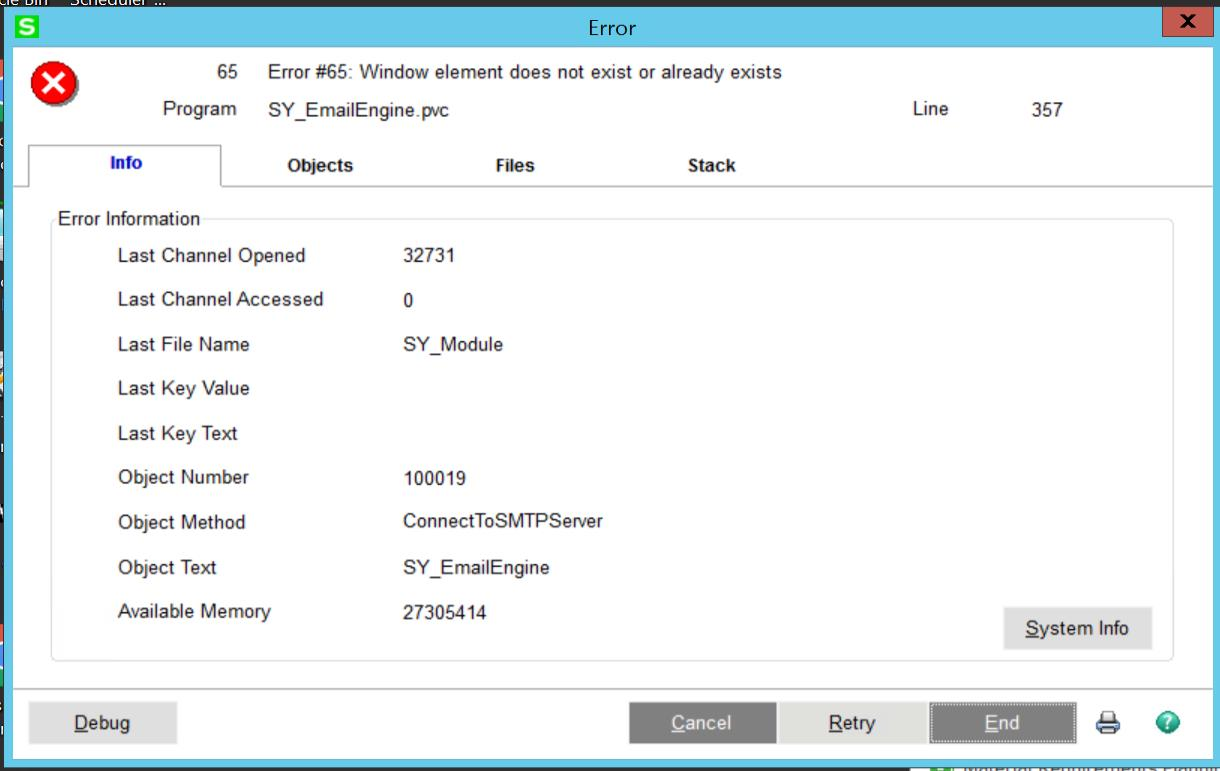
    I tried copying the program file to the local Sage folder but was waiting until everyone is done emailing to test.

    Looks like maybe we will have to use an SMTP relay ( which I have not yet found a great source of instructions for IT on how to create  - though I did think this looked comprehensive - https://adamtheautomator.com/office-365-smtp-relay

    I wish Sage was more proactive on this and created an actual knowledgebase article 


    ------------------------------
    Wayne Schulz
    Schulz Consulting
    860-516-8990
    ------------------------------


  • 20.  RE: Sage 100 2018 email smtp error

    Posted 10-28-2021 16:01
    Looked at Wayne's response and I'm still waiting for the patch. So I thought to myself, no one out at Sage is splitting the atom, so is it possible that the files are just a copy of files from the newer installs. (I don't use Office365 internally, so I had to test on some of my end users test servers set up for upgrades). So I connected to my end user who has 2018.10 and I took the virgin files from 2020 (99% sure the one I used was 2020.0). The file specifics are

    ChilkatDotNet47.dll date modified is 1/30/2020 and the size is 8,320 KB

    SY_EmailEngine.pvc date modified is 12/7/2019 and the size is 11 KB

    I put the ChilkatDotNet47.dll file in the home folder and renamed SY_EmailEngine.pvc in the SY folder to .old and copied the new one in.
    I went back to the Home folder, right clicked the ChilkatDotNet47.dll file and open with Regsvr32 in the Windows\SYSWOW64 folder.
    It gave me a error, because this TEST server already had a 2020 install on it, but the error is basically "dll was loaded but the entry point was not found" (because it is already on the server in another location). Closed the RegSvr32 window. (I don't think you will get this error on a machine that hasn't already had ChilkatDotNet47.dll installed)

    Logged in and tested it and it worked. I'm hoping someone can test this and confirm or not if we have a fix/work around to this issue.

    ------------------------------
    Jim Steele
    Orion Business & Accounting Solutions
    ------------------------------

    Attachment(s)

    pvc
    SY_EmailEngine.pvc   10 KB 1 version
    dll
    ChilkatDotNet47.dll   8.12 MB 1 version


  • 21.  RE: Sage 100 2018 email smtp error

    Posted 10-28-2021 16:05
    Here are the dates/times on the files Sage sent me for the 2018.8 specific patch 


    ------------------------------
    Wayne Schulz
    Schulz Consulting
    860-516-8990
    ------------------------------


  • 22.  RE: Sage 100 2018 email smtp error

    Posted 10-28-2021 17:16
    Edited by Jim Steele 10-28-2021 17:17
      |   view attached
    Update, just tried it on the Live Sage Standard 100 2018.10 server for my end user and it work.  Only note to add is that the error (see attached) popped up again, making me believe that the ChilKatDotNet47.dll is already installed on most machines as part of a DotNet update. I just closed out of the window and tested it again on the live server and it worked.  Hope this is the same result for your 2018.10 install?

    ------------------------------
    Jim Steele
    Orion Business & Accounting Solutions
    ------------------------------


  • 23.  RE: Sage 100 2018 email smtp error

    Posted 10-28-2021 17:18
    " no one out at Sage is splitting the atom"  @Jim Steele  Understatement of the decade. Now that's funny!! LOL!!


    ------------------------------
    Doug Higgs
    Midwest Commerce Solutions, Inc
    (312) 315-0960
    Chauffeur, Chef, and Personal Assistant to Sprinkles
    ------------------------------


  • 24.  RE: Sage 100 2018 email smtp error

    Posted 10-29-2021 16:44
    Any thoughts on whether these files might work on a 2017 install ? Specifically 2017.3 ?

    ------------------------------
    George Khairallah
    CTO | gotomyerp, LLC
    george.k@gotomyerp.com | 877-888-5525
    http://gotomyerp.com/
    ------------------------------


  • 25.  RE: Sage 100 2018 email smtp error

    Posted 11-03-2021 10:11
    George, I did a 2016.5 yesterday and it worked fine, I would say it's worth a try.

    ------------------------------
    Jim Steele
    Orion Business & Accounting Solutions
    ------------------------------


  • 26.  RE: Sage 100 2018 email smtp error

    Posted 11-03-2021 10:59
    Thanks @Jim Steele I will give it a shot then!


    ------------------------------
    George Khairallah
    CTO | gotomyerp, LLC
    george.k@gotomyerp.com | 877-888-5525
    http://gotomyerp.com/
    ------------------------------


  • 27.  RE: Sage 100 2018 email smtp error

    Posted 10-29-2021 01:57
    I did a quick test today and it was successful and super easy. 
    I didn't make any changes to my Office 365 tenant: 

    - Install SMTP Service on the server where Sage is. 
    - Configure the credentials for an Office 365 mailbox (make sure to use an app password if 2FA is enabled on the account)
    - Change the outbound connection port to 587
    - Change the Smarthost to smtp.office365.com

    That's it. 
    Now set Sage email to the server address on port 25 with no authentication. Just tested it on my end, and it worked with no issues. Took me about 2 minutes to set it up. 

    Not sure if I missed something crucial here, or if our Office 365 tenant has something setup on it that facilitated this to work out of the box, but definitely worth a shot. 

    We've also had a client report that reducing the TLS back down to 1.0/1.1 and changing their smtp to legacy-smtp.office365.com also worked.

    p.s: I have written a step by step article on how to create this, but it's internal to our support team, but if there is interest, I can get a PDF version of the KB for this group.

    Cheers,

    ------------------------------
    George Khairallah
    CTO | gotomyerp, LLC
    george.k@gotomyerp.com | 877-888-5525
    http://gotomyerp.com/
    ------------------------------


  • 28.  RE: Sage 100 2018 email smtp error

    Posted 10-29-2021 06:46
    Edited by Wayne Schulz 10-29-2021 10:54
    I believe you’re referring to smtp relay

    I had it work in 2 instances. Both IT people seemed to indicate it took them a while.

    The legacy link for office smtp didn’t work. There are a few powershell or other configuration steps and I’m not getting involved with configuring the server unless I have the skills ( I don’t ) and have been retained for server management ( I haven’t ). The problem here is that I ask the IT person if they made all prerequisite changes and almost always they say “oh yeah”. And about half the time they have even read the article on what’s needed. So I have no clue why it didn’t work.

    Sage has a Sage City post up on this topic. I looked at it really quickly last night and maybe I missed something but it didn’t seem to tell me how to fix anything. The main point seemed to be that soon Sage will only support N-1 if Microsoft stops allowing login with user/password.

    I asked Sage about this nightmare before it began - back after our last sad engineering meeting with them - and they gave me the deer in the headlights and flew off into the dark to continue hiding from UK.

    ---------------------------------
    Wayne Schulz
    Schulz Consulting
    860-516-8990
    ---------------------------------


  • 29.  RE: Sage 100 2018 email smtp error

    Posted 10-29-2021 16:05
    Quick Update, I did 3 end-users today with the files I posted, a 2018.10 standard, a 2018.10 advanced and a 2018.5 standard and they all worked.

    ------------------------------
    Jim Steele
    Orion Business & Accounting Solutions
    ------------------------------


  • 30.  RE: Sage 100 2018 email smtp error

    Posted 10-29-2021 16:07
    Sage pinged me today that they are working on a patch that will be available for all 2018. Personally I agree with Jim's thought that pulling in those newer files is likely what Sage ends up doing. I think the error with Regsrv might be if the DLL doesn't require registration?

    ------------------------------
    Wayne Schulz
    Schulz Consulting
    860-516-8990
    ------------------------------


  • 31.  RE: Sage 100 2018 email smtp error

    Posted 10-29-2021 16:37
    Wayne, that could be true about the .dll, I'm not sure, when I was playing around with the different versions of the files and I wasn't sure about registering the .dll, but in all the cases, it errored when I registered, but the error was that the dll was loaded in the Home directory but couldn't find the entry point, which I thought means it exists on this machine and is registered in another location. Either way it worked when I did that so I wasn't complaining. It's great to be busy, but an emergency upgrade for 5 or 6 Sage 100 2018 stragglers that didn't or couldn't upgrade because of 3rd party apps would be a nightmare. Now after some gentle chastising, I've got them committed to an upgrade cycle that I can take my time with, so it's a win-win (by the way I'm still waiting on the patch from Sage after I've sent in 2 signed pre-release forms).
    Happy Friday Everyone!

    ------------------------------
    Jim Steele
    Orion Business & Accounting Solutions
    ------------------------------


  • 32.  RE: Sage 100 2018 email smtp error

    Posted 11-03-2021 11:01
    Edited by Wayne Schulz 11-03-2021 11:43
    duplicated by HL


  • 33.  RE: Sage 100 2018 email smtp error

    Posted 11-03-2021 11:12
    Sage is claiming a 2018.x patch is coming through honestly it seems this group was a good month ahead of Sage in both spotting this and in developing a workaround for our customers.

    The next wave of problems may come when/if Microsoft does away with allowing access to smtp via a user/password login in favor of a Auth only supported in 2021+ versions.

    And Sage has said they have no intention of issuing a patch to support Auth for versions prior to 2021 - which IMO is a defacto hidden change in supported versions policy.

    Customers need to be counseled that if they invest in certain invasive add-on products which strand them at specific versions it may become very expensive to upgrade in an emergency situation.

    Sage is not watching issues with their endorsed solutions ( late upgrades, difficulty in upgrading some ) which in many cases makes it hard to regularly upgrade.

    ---------------------------------
    Wayne Schulz
    Schulz Consulting
    860-516-8990
    ---------------------------------


  • 34.  RE: Sage 100 2018 email smtp error

    Posted 11-04-2021 08:15
    There is a patch now available for 2018.x in the KB.

    ---------------------------------
    Wayne Schulz
    Schulz Consulting
    860-516-8990
    ---------------------------------


  • 35.  RE: Sage 100 2018 email smtp error

    Posted 11-04-2021 08:43
      |   view attached
    Download Sage 100 2018 Program Fix LM6026T (pdf instructions below and attached)
    (https://www.sagecity.com/us/sage100_erp/f/sage-100-announcements-news-tips/177145/sage-100-announcing-sage-100-2018-program-fix-lm6026t)


    ------------------------------
    Brett Zimmerman
    Net at Work
    Greater Boston Area
    ------------------------------

    Attachment(s)

    pdf
    Sage 100 2018 LM6026T.pdf   129 KB 1 version


  • 36.  RE: Sage 100 2018 email smtp error

    Posted 11-04-2021 11:29

    Sage needs to get into this decade and support OAuth 2.0.   It makes emails sending way more secure and much faster and is super simple to setup for us IF, sage does the necessary API work on their end in the software.

    This has been a general nightmare if any of you support things like multi-function office machines that let users send themselves or others scans by email.

    SMTP is almost dead with M365 and as you can see is a real hassle to get working due to all the security up grades that have occured.

    When proper developers support OAuth 2.0, things go so much smoother


    ------------------------------
    Mark Chinsky
    Clients First Business Solutions
    ------------------------------


  • 37.  RE: Sage 100 2018 email smtp error

    Posted 11-04-2021 11:51
    OAuth was added... but only in 2021.


    ------------------------------
    Kevin Moyes
    Technical Systems Analyst
    Munjal White Consulting Co.
    Toronto ON
    ------------------------------


  • 38.  RE: Sage 100 2018 email smtp error

    Posted 11-04-2021 13:25
    Edited by Brett Zimmerman 11-04-2021 13:26

    Any thoughts on whether this v2018-specific fix can be tried on v2017 or v2016?  Easy-enough to first make a manual bkup of the 'mas90' folder, but who knows what gets touched outside of Sage 100 by running that .bat?  I'm just afraid we may not be able to simply revert back.


    ------------------------------
    Brett Zimmerman
    Net at Work
    Greater Boston Area
    ------------------------------


  • 39.  RE: Sage 100 2018 email smtp error

    Posted 11-04-2021 13:50
    Edited by Steve Iwanowski 11-04-2021 13:51

    The only actions in the BAT (outside of privilege checks) are:

    regsvr32 /u /s ChilkatCert.dll
    regsvr32 /u /s ChilkatMail2.dll
    regsvr32 /u /s ChilkatUtil.dll
    regsvr32 /s ChilkatAx-9.5.0-win32.dll

    So it's just the last file that is unique to the patch.  If things go sideways, to undo it, you can just:
    regsvr32 /u /s ChilkatAx-9.5.0-win32.dll
    regsvr32 /s ChilkatCert.dll
    regsvr32 /s ChilkatMail2.dll
    regsvr32 /s ChilkatUtil.dll

    My uneducated gut reaction is to be more worried about the PVC than that DLL.


    ------------------------------
    Steve Iwanowski, NextStep Technology Advisors, aka DSD Lancaster PA ¯\_(ツ)_/¯
    ------------------------------


  • 40.  RE: Sage 100 2018 email smtp error

    Posted 11-04-2021 14:32
    Thanks, @Steve Iwanowski.  I'm still hesitant.​

    ------------------------------
    Brett Zimmerman
    Net at Work
    Greater Boston Area
    ------------------------------