Sage 100

 View Only
  • 1.  Select Transactions with Current Date - VI Export

    Posted 07-08-2022 08:57
    Does anyone have a quick and easy way to restrict a Visual Integrator export's transactions to the current system date?  I am not script-knowledgeable and would prefer not to source this work out for a simple sales order export, which would increase the project cost by several hundred dollars.

    @David Speck II I found this formula from a response you posted on Sage City about a year ago, for selecting transactions within the past 14 days; you mentioned using Perform Logic:

    cSelectStatement$="IF PO_ReceiptHistoryHeader01.InvoiceNo$ = """" AND PO_ReceiptHistoryHeader01.OrderDate$ >= DTE(JUL(DTE(0)) - 14:""%Y%Mz%Dz"") AND PO_ReceiptHistoryHeader01.OrderDate$ <= DTE(JUL(DTE(0)):""%Y%Mz%Dz"") { selected = isTRUE } ELSE { selected = isFALSE }"

    I'm just not sure what to do with it.  Do I enter something similar to (SO_SalesOrderHeader_OrderDate = DTE(JUL(DTE(0)) ) into the Perform Logic box?  I ​entered this into the Select tab and it skipped all records (sales order with today's date exist).  I added a "-1" at the end to see if yesterday's orders would export, no luck.

    Thanks in advance!

    ------------------------------
    Susan Pawlowic
    Sage 100 Solutions Architect
    RKL eSolutions, LLC
    spawlowic@rklesolutions.com
    (717) 735-9109 Ext. 4352
    ------------------------------


  • 2.  RE: Select Transactions with Current Date - VI Export

    Posted 07-08-2022 09:26
    I just tried this and it worked for me (from KB 65514):

    <content>
    1. Open the Select tab in Visual Integrator Export Job Maintenance
    2. Select the date field where today's date is desired
    3. Set Relation to Equal (=)
    4. Enter the following formula in the Selection Value:
      • EVS("DTE(day)")

    Note: For export of records based on today's date, try also:

    • Example: Records with dates greater than 180 days ago:
      • Relation: Greater than (>)
      • Selection Value: EVS("DTE(JUL(day)-180)")
    • Example: Records with dates of yesterday or today:
      • Relation: Greater than or Equal (>=)
      • Selection Value: EVS("DTE(JUL(day)-1)")
    • Example: Records with dates older than 30 days ago
      • Relation: Less than (<)
      • Selection Value: EVS("DTE(JUL(day)-30)")

    Note: Sage 100 stores dates in YYYYMMDD format. When using selection criteria on Date Fields, open date field in Data tab and remove Date Mask

    </content>


    ------------------------------
    Doug Higgs
    Midwest Commerce Solutions, Inc
    (312) 315-0960
    Chauffeur, Chef, and Personal Assistant to Sprinkles
    ------------------------------


  • 3.  RE: Select Transactions with Current Date - VI Export

    Posted 07-08-2022 10:02
    @Doug Higgs this worked!  Thank you so much!

    @David Speck II I saved your notes for future reference.  Never know when it will come in handy!  Thank you.
    ​​

    ------------------------------
    Susan Pawlowic
    Sage 100 Solutions Architect
    RKL eSolutions, LLC
    spawlowic@rklesolutions.com
    (717) 735-9109 Ext. 4352
    ------------------------------


  • 4.  RE: Select Transactions with Current Date - VI Export

    Posted 07-08-2022 10:13
    Wow, I thought VI always treated things entered on the Selection tab as literals, maybe it is that way in the imports but not the exports.

    ------------------------------
    David Speck II
    Tennessee Software Solutions
    ------------------------------


  • 5.  RE: Select Transactions with Current Date - VI Export

    Posted 07-08-2022 10:39
    I believe the value field is typically treated as a literal, however, the EVS (evaluate string) function calls the interpreter, so any directives or functions get executed.

    ------------------------------
    Doug Higgs
    Midwest Commerce Solutions, Inc
    (312) 315-0960
    Chauffeur, Chef, and Personal Assistant to Sprinkles
    ------------------------------


  • 6.  RE: Select Transactions with Current Date - VI Export

    Posted 07-08-2022 10:44
    Good to know, thanks for that.

    ------------------------------
    David Speck II
    Tennessee Software Solutions
    ------------------------------


  • 7.  RE: Select Transactions with Current Date - VI Export

    Posted 07-08-2022 09:40
    VI Exports won't execute perform logic, so you would have to put it in a file like it is shown in the post.
    https://www.sagecity.com/us/sage100_erp/f/sage-100-business-object-interface/170144/in-visual-integrator-is-there-a-way-to-select-records-within-a-number-of-days/435982#435982

    Alternatively, you could use a temp field as shown below.  Using the temp field approach eliminates the need for a separate file to be maintained that contains the logic.
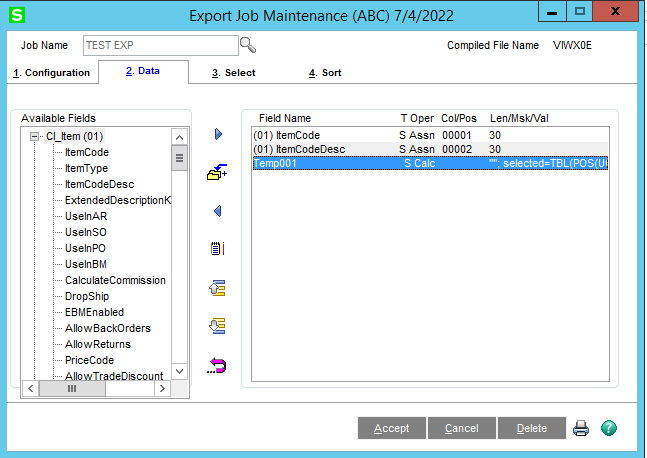
    The following three must be configured exactly as seen below.
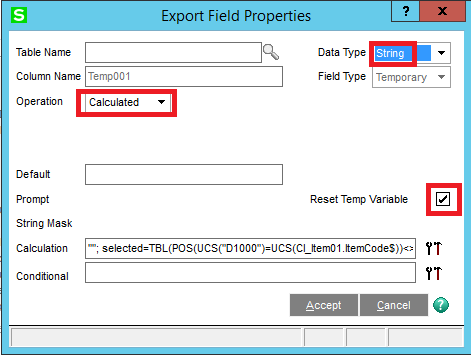
    The calculation will vary depending on each job's criteria.  In the example above, I used the following.
    ""; selected=TBL(POS(UCS("D1000")=UCS(CI_Item01.ItemCode$))<>0,isFalse,isTrue)


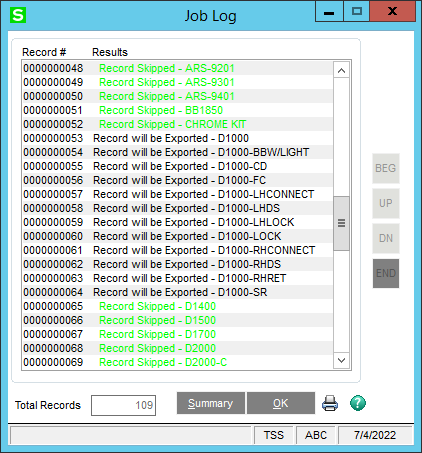
    It first assigns an empty string to the temp field because the temp field's only purpose is so we can execute the next command which assigns a boolean value to the "selected" variable that the export evaluates on each record before writing it to the file.  In the example above, it will only export items where the item code contains "D1000".
    For you case, you would need to substitute the "CI_Item01.ItemCode$" field with your field from the export's available columns, make sure to get the correct numeric table suffix.  If your job uses SO_SalesOrderHeader as the main table, then it should be SO_SalesOrderHeader01, if it uses SO_SalesOrderDetail, then the header will have a different number, see below for what this refers to.
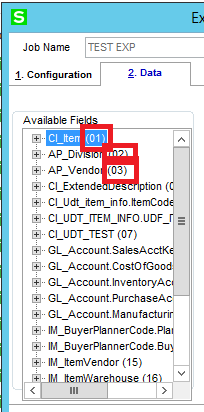
    Once you have the correct table and field variable, you need to create the evaluation used in the TBL function.  The TBL function works a couple different ways but in this case, we are using it to evaluate our criteria and return either true or false (the contents in the isTrue and isFalse variables).  To use the current date against the order date, it would look something like this.  As mentioned above, change the numeric table suffix accordingly based on what is displayed in list of available fields.
    ""; selected=TBL(SO_SalesOrderHeader01.OrderDate$=DTE(0,"%Y%Mz%Dz"),isFalse,isTrue)​


    ------------------------------
    David Speck II
    Tennessee Software Solutions
    ------------------------------