Sage 100

 View Only
  • 1.  Reports Printing Gibberish

    Posted 03-01-2022 10:06
    Hello All! New member here :)

    Looking for some insight on a weird printer-related issue for a customer we just recently upgraded and moved to a hosted environment (not SPC). 
    My Sage tech team have exhausted their knowledge on this, as has the hosting partner we work with. Sage support is involved, but we're not getting very far.

    Here's the breakdown of the issue:

    1. Sage 100 successfully installed and tested on hosted environment
    2. Printers route THROUGH to customer's local environment
    3. Print to PDF (microsoft PDF, Adobe PDF... whatever) printer
    4. Reports print in gibberish
    5. We have had internal, SWK and Sage help and tried a multitude of things including:
      1. uninstall MS PDF printer, reboot, reinstall LOCAL -> re-connect to hosted environment
      2. Change font settings in Control Panel on customer's local drive
      3. Tried different PDF "printers"
      4. Print to preview and then EXPORT to PDF (this works but customer doesn't want to have to do this...)
    6. Customer has now uninstalled ALL physical printers and doesn't know how to re-install and/or connect them back to her hosted connection
      1. She can't print to paper...
    7. She has installed a PDF printer, apparently
    8. Issue still unresolved.

     Report looks like this:
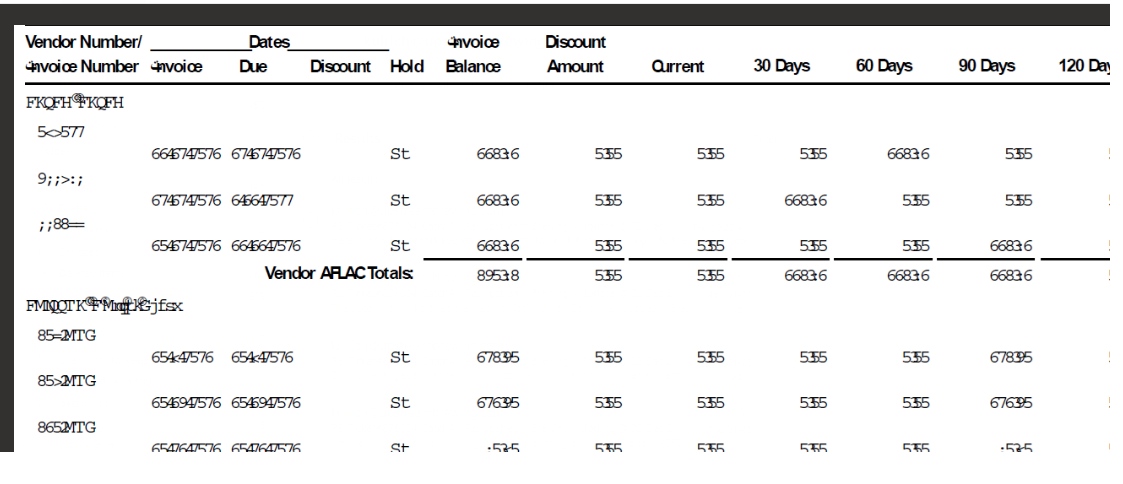
    Really appreciate any advice/help here - thanks!


    ------------------------------
    Kellie Jacobs
    VP of Customer Success
    Brainsell
    ------------------------------


  • 2.  RE: Reports Printing Gibberish

    Posted 03-01-2022 10:14
    Check the report's font.  Use something standard (instead of pretty).

    ------------------------------
    Kevin Moyes
    Technical Systems Analyst
    Munjal White Consulting Co.
    Toronto ON
    ------------------------------


  • 3.  RE: Reports Printing Gibberish

    Posted 03-01-2022 10:35
    Thank you, Kevin! I will get back to my team to see if they've tried this, and if not - see that they do.

    ------------------------------
    Kellie Jacobs
    VP of Customer Success
    Brainsell
    ------------------------------


  • 4.  RE: Reports Printing Gibberish

    Posted 03-01-2022 10:21
    If you are using Remote Desktop, try installing TSPrint on the server and the workstation.  I believe there is a free trial version.

    https://www.terminalworks.com/remote-desktop-printing

    ------------------------------
    Doug Higgs
    Midwest Commerce Solutions, Inc
    (312) 315-0960
    Chauffeur, Chef, and Personal Assistant to Sprinkles
    ------------------------------


  • 5.  RE: Reports Printing Gibberish

    Posted 03-01-2022 10:36
    Hi Doug,

    Thanks for the suggestion - followed up with my team on this as well.
    Fingers crossed!

    ------------------------------
    Kellie Jacobs
    VP of Customer Success
    Brainsell
    ------------------------------