Yes, sorry, I should have been more clear in my posting.
The user has an employee who is good with Crystal. They'd like that employee to be able to create reports and add them to the Sage menu. This requires that the employee have access to the Report Manager option under LM and that it also needs the "Allow user to access menu wizard." rights or that report which is added can't progress to go onto the menu --- which is what I think resulted in the above error message.
I'm noting that this is one of the bizarro features that Role Maintenance / Security can cause issues with unless you hit all the right switches. Anothere area is ACH which will mask the contents of the export unless you not only give the user rights to the ACH but also the rights to sensitive information ( See ACH Direct Deposit file encrypted with asterisks).
I guess at this stage in the products lifecycle this type of haphazard design is somewhat expected.
Just pointing out the issues that make result in multiple customer call backs to get what seems like an simple thing working...
------------------------------
Wayne Schulz
wayne@s-consult.com
Schulz Consulting
(860) 516-8990
Moodus, CT
------------------------------
Original Message:
Sent: 04-25-2024 10:13
From: Bruce Kern
Subject: Report Manager - You are not authorized to access this program
It looks like you may be under the LM Tasks. There is also a Tasks Sage Intelligence > Reports > "Report Manager". 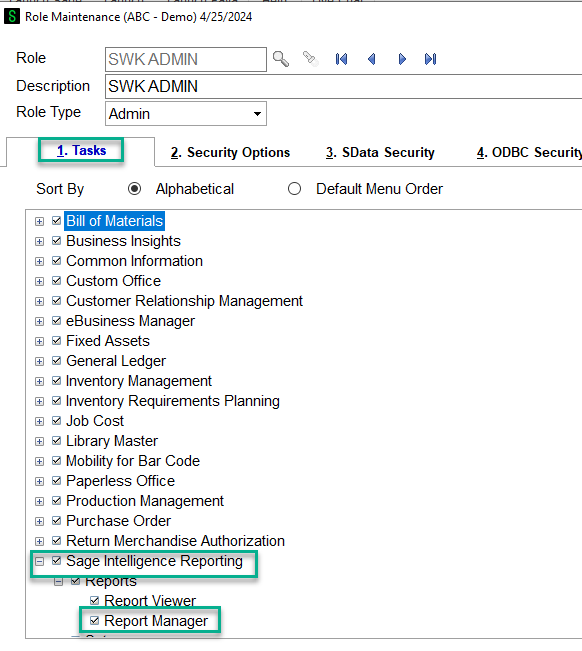
------------------------------
Bruce Kern
SWK Technologies Inc.
------------------------------