Agree. Hiding file extension for known file types results in the unobservant user opening invoice.pdf.exe
Me: "Right click on Autorun.exe and select run as administrator", User: "which autorun, there are 2?"
Always turn off the hide extension option and change association of .csv to Notepad.
Original Message:
Sent: 12-19-2023 22:34
From: Doug Higgs
Subject: Rename File Perform Logic
Yes. I can't think of a good reason for hiding the file extension. Why is it even an option?
------------------------------
Doug Higgs
Midwest Commerce Solutions, Inc
(312) 315-0960
Chauffeur, Chef, and Personal Assistant to Sprinkles
------------------------------
Original Message:
Sent: 12-19-2023 22:02
From: Jeff Schwenk
Subject: Rename File Perform Logic
Whoa, that perform logic file is an oldie but goodie. Slade was a master of scripting back in the day!!
@Tina Leonard - I think everyone has been bitten by the hidden extension issue at least once. I learned the hard way back in the mid-aughts. Since that day, I always click on the display file name extensions options in file explorer view tab. Not sure why MSFT defaults this setting to off.
------------------------------
Jeff Schwenk
Bottomline Software, Inc.
(540) 221-4444
Original Message:
Sent: 12-19-2023 11:22
From: Tina Meacham
Subject: Rename File Perform Logic
@David Overholt UGH...yes that was it! Thank you!
------------------------------
Tina Meacham
RKL eSolutions, LLC
Original Message:
Sent: 12-19-2023 06:34
From: David Overholt
Subject: Rename File Perform Logic
Tina,
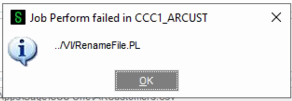
the error message is indicating that it can't find the file Renamefile.PL in the vi folder. so the code in the file is not an issue.
I see you copied that text and renamed the file. is it possible that there is a hidden .TXT file extension on the file name or something?
------------------------------
David Overholt
DWD Technology Group
Original Message:
Sent: 12-18-2023 17:58
From: Kevin Moyes
Subject: Rename File Perform Logic
That looks fine (as long as you have copied that file to the right folder on the server).
If it failed in MAS90 mode I'd suspect something is blocking the rename at the operating system level, unrelated to Sage 100.
You are testing with a UNC path to the file, and you have full control over the file, it isn't open or marked as Read Only...?
------------------------------
Kevin Moyes
Technical Systems Analyst
Munjal White Consulting Co.
Toronto ON
Original Message:
Sent: 12-18-2023 17:52
From: Tina Meacham
Subject: Rename File Perform Logic
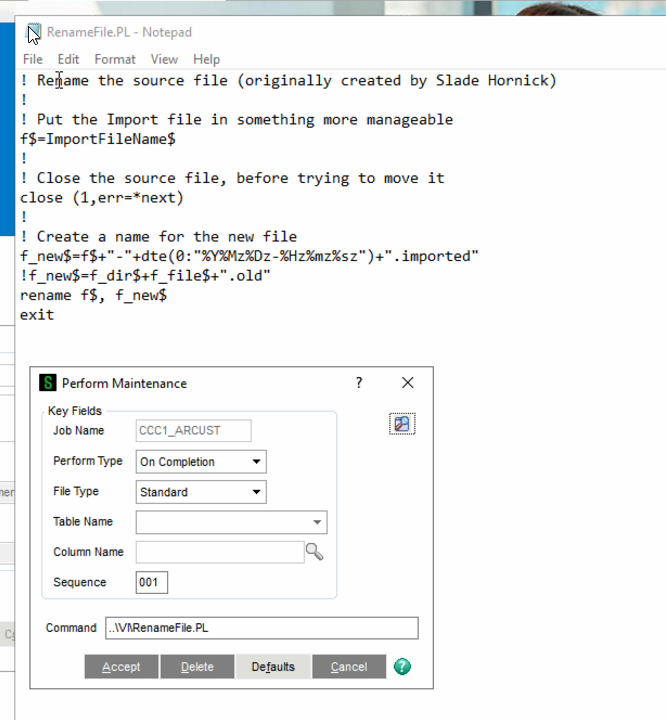
Tried in MAS90 and failed. Just so you can view and make sure I haven't missed anything. I do not need to edit the file or anything correct?
------------------------------
Tina Meacham
RKL eSolutions, LLC
Original Message:
Sent: 12-18-2023 17:09
From: Kevin Moyes
Subject: Rename File Perform Logic
I'd try MAS90 style, just to confirm it is a permission issue, not something in the perform logic itself.
! Rename the source file (originally created by Slade Hornick)
!
! Put the Import file in something more manageable
f$=ImportFileName$
!
! Close the source file, before trying to move it
close (1,err=*next)
!
! Create a name for the new file
f_new$=f$+"-"+dte(0:"%Y%Mz%Dz-%Hz%mz%sz")+".imported"
!f_new$=f_dir$+f_file$+".old"
rename f$, f_new$
exit
------------------------------
Kevin Moyes
Technical Systems Analyst
Munjal White Consulting Co.
Toronto ON
Original Message:
Sent: 12-18-2023 17:04
From: Tina Meacham
Subject: Rename File Perform Logic
I stopped the Sage Service and ran as my user. Which I confirmed is in the Administrator group. Still not working, just get this message.
------------------------------
Tina Meacham
RKL eSolutions, LLC
Original Message:
Sent: 12-18-2023 14:18
From: Kevin Moyes
Subject: Rename File Perform Logic
The windows account used by the Sage service will need the permission for this. (We always run the Sage service as a named user with local admin permission, as well as access to any network paths used with Sage 100).
------------------------------
Kevin Moyes
Technical Systems Analyst
Munjal White Consulting Co.
Toronto ON
Original Message:
Sent: 12-18-2023 14:07
From: Tina Meacham
Subject: Rename File Perform Logic
Just says failed. I'm trying to change the service for SQL and Sage, as they appear to be running as local accounts. Then try again.
------------------------------
Tina Meacham
RKL eSolutions, LLC
Original Message:
Sent: 12-18-2023 12:59
From: David Overholt
Subject: Rename File Perform Logic
Are you getting errors or is it just not actually doing anything?
------------------------------
David Overholt
DWD Technology Group
Original Message:
Sent: 12-18-2023 12:36
From: Tina Meacham
Subject: Rename File Perform Logic
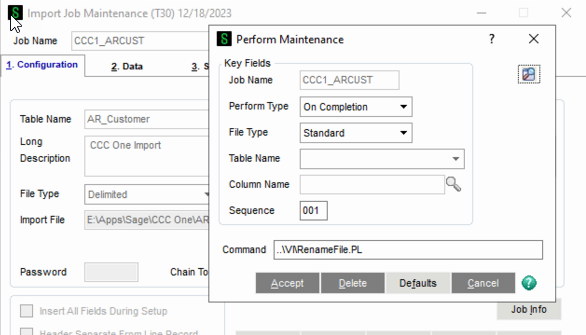
Kevin
That was a typo on my part I do have it in there.
------------------------------
Tina Meacham
RKL eSolutions, LLC
Original Message:
Sent: 12-18-2023 12:31
From: Kevin Moyes
Subject: Rename File Perform Logic
You are missing a backslash in your command.
..\VI\RenameFile.PL
Edit:
You can also put the PL file in the CM\script folder, and it should be automatically copied during upgrade migrations. (Located in the VI folder means you have to copy it manually during upgrades).

------------------------------
Kevin Moyes
Technical Systems Analyst
Munjal White Consulting Co.
Toronto ON