Sage 100

 View Only
  • 1.  Remove APS / Repay...

    Posted 08-22-2023 18:03

    Customer has switched from Repay to eBizCharge, and I'm about to do an upgrade from v2020 to v2023 (Premium to Premium). 

    I can see an Uninstall button (greyed out, in Repay Payment Options), but don't see any instructions about how it works in the documentation... beyond "click it".

    I am guessing I need to disable Repay first, before the button becomes active... and I'm hoping to avoid the module re-installs in the old version, doing the disable / uninstall at the last minute before the upgrade migration (Friday).  Has anyone done this before?  Any insights / tips to share?


    ------------------------------
    Kevin Moyes
    Technical Systems Analyst
    Munjal White Consulting Co.
    Toronto ON
    ------------------------------


  • 2.  RE: Remove APS / Repay...

    Posted 08-23-2023 16:06

    I am interested in this as well.  Client dropped APS for Century last year and I have an upgrade to v2023 coming up.  FWIW, the client did not appreciate the "hidden" charges he was hit with from Century.  But then, I was not involved with any presales or post sales installation support.


    ------------------------------
    Jeff Schwenk
    Bottomline Software, Inc.
    (540) 221-4444
    ------------------------------


  • 3.  RE: Remove APS / Repay...

    Posted 08-28-2023 11:00

    Update (this upgrade went Live over the weekend).

    The reply I received from Repay / Brittany (who is usually very helpful) basically ignored that I wanted to uninstall / Repay lost the customer, telling me to just re-install Repay software in the new version.

    Before you can even try to Uninstall, Repay needs to be made inactive in all company codes (including test copies of the Live company code). 

    Then click Uninstall, and confirm.
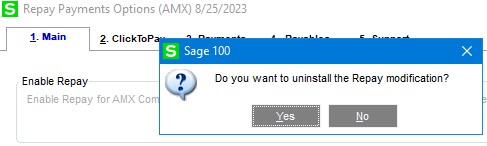
    After about a half-second, there was an error.
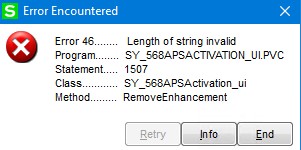
    Click to re-open the Repay Payment Options (for a re-try) and... another error.  No way to do anything else.
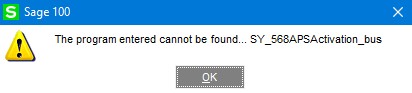
    I chose to ignore this and proceed with the upgrade, which went fine... except all the Repay system table data (Role tasks, menu tasks...) were still present in the new system.  Thankfully the panel changes (like settings in Customer Maintenance) appear to have been removed.

    Conclusions:

    • Be prepared for the "Uninstall" to not work.
    • Ignoring Repay's failed uninstall attempt (in the source system, during an upgrade) might work, but there will be garbage left in the new system's roles / menus... which presumably could be cleaned up by removing the raw table data.
      • If anyone knows what tables need to be edited to remove the obsolete records, I'd appreciate the tips, because I might need to do that if the customer complains.  SY_Task... SY_RoleSecurity... SY_Menu...


    ------------------------------
    Kevin Moyes
    Technical Systems Analyst
    Munjal White Consulting Co.
    Toronto ON
    ------------------------------


  • 4.  RE: Remove APS / Repay...

    Posted 08-04-2025 15:22

    Any new SOP's for this?  RIP Repay.  You were great until your soul to the PE devils.  There outa be a law.

    So we are moving the client to Nuvei (Tom Nanci).

    Waiting to see his SOP.

    They are also using CimCloud CC processing

    Surely, someone has encountered this issue since 2023.

    Help us Obi Wan....

    Thanks in advance.


    ------------------------------
    Jeff Schwenk
    Owner
    Bottomline Software, Inc.
    Waynesboro VA
    (540) 221-4444

    Improving bottom lines for over 25 years!
    ------------------------------


  • 5.  RE: Remove APS / Repay...

    Posted 08-05-2025 15:23
    Edited by Jeff Schwenk 08-05-2025 15:37
      |   view attached

    This is interesting from Tom Nanci,

    Nuvei has built an uninstall tool and is configured based on your client's serial number & customer number. If we want to do it manually or re-install AR/SO/LM modules we can do that too. The utility tries to delete some program files mainly, and then tries to remove panel customizations.

    PDF attached.

    Has anyone used it?

    Paya Development Team did the work. ....

    https://www.linkedin.com/in/chris-mattson-b11895a8/

    https://www.linkedin.com/in/shawn-burt-15bb3929/


    ------------------------------
    Jeff Schwenk
    Owner
    Bottomline Software, Inc.
    Waynesboro VA
    (540) 221-4444

    Improving bottom lines for over 25 years!
    ------------------------------

    Attachment(s)