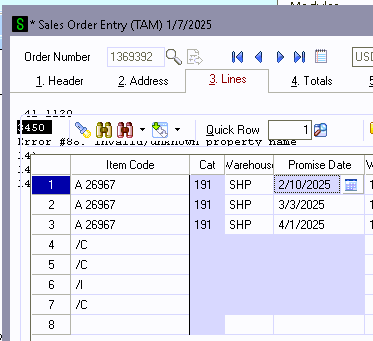
Good Morning! Does anyone have a script that successfully accesses a work ticket and then the lines associated with that work ticket? I have a client that uses ScanForce's Make to Order enhancement which gives us a link between SO and PM. This script happily opens the WT Header table and will update header fields but trying to open the lines associated with the work ticket is crashing out on me with an error 88 that half prints on the screen so I can't see the full error message. Can anyone see what I'm doing wrong? Thank you!
'dim variables
WTNum = "" :  PromiseDate = "" :

'get values from SO Sales Order Detail

retVal = oBusObj.GetValue("PromiseDate$", PromiseDate)
retVal = oBusObj.GetValue("SO519_WorkTicketNo$", WTNum)

'only if WT number is populated
if WTNum <> "" then
	'open Work Ticket Object
	oWT2 = oSession.GetObject("PM_WorkTicket_Bus")
	if oWT2 <> 0 then
		set oWT2 = oSession.AsObject(oWT2)
			retD = oScript.DebugPrint("WT Object Open")
		retVal = oWT2.SetIndex("KWORKTICKETNO")
		retVal = oWT2.SetKeyValue("WorkTicketNo$", WTNum)
		retVal = oWT2.SetKey()
			retD = oScript.DebugPrint("WT found? " & retVal)

		set oWTLines = oWT2.AsObject(oWT2.Lines)
			retVal = oWTLines.MoveFirst()
			Do until oWTLines.EOF
				retVal = oWTLines.SetValue("PromiseDate$", PromiseDate)
				retVal = oWTLines.Write()
			retVal = oWTLines.MoveNext()
			Loop
	end if ' WT rights

retVal = oSession.DropObject("PM_WorkTicket_Bus")

end if 'WT number populated
This is what the error looks like in case it helps:
------------------------------
Kate Krueger
Consultant
MicroAccounting
214.800.5555x553
------------------------------