Sage 100

 View Only
  • 1.  Print Additional Documents during SO Invoice Printing

    Posted 06-17-2025 14:57
    Edited by Beth Bowers 06-17-2025 15:01

    NEVER MIND - even though it didn't show in the Viewer, I did receive both documents in my test email.

    Have an end user actually trying to use this, darn them.

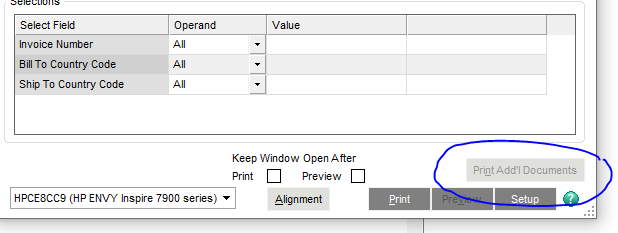
    So when using SO Invoice Printing (NOT Quick Print), there is this button at the bottom.  In both Printing and Quick Print, you can click on the icon beside the Paperless Options and include additional documents, but I do not see in Paperless Viewer that they actually printed with the invoice.  And I can't get this button to be active no matter what Paperless Option I choose.  Anyone know the secret?  Sage doesn't even mention the field in SO Invoice Printing, so I'm starting to think it's an April Fool's joke.


    ------------------------------
    Beth Bowers
    Dog Mom, first and foremost. The rest is all just necessary to keep the dogs in biscuits.
    (269) 358-0989
    ------------------------------


  • 2.  RE: Print Additional Documents during SO Invoice Printing

    Posted 06-18-2025 16:14

    In S/O Options, if Print Shipping Labels = Y or Print COD Labels = Y then this button should light up because those are considered chained reports/forms.


    ------------------------------
    Alnoor Cassim
    Accounting Systems, Inc. (ASI)
    ------------------------------


  • 3.  RE: Print Additional Documents during SO Invoice Printing

    Posted 06-18-2025 16:31

    @Alnoor Cassim - ooh, I was certainly barking up the wrong tree!  THANK YOU!


    ------------------------------
    Beth Bowers
    Dog Mom, first and foremost. The rest is all just necessary to keep the dogs in biscuits.
    (269) 358-0989
    ------------------------------