Phil,
That is normally only needed for MAS_Reports. Usually MAS_User doesn't own any objects
within the databases, so setting database ownership works directly.
use MAS_###;
exec sp_changedbowner 'MAS_User';
exec sp_dropuser 'MAS_Reports';
exec sp_grantdbaccess 'MAS_Reports';
exec sp_addrolemember 'db_datareader', 'MAS_Reports';
------------------------------
Kevin Moyes
Technical Systems Analyst
Munjal White Consulting Co.
------------------------------
Original Message:
Sent: 11-23-2022 14:28
From: Phil McIntosh
Subject: Premium version moved from live server to hosting server
Usually, you have to remove MAS_User from each database and then add it back, which get the actual MAS_User with the correct guid for the new server
------------------------------
Phil McIntosh
President
Friendly Systems, Inc.
------------------------------
Original Message:
Sent: 11-23-2022 14:22
From: Kevin Moyes
Subject: Premium version moved from live server to hosting server
I think I've seen that SQL error before... where the "old" MAS_User owns something in the database (like a schema) blocking the ownership change, due to the name conflict. Try looking in each database's Users to track down what's blocking the change.
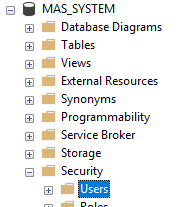 (Be sure you have good backups before making any changes!).
------------------------------
Kevin Moyes
Technical Systems Analyst
Munjal White Consulting Co.