You could
carefully look to see if the UDTs are missing from the dictionary and possibly edit it. Here is 1 way:
1. Open pvxwin32.exe from File Explorer.
2. At the prompt type CD ..
(to put you into the \mas90 folder)
3. Type DD and press Enter
4. In Data Dictionary Maintenance, use the Binocular button to search for one of the UDTs. If you don't see it that's the problem. You could run Customizer Export Wizard out of the old system and Import Wizard into the new.
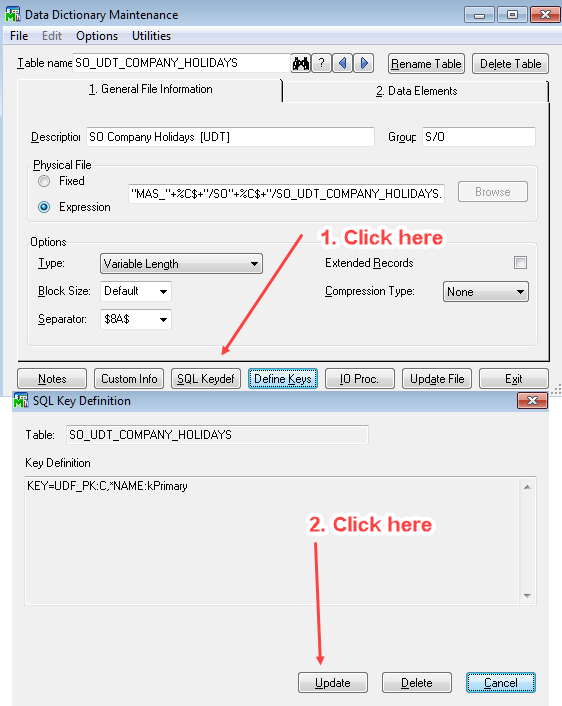
5. But if you do see it, do the steps in this screenshot (where I'm using my own UDT as an example), then click OK on the next message you see. This updates the Providex.KDF file. Sometimes the table entry is missing from here even though it is in DDF. Exit DD Maintenance then try UDF Maintenance again.
------------------------------
Alnoor Cassim
Email:
alnoor@asifocus.comPh: 949-689-9887
Orange County, CA
------------------------------