Sage 100

 View Only
  • 1.  Premium server move using Merge method... and UDT's are missing!?!

    Posted 02-19-2021 12:49
    Customer is changing hosting providers and the old host won't give a full server image to migrate from, so I'm trying the Merge method (from @Carmen Cruz ).  Most of it worked, but UDT's are broken.  They exist in the company databases, listed in the system table, but invisible within Sage 100.
    Any ideas on how I can fix the problem?
    ​​​


    ------------------------------
    Kevin Moyes
    Technical Systems Analyst
    Munjal White Consulting Co.
    Toronto ON
    ------------------------------


  • 2.  RE: Premium server move using Merge method... and UDT's are missing!?!

    Posted 02-19-2021 14:41
    Edited by Alnoor Cassim 02-19-2021 14:41
    You could carefully look to see if the UDTs are missing from the dictionary and possibly edit it. Here is 1 way:

    1. Open pvxwin32.exe from File Explorer.
    2. At the prompt type CD ..
    (to put you into the \mas90 folder)
    3. Type DD and press Enter
    4. In Data Dictionary Maintenance, use the Binocular button to search for one of the UDTs. If you don't see it that's the problem. You could run Customizer Export Wizard out of the old system and Import Wizard into the new.
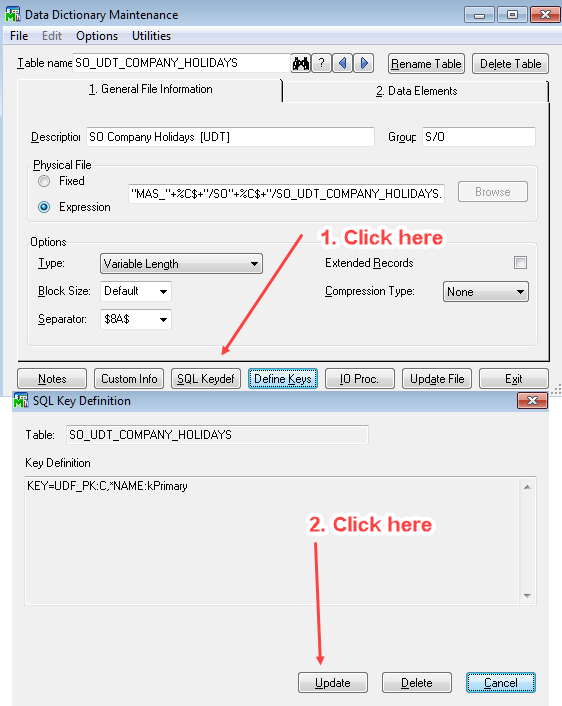
    5. But if you do see it, do the steps in this screenshot (where I'm using my own UDT as an example), then click OK on the next message you see. This updates the Providex.KDF file. Sometimes the table entry is missing from here even though it is in DDF. Exit DD Maintenance then try UDF Maintenance again.


    ------------------------------
    Alnoor Cassim

    Email: alnoor@asifocus.com
    Ph: 949-689-9887
    Orange County, CA
    ------------------------------


  • 3.  RE: Premium server move using Merge method... and UDT's are missing!?!

    Posted 02-19-2021 14:54
    Thanks Alnoor.  I appreciate the reply. 

    After posting I tried a custom office export / import, and that seemed to bring most of them back online (without a loss of data).  For one of the tables that didn't work for, creating the table again manually seemed to work (again, without a loss of data).  Checking the data dictionary for another missing one, and it is indeed not listed in the DD lookup.

    Before going Live I'll be sure to make a fresh export of custom office settings.  (This is just a test right now).

    This is so much fun! :-/

    ------------------------------
    Kevin Moyes
    Technical Systems Analyst
    Munjal White Consulting Co.
    Toronto ON
    ------------------------------