If you are not running SQL backups from within SQL, change the "Recovery model" to Simple... for all Sage databases.
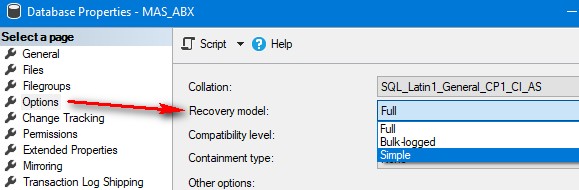
Simple recycles log file space, with backups done as file copies. (Most important is the MDF, but BAK files and server snapshots are fine too).
Full retains the log files (which grow without limit) until a SQL backup command is run against the database. (The backup releases the log file space for re-use). This is part of a backup and recovery strategy that can pair a full backup with the log file to restore a database up to a point in time (beyond what the backup contains). This architecture was from the pre-RAID days, where you would put backup and log file onto one physical drive, and the main data file on another physical drive. That way you could always restore up-to-the-minute if either drive failed. (MDF = full data, and BAK + LDF can be used to re-create the MDF). Obviously this configuration needs a high level of skill in whoever is supporting the SQL environment, which is rarely the case in the Sage 100 world.
Edit: with Full you can also do full backups (eg. nightly) + log backups (eg. hourly) to increase recovery options, with the backups being smaller (plus having a smaller performance hit) than multiple full backups. If you have clients with a business need to have more-than-daily backups, consult with a SQL DBA to talk options.
------------------------------
Kevin Moyes
Technical Systems Analyst
Munjal White Consulting Co.
------------------------------
Original Message:
Sent: 02-28-2023 11:28
From: Wayne Schulz
Subject: Premium 2019 to 2022 migration problem
@Carmen Cruz - For your class - I'm interested in what the best practice is for backing up SQL servers, as well as how to set up the server so that the log files don't grow exponentially. In all my other SQL upgrades, I've had IT manage the SQL backups and logs; however I have one now where the MSP seems to think that should be my role.
I'm not 100% sure whether a "regular" network backup is enough to save the SQL databases or if there is another step that should be taken. Fortunately, once Sage 100 Premium is up and running it seems fairly bulletproof regarding data file corruption.
------------------------------
Wayne Schulz
wayne@s-consult.com
Schulz Consulting
(860) 516-8990
Moodus, CT
------------------------------
Original Message:
Sent: 02-28-2023 11:06
From: Carmen Cruz
Subject: Premium 2019 to 2022 migration problem
Thank you Kevin, Sorry we are going to miss you this year.
Hi Elliott,
I hope this gets through since I cant seem to logon to the website AGAIN. Anyways, lets meet or come to my class and I will cover as much as I know. Looking forward to seeing you all this year.
Kind Regards,
Original Message:
Sent: 2/27/2023 2:54:00 PM
From: Kevin Moyes
Subject: RE: Premium 2019 to 2022 migration problem
Talk to Elliott at MOTM. (Sadly I won't be there). He bought into the idea of Premium to Premium upgrades needing to be easier, but I didn't ask for a step-by-step guide on what the migration tool does.
------------------------------
Kevin Moyes
Technical Systems Analyst
Munjal White Consulting Co.
Original Message:
Sent: 02-27-2023 14:43
From: Phil McIntosh
Subject: Premium 2019 to 2022 migration problem
Can we get Sage to tell us, step by step, exactly what the migration tool does, especially for Premium migrations?
------------------------------
Phil McIntosh
President
Friendly Systems, Inc.
Original Message:
Sent: 02-27-2023 09:44
From: Wayne Schulz
Subject: Premium 2019 to 2022 migration problem
This is possibly a huge Sage issue.
I have a similar migration where the errors differ, but the outcome is similar. The biggest problem is if the migration doesn't work or crashes midway through the process, you either have to restore your Sage data ( for the system you are migrating to ) or reinstall the version of Sage you are migrating to.
------------------------------
Wayne Schulz
wayne@s-consult.com
Schulz Consulting
(860) 516-8990
Moodus, CT
Original Message:
Sent: 02-26-2023 13:07
From: Jane Scanlan
Subject: Premium 2019 to 2022 migration problem
Phil,
This is some kind of Sage issue, because another client of Next Level's had the same problem. I'm attaching the installer here that resolved the issue.
------------------------------
Jane Scanlan
Partner
Next Level Manufacturing Consulting Group