Sage 100

 View Only
Expand all | Collapse all

Preferred way for Opening Ports for Sage 100 Advanced.

  • 1.  Preferred way for Opening Ports for Sage 100 Advanced.

    Posted 10-06-2021 16:23
    There appears to be two ways for opening ports.  They seem to be very similar but slightly different.  One specifies open a PORT and the other specifies an executable.  Is one a better (more secure) method?

    KB 18231


    or KB  105259


    ------------------------------
    Jeff Schwenk
    FORMER 90M Board Member -140,000,000 is a TERRIBLE thing to waste!!!
    Bottomline Software, Inc.
    Waynesboro VA
    540-221-4444
    ------------------------------


  • 2.  RE: Preferred way for Opening Ports for Sage 100 Advanced.

    Posted 10-07-2021 09:33
    I thought all of these were needed - inbound and outbound rules. I do all of these.

    Sage Advanced firewall settings

     Create INBOUND rules to allow the following:

    <drive letter>\..\mas90\home\pvxwin32.exe

    <drive letter>\..\mas90\Home\pvxiosvr.exe             (if using CS/ODBC)


    Create OUTBOUND rules to allow the following:

    <drive letter>\..\mas90\launcher\launch32.exe

    <drive letter>\..\mas90\launcher\launcher.2016.exe

    <drive letter>\..\mas90\launcher\launcher.old.exe 


    Also create a INBOUND rule for the Sage 100 PORT number.


    ------------------------------
    Mary Mays
    Sr. Consultant, DSD Business Systems
    DSD Business Systems
    Goddard KS
    316-269-4264
    ------------------------------


  • 3.  RE: Preferred way for Opening Ports for Sage 100 Advanced.

    Posted 10-08-2021 02:34
    I also do all that @Mary Mays has mentioned.  I know all of them are not necessary on every install, it depends upon What IT has enabled vs. disabled.​

    ------------------------------
    [Michele] [Herzog] [CPA,CITP, CGMA]
    [Overland Park] [KS]
    [816-520-1365]
    ------------------------------


  • 4.  RE: Preferred way for Opening Ports for Sage 100 Advanced.

    Posted 10-08-2021 18:46
    Any firewall gurus out there that can shed some light?  Is one way old school and another new school?  I would hazard a guess that opening the wall for a program would be safer than opening a port.  Would like a better understanding of the why's and wherefores....

    ------------------------------
    Jeff Schwenk
    FORMER 90M Board Member -140,000,000 is a TERRIBLE thing to waste!!!
    Bottomline Software, Inc.
    Waynesboro VA
    540-221-4444
    ------------------------------


  • 5.  RE: Preferred way for Opening Ports for Sage 100 Advanced.

    Posted 10-08-2021 09:11
    I just do the port number inbound / outbound rules and never had an issue.

    ------------------------------
    Bruce Kern
    SWK Technologies Inc.
    ------------------------------


  • 6.  RE: Preferred way for Opening Ports for Sage 100 Advanced.

    Posted 04-23-2024 14:56

    Looking for confirmation now that I have started using Sage 64-bit.

    In the KB's, drive letter>\..\mas90\home\pvxwin32.exe is referenced in the inbound/outbound rules.  If you are installing 64-bit, do you now reference ..\pvxwin64.exe??


    ------------------------------
    Jeff Schwenk
    Bottomline Software, Inc.
    (540) 221-4444
    ------------------------------


  • 7.  RE: Preferred way for Opening Ports for Sage 100 Advanced.

    Posted 04-23-2024 15:28

    @Jeff Schwenk - good question.  I've noticed that all of the workstations still call pvxwin32...


    ------------------------------
    Beth Bowers
    (269) 358-0989
    ------------------------------


  • 8.  RE: Preferred way for Opening Ports for Sage 100 Advanced.

    Posted 04-23-2024 16:14

    I have started adding the pvxwin64.exe to the firewall rules for any 64-bit installation.


    ------------------------------
    Mary Mays
    Sr. Consultant, DSD Business Systems
    DSD Business Systems
    ------------------------------


  • 9.  RE: Preferred way for Opening Ports for Sage 100 Advanced.

    Posted 04-23-2024 16:44

    And another observation (or is it just me), when installing Sage 64 bit on a clean server/workstation, does it NOT install the sotamas90 odbc driver or do you HAVE to install the 64 bit installer as well?  I am not seeing it unless the extra step to add the 64 bit installer is taken.  Seems odd that if you install the 64 bit workstation, the program will install the sotamas90 driver without prompting.

    Thoughts?  What am I missing?


    ------------------------------
    Jeff Schwenk
    Bottomline Software, Inc.
    (540) 221-4444
    ------------------------------


  • 10.  RE: Preferred way for Opening Ports for Sage 100 Advanced.

    Posted 04-23-2024 16:52
    Edited by Kevin Moyes 04-23-2024 16:55

    SOTAMAS90 is not a driver... it is a DSN that uses the Providex ("MAS 90 4.0 ODBC...") driver, and I believe the 64-bit workstation install includes the 64-bit driver without an extra step.  (Otherwise printing would not work at all).

    The SOTAMAS90 DSN should use whatever drivers are installed on that machine, which is easy to check.
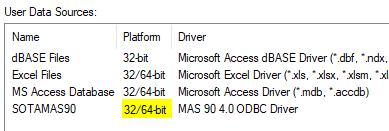
    Edit:

    The DSN (SOTAMAS90) is not created during the workstation install... it is created / re-created as you successfully log in to Sage 100.


    ------------------------------
    Kevin Moyes
    Technical Systems Analyst
    Munjal White Consulting Co.
    Toronto ON
    ------------------------------


  • 11.  RE: Preferred way for Opening Ports for Sage 100 Advanced.

    Posted 04-25-2024 10:03

    Some feedback from Sage

    Community Hub (sage.com)


    ------------------------------
    Jeff Schwenk
    Bottomline Software, Inc.
    (540) 221-4444
    ------------------------------