Not by default.
I was able to get the table to appear in the VI import table selection but unfortunately, the import kept failing every attempted import claiming the ModuleCode is required.
Turns out, the SY_MemoManager_Bus expects to be launched from one of the known modules that memos can exist under, i.e. A/P, A/R, S/O, etc and because launching the VI job causing the module to be set to V/I, this would prevent the records from being written.
So it requires some perform logic on the Execution and Completion events.
Below are the steps I used to get the table to be available to select in the VI Import table selection.
File > Run > SYZCON > DD, locate the "GL_CompanyMemoManagerSettings" table, click "Custom Info", you should see the the row for "Business Object" is blank.
If you enter "SY_MemoManager_Bus" as seen below and update the file.
Then VI Import will let you select the table.
Here is the perform logic overview.
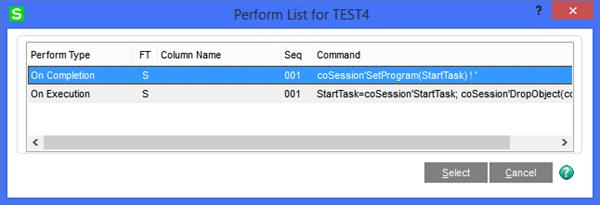
Completion:
coSession'SetProgram(StartTask) ! '
Execution:
StartTask=coSession'StartTask; coSession'DropObject(coBusiness); coSession'SetProgram(coSession'LookupTask("SY_MemoManager_UI")); coBusiness=coSession'GetObject("SY_MemoManager_Bus") ! '
The perform logic is just saving the existing task id to a variable and then dropping the current coBusiness object handle that was created under the VI module.
It then gets a new object handle for coBusiness after setting the start program to the SY_MemoManager_UI.
------------------------------
David Speck II
Tennessee Software Solutions
------------------------------