@Jeff Schwenk asked me recently if the Perform Logic I shared several years ago for preventing duplicate invoices from A/P Invoice imports could be re-purposed for A/P Manual Check Entry. In both cases by default, V/I treats an existing Invoice No on an import as an Adjustment instead of a duplicate to reject.
So here is one I did for a client last year for A/P Manual Check Entry.
Slightly different than the one A/P Invoice Data Entry.
This worked for Jeff for 2019 Adv and 2018 Adv.
Happy importing!
In Import Job Maintenance click on Perform button and set it up like this:
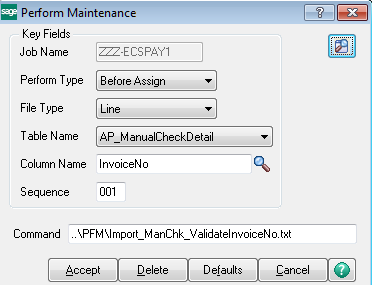
Create a folder called PFM under \Mas90 and place the attached Import_ManChk_ValidateInvoiceNo.txt there.
Note: You don't have to put it in PFM folder. That is just my own convention.
When a dupe is found it will force the record to fail and it will appear in the Job Log.
------------------------------
Alnoor Cassim
Free Agent Developer and Consultant
CallForHelp.biz
Email:
alnoor@callforhelp.bizOrange County, CA
------------------------------