Original Message:
Sent: 03-17-2026 13:40
From: Wayne Schulz
Subject: Part of this app has been blocked - during workstation setup on Sage 100 2023 STD to Windows 11
I used Gemini to get the answer ( which worked ) and I didn't have a chance to test any of the other suggestions. Here is the full reply.
It looks like Windows 11's Smart App Control is stepping in and blocking your installer. This security feature prevents apps from loading certain files-in this case, CrystalDecisions.VSDesigner.Mobile.resources.dll (which is part of SAP Crystal Reports)-because it can't verify the developer's digital signature.
Here are the ways you can bypass this block and get the app to run, ranging from the safest method to the "nuclear" option.
Method 1: Unblock the downloaded file (Recommended)
Often, Windows flags files downloaded from the internet and applies blanket restrictions. You can manually tell Windows that you trust the file.
Right-click the setup/installer file you are trying to run.
Select Properties.
On the General tab, look at the very bottom for a Security section.
If you see a checkbox that says Unblock, check it.
Click Apply, then OK, and try running the app again.
Method 2: Run as Administrator
Sometimes simply elevating the permissions bypasses the restriction.
Right-click the installer file.
Select Run as administrator.
Click Yes on the User Account Control prompt.
Method 3: Turn off Smart App Control (The Nuclear Option)
If the above steps don't work, the only way to get past this specific error is to disable Smart App Control entirely.
Important Warning: Turning off Smart App Control is a permanent decision. Once you turn it off, you cannot turn it back on without completely reinstalling Windows.
If you absolutely need to run this installer and understand the security trade-off:
Click the Start button and search for Windows Security.
Go to App & browser control on the left menu.
Click on Smart App Control settings.
Change the setting to Off.
Restart your computer and run the installer again.
Note: I also noticed that "Activate Windows" watermark hiding in the background! Just a heads up that you might need to head to your Settings to take care of that eventually, as unactivated Windows can sometimes restrict certain system and personalization settings.
Would you like me to help you find the latest, officially signed version of the Crystal Reports software so you might not have to compromise your security settings to install it?
Original Message:
Sent: 03-17-2026 12:31
From: David Overholt
Subject: Part of this app has been blocked - during workstation setup on Sage 100 2023 STD to Windows 11
I 100% agree with @Beth Bowers WTH?
@Wayne Schulz what were the above steps that "If the above steps don't work," are referencing?
------------------------------
David Overholt
Programmer/Project Manager
DWD Technology Group
Fort Wayne IN
(260) 399-8655
Original Message:
Sent: 03-17-2026 12:00
From: Beth Bowers
Subject: Part of this app has been blocked - during workstation setup on Sage 100 2023 STD to Windows 11
OK, what the what kind of an option is that where it can't be turned back on without "completely reinstalling Windows"? REALLY, Microsoft? That really gives off "We are so much smarter than you" vibes...
------------------------------
Beth Bowers
Dog Mom, first and foremost. The rest is all just necessary to keep the dogs in biscuits.
(269) 358-0989
Original Message:
Sent: 03-17-2026 11:41
From: Wayne Schulz
Subject: Part of this app has been blocked - during workstation setup on Sage 100 2023 STD to Windows 11
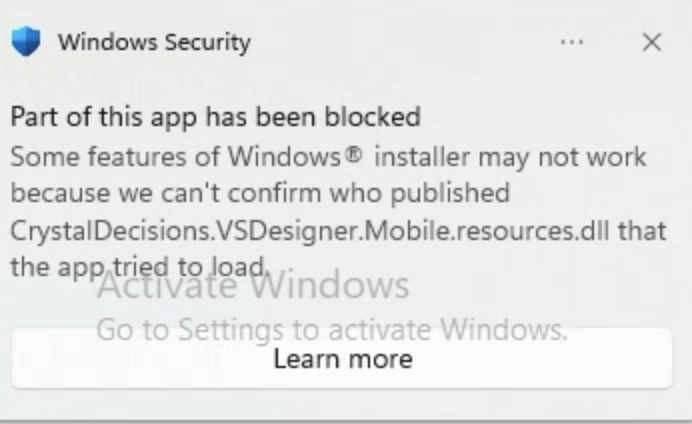
This was the first time I've run into this security feature which blocked the setup of the Sage 100 workstation (I was running the setup "as administrator).
This seems to be a "feature" of Windows 11 Smart App control.
I took the quick route:
Turn off Smart App Control (The Nuclear Option)
If the above steps don't work, the only way to get past this specific error is to disable Smart App Control entirely.
Important Warning: Turning off Smart App Control is a permanent decision. Once you turn it off, you cannot turn it back on without completely reinstalling Windows.
If you absolutely need to run this installer and understand the security trade-off:
Click the Start button and search for Windows Security.
Go to App & browser control on the left menu.
Click on Smart App Control settings.
Change the setting to Off.
Restart your computer and run the installer again. (I did not reboot the workstation and this worked)
------------------------------
Wayne Schulz
wayne@s-consult.com
Schulz Consulting
(860) 516-8990
Connecticut
------------------------------