Sage 100

 View Only
  • 1.  Paperless to Sent box or copy back to staff

    Posted 10-04-2021 18:28
    I frequently get the request to see the Paperless appear in the sent box of the staff or an easy way to setup a copy of each outbound to go to a staff person.   Options?  On 2018 going to 2021 this week.

    ------------------------------
    Larry Bradford
    Accounting Technology LLC Consultant and Owner
    Accounting Technology, LLC
    Fairfax VA
    703-913-3500
    ------------------------------


  • 2.  RE: Paperless to Sent box or copy back to staff

    Posted 10-04-2021 18:53
    I've done an 'add'l email' on each customer's setup and put in an employee email as they wanted a copy in their email somewhere.  Haven't figured out the 'sent' so went the other way.
    They could set up a rule to put them all into a folder
    N

    ------------------------------
    Nancy Hanson
    Blytheco LLC
    Eagan MN
    ------------------------------


  • 3.  RE: Paperless to Sent box or copy back to staff

    Posted 10-04-2021 19:02
    A salesperson feature was added recently for auto CC / BCC, but that is just for customer facing documents.

    I believe the authentication account might have the "Sent" item, depending on the email server settings.  (Not the "From" address' Sent folder).

    ------------------------------
    Kevin Moyes
    Technical Systems Analyst
    Munjal White Consulting Co.
    Toronto ON
    ------------------------------


  • 4.  RE: Paperless to Sent box or copy back to staff

    Posted 10-05-2021 09:48
    Edited by Brett Zimmerman 10-05-2021 09:51
    Perfect timing, especially @Kevin Moyes.  This was news to me, but good news!  To my surprise, just yesterday a client asked if they could have their Paperless 'sent' e-mails show in 'Sent' in Outlook "like how it used to" (they recently had to change the Paperless authentication e-mail).  They're on Office 365 (smtp.office365.com, 587, TLS/STARTTLS).  So I'll be pleased to simply instruct IT to make the necessary change to their e-mail settings.

    But I, too typically suggest always including a standard internal email address for each customers' Paperless email setup.


    ------------------------------
    Brett Zimmerman
    Net at Work
    Greater Boston Area
    ------------------------------


  • 5.  RE: Paperless to Sent box or copy back to staff

    Posted 10-05-2021 09:53
    I think it is annoying to setup three different paperless settings for each customer as it is.  Adding another email to each setup seems annoying.

    ------------------------------
    Larry Bradford
    Accounting Technology LLC Consultant and Owner
    Accounting Technology, LLC
    Fairfax VA
    703-913-3500
    ------------------------------


  • 6.  RE: Paperless to Sent box or copy back to staff

    Posted 10-05-2021 10:11
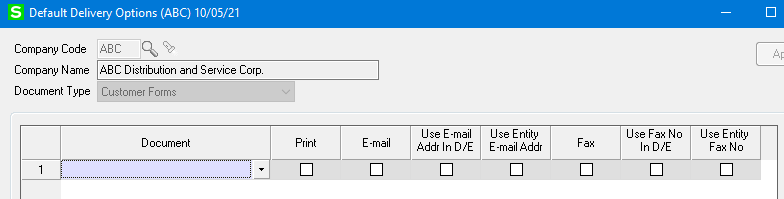
    New feature for Paperless defaults can help with that.

    ------------------------------
    Kevin Moyes
    Technical Systems Analyst
    Munjal White Consulting Co.
    Toronto ON
    ------------------------------


  • 7.  RE: Paperless to Sent box or copy back to staff

    Posted 10-05-2021 11:09
    @Kevin Moyes  Do you know if the new feature works with Google Mail (Google Workspace)?  My customer sends out purchase orders and the email address always comes from the user id field set up in Company Maintenance, Email tab NOT the email address set up in Paperless Office, Setup, Form Maintenance, From E-Mail Address field.   They would like to be able to specify a different email addresses for each form.

    ------------------------------
    Doug Higgs
    Midwest Commerce Solutions, Inc
    (312) 315-0960
    Chauffeur, Chef, and Personal Assistant to Sprinkles
    ------------------------------


  • 8.  RE: Paperless to Sent box or copy back to staff

    Posted 10-05-2021 11:18
    That new feature is just setting defaults, nothing more.
    The "From" address that the recipient sees should be based on Paperless settings.
    The "Sent" item can only show in the authentication mail box (Company Maintenance).  That is just how email works.

    ------------------------------
    Kevin Moyes
    Technical Systems Analyst
    Munjal White Consulting Co.
    Toronto ON
    ------------------------------


  • 9.  RE: Paperless to Sent box or copy back to staff

    Posted 10-05-2021 11:30
    @Kevin Moyes  I need to do some more investigation and testing on this.  Apparently what you indicate should be occurring is not what is happening.  The customer indicates that the From address the recipient sees is always the email address in Company Maintenance and not the one specified in Paperless Office.  They recently changed from O365 to Google Workspace email.  they are convinced this has something to do with the strange behavior.

    ------------------------------
    Doug Higgs
    Midwest Commerce Solutions, Inc
    (312) 315-0960
    Chauffeur, Chef, and Personal Assistant to Sprinkles
    ------------------------------


  • 10.  RE: Paperless to Sent box or copy back to staff

    Posted 10-05-2021 11:39
    Look for multiple settings in Paperless... but it is entirely possible the email service is screwing things up.  We know O365 will give errors unless the "Send As" / relay permission is in place.  I don't know anything about Google Workspace at all.

    ------------------------------
    Kevin Moyes
    Technical Systems Analyst
    Munjal White Consulting Co.
    Toronto ON
    ------------------------------