Scripting

  • 1.  oScript.SetUIControl not working

    Posted 08-26-2024 16:55

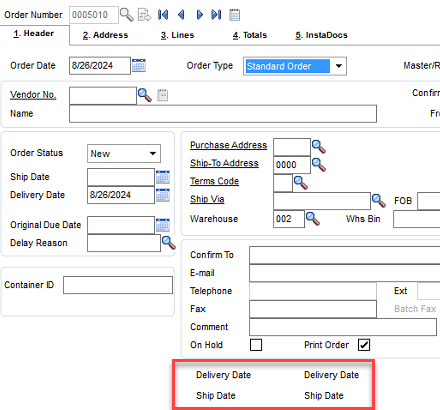
    I have this method working in SO Entry where it shows or hides UDFs based on some logic. I have a default value set in the field value so it just shows that text value or hides it. I have all 4 fields placed on the screen & then make them borderless to look like headings.

    I copied the same thing over to PO Entry & its just not working. Same client, same company code.

    I have 4 UDFs for date headings. I want to show 2 of them when its a Drop Ship & then show the other 2 when its a Standard Order. So, I had it set to Hide on 2 & Show on 2 for one order type. Then vice versa on the other order type.

    I got frustrated & just set them all to "HIDE" & they just continue to show. I added some debugging & can see its getting thru the logic but then just not doing what it should be. I feel like I am missing something obvious & easy.

    sType = ""
    retVal = oBusObj.GetValue("OrderType$",sType)
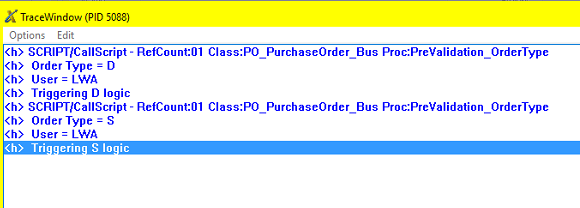
    r=oScript.DebugPrint(" Order Type = " & sType)
    r=oScript.DebugPrint(" User = " & oSession.UserCode)
    if sType = "D" Then
    r=oScript.DebugPrint(" Triggering D logic")
    retVal = oScript.SetUIControl("UDF_TEXT2_DELIVERY_DATE$", "HIDE")
    retVal = oScript.SetUIControl("UDF_TEXT2_SHIP_DATE$", "HIDE")
    retVal = oScript.SetUIControl("UDF_TEXT_DELIVERY_DATE$", "HIDE")
    retVal = oScript.SetUIControl("UDF_TEXT_SHIP_DATE$", "HIDE")
    End If
    if sType = "S" Then
    r=oScript.DebugPrint(" Triggering S logic")
    retVal = oScript.SetUIControl("UDF_TEXT_DELIVERY_DATE$", "HIDE")
    retVal = oScript.SetUIControl("UDF_TEXT_SHIP_DATE$", "HIDE")
    retVal = oScript.SetUIControl("UDF_TEXT2_DELIVERY_DATE$", "HIDE")
    retVal = oScript.SetUIControl("UDF_TEXT2_SHIP_DATE$", "HIDE")
    End If

    As I flip the Order Type field, its seeing it & triggering the script, but all 4 fields just stay as show. 
    I went back to SO & it works, as designed. As I change the order type, fields show/hide.

    I've reset the panel. Updated panels. 

    I have it firing on post-read, column pre-validate, & on panel post-load. 

    Any thoughts or suggestions on what I am overlooking? Thx!


    ------------------------------
    Dana Young
    Lehman Wesley
    Lansing, MI
    ------------------------------


  • 2.  RE: oScript.SetUIControl not working

    Posted 08-26-2024 17:25

    Dana,

    On what event is the script triggered? Have you tested the retVal and oScript.LastErrorMsg
    after the SetUIControls?


    ------------------------------
    Dan Burleson
    Software Consultant
    Connex Software
    Corvallis OR
    541-224-6642
    ------------------------------


  • 3.  RE: oScript.SetUIControl not working

    Posted 08-28-2024 12:30

    @Dan Burleson

    Its triggered 3 times: post-read, column pre-validate, & on panel post-load. 

    It fails 3 times & displays this same error 3 times "Error: 0" when I set the oScript.LastErrorMsg


    ------------------------------
    Dana Young
    Lehman Wesley
    Lansing, MI
    ------------------------------


  • 4.  RE: oScript.SetUIControl not working

    Posted 08-27-2024 08:17

    I'd see if the HIDE retvals are returning anything funky. Do you have a retVal = oUIObj.HandleScriptUI() later in the script?


    ------------------------------
    Steve Iwanowski, NextStep Technology Advisors, aka DSD Lancaster PA ¯\_(ツ)_/¯
    ------------------------------


  • 5.  RE: oScript.SetUIControl not working

    Posted 08-28-2024 12:31

    @Steve Iwanowski 

    No, do I need it? I don't have it in my other one that works either. 


    ------------------------------
    Dana Young
    Lehman Wesley
    Lansing, MI
    ------------------------------


  • 6.  RE: oScript.SetUIControl not working

    Posted 08-28-2024 12:34

    Dana - Sometimes SetUIControl doesn't work on some events for some panels so you can try 1 of these 2 alternatives. 

    using this example:
    retVal = oScript.SetUIControl("UDF_TEXT2_SHIP_DATE$", "HIDE")

    1. Change to use SetControlProperty from the UI Object oUIObj. In a UI script this is passed in for you. In a biz script, you have to set it yourself. I myself set it in a conditional way at the top of the script. You don't have to do Set oUIObj quite like this:

    SessionUI = oSession.UI 'Does a UI exist E.g. Running V/I import inside of Launcher has a UI but auto-run V/I does not.
    ScriptUI = oScript.UIObj 'Is UIObj property set for Sy_Script
    If (SessionUI and ScriptUI) Then SittingInTheUI = 1 'If SittingInTheUI, we can safely use oUIObj now.
    r=oScript.DebugPrint("SittingInTheUI: " & SittingInTheUI)
    ' If an event script set oUIObj - button and UI scripts already have it
    If SittingInTheUI Then
       If IsObject(oUIObj) = False Then
        oUIObj = oScript.UIObj 'Updates will not have UIObj
        Set oUIObj = oSession.AsObject(oUIObj)
      End If
    End If

    Now you can use SetControlProperty. Here's an example
    oUIObj.SetControlProperty "UDF_TEXT2_SHIP_DATE", "Visible", 0
    'You're using the control name not the field name which is why there's no $
    'Sometimes the control name starts with ML_ you can use Customizer to check
    'Visible is an example of a control property. 0 means HIDE, 1 means SHOW.

    'ENANBLED can be used to enable/disable a field. This example disables a field:
    oUIObj.SetControlProperty "UDF_TEXT2_SHIP_DATE", "ENABLED", 0


    2. Use the pvx directive HIDE CONTROL or SHOW CONTROL.
    oScript.Execute("HIDE CONTROL UDF_TEXT2_SHIP_DATE.ctl")
    'Notice .ctl as it represents the control variable


    ------------------------------
    Alnoor Cassim
    Accounting Systems, Inc. (ASI)
    ------------------------------


  • 7.  RE: oScript.SetUIControl not working

    Posted 08-28-2024 13:03

    @Alnoor Cassim Thank you!

    The first method worked. I appreciate the alternative method when the one I typically use just doesn't seem to like the screen. 


    ------------------------------
    Dana Young
    Lehman Wesley
    Lansing, MI
    ------------------------------


  • 8.  RE: oScript.SetUIControl not working

    Posted 09-23-2024 15:06

    I have a follow up issue with this one.

    If I go into PO Entry, it works fine. However, if SO wants to generate the PO, I get an error 88. How do I disable it when this process is trying to happen?

    Thanks!


    ------------------------------
    Dana Young
    Lehman Wesley
    Lansing, MI
    ------------------------------


  • 9.  RE: oScript.SetUIControl not working

    Posted 09-23-2024 16:07
    Edited by Alnoor Cassim 09-23-2024 16:07

    oSession.StartProgram indicates the starting point. When you're in P/O Entry, that would be PO_PURCHASEORDER_UI (in upper-case just as you see). If you're in S/O Entry it's SO_SALESORDER_UI even though you're generating POs. Since it's firing off your P/O scripts from there but you don't want it to, condition your PO script accordingly. For example, add this near the top

    If oSession.StartProgram = "PO_PURCHASEORDER_UI" Then .... 'do the rest 
    or
    If oSession.StartProgram <> "PURCHASEORDER_UI" Then Exit Sub 

    (It may not apply here but generally you also want to think about other ways P/O Entry can be done and whether your script should exit early or continue running. For instance, if V/I is used to create POs or scanning is used to do that, then you could condition your script for that using StartProgram too. For V/I import it will always be the 6-digit compiled job name, as is VIWIxx where xx varies. There is a sort of an  example built into the one I did for you involving GetResultSets)


    ------------------------------
    Alnoor Cassim
    Accounting Systems, Inc. (ASI)
    ------------------------------